This article describes how to configure DLP with Rule type Content Analysis from Director.
DLP works on a hierarchical pattern which makes it easy to understand, it can be broken down into the following Data Patterns → Data Protection Profiles → DLP Rules → DLP Profile
- Data Patterns →Data Patterns are the most granular detection elements in DLP. They define what constitutes sensitive information based on keywords, patterns or sensitive terms. Detection happens only if both keyword and regex are present within the configured byte range. There is option to use custom and predefined patterns, predef patterns are updated using spack.
- Data Patterns Profiles →This groups multiple Data Patterns to create more meaningful classification logic. You can add up to 10 data patterns and basic boolean operators AND/OR/NOT(Exclude specific matches)/NEAR/n (Patterns must appear within “n” words of each other)
- DLP Rules →DLP Rules uses one or more Data Protection Profiles and determine how detection occurs and what action is enforced. Do not select Header in DLP policy until it’s explicitly required.
- DLP Profile-> Consolidates multiple DLP rules and is the single object reference called in the security policy.You can configure a data protection profile to stop evaluating rules after the first rule that matches (Exit on First Rule Match option) or to evaluate all rules and apply all those that match (default behavior).
Prerequisite
- DLP does not support all app's the supported list of applications can be obtained from the KB Applications.
- DLP content analysis on HTTPS requires decryption to be enabled so that we can analyze the files.
Configuration
Goal of the below config is to block text file upload and download if contains aadhaar, pan card or credit card details for traffic using HTTP/HTTPS.
Step1
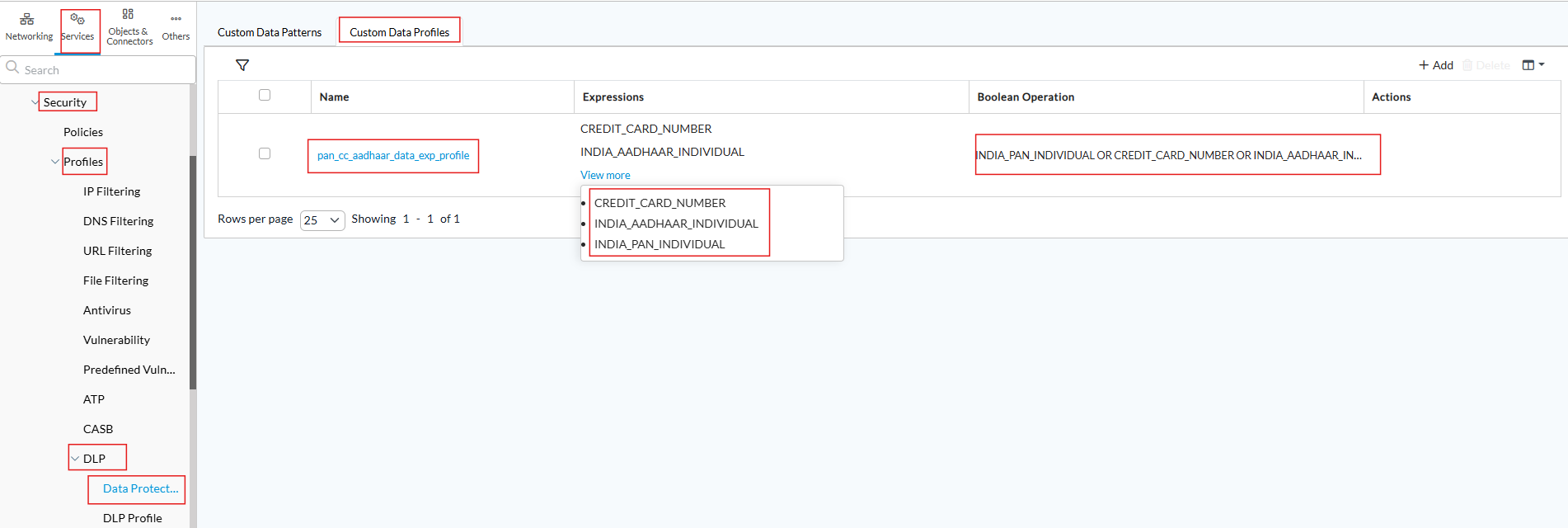
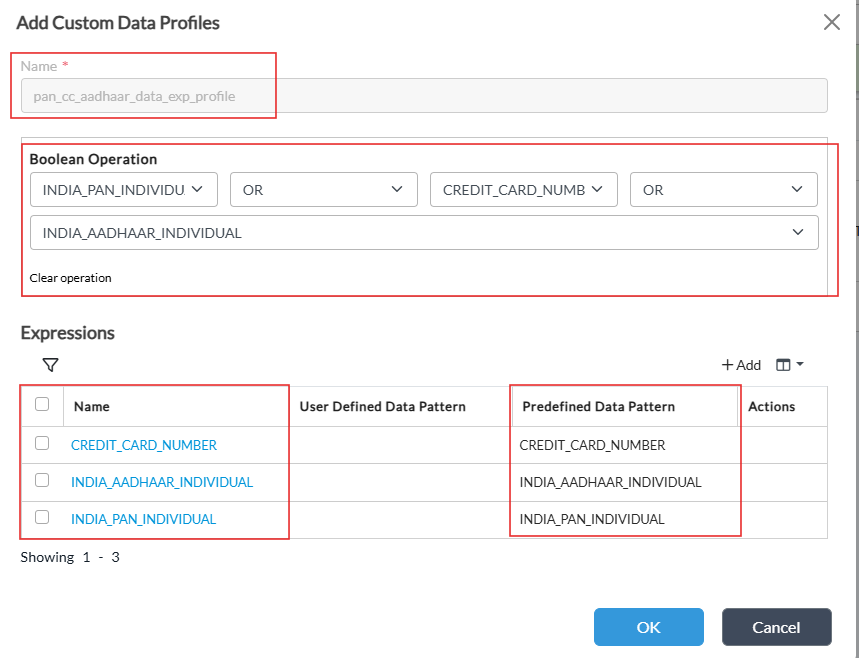
Configure the DLP data pattern profile in Services ->Security->Profiles->DLP->Data Protection using the predefined expressions or user defined expressions as shown below, for example we are taking the predefined patterns for aadhaar,pan and credit card.
CLI config for reference
set orgs org-services Tenant1 security profiles dlp data-protection custom-data-profiles pan_cc_aadhaar_data_exp_profile expressions CREDIT_CARD_NUMBER predefined-data-pattern CREDIT_CARD_NUMBER
set orgs org-services Tenant1 security profiles dlp data-protection custom-data-profiles pan_cc_aadhaar_data_exp_profile expressions INDIA_AADHAAR_INDIVIDUAL predefined-data-pattern INDIA_AADHAAR_INDIVIDUAL
set orgs org-services Tenant1 security profiles dlp data-protection custom-data-profiles pan_cc_aadhaar_data_exp_profile expressions INDIA_PAN_INDIVIDUAL predefined-data-pattern INDIA_PAN_INDIVIDUAL
set orgs org-services Tenant1 security profiles dlp data-protection custom-data-profiles pan_cc_aadhaar_data_exp_profile boolean-operation "INDIA_PAN_INDIVIDUAL OR CREDIT_CARD_NUMBER OR INDIA_AADHAAR_INDIVIDUAL
Step 2
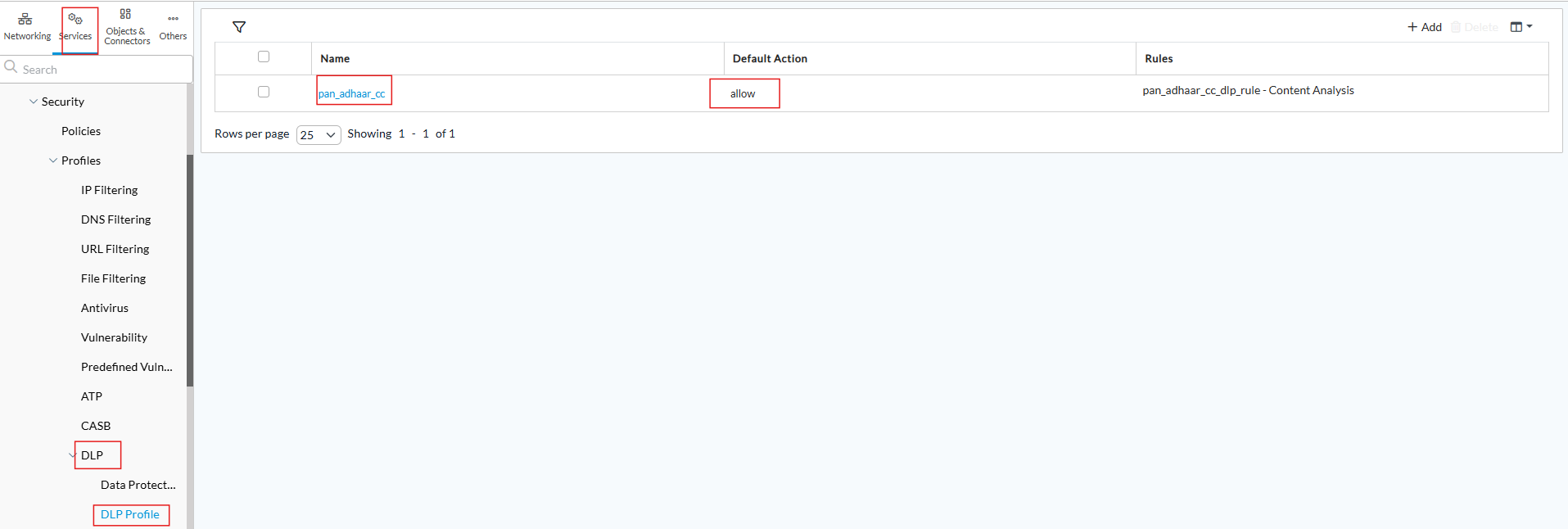
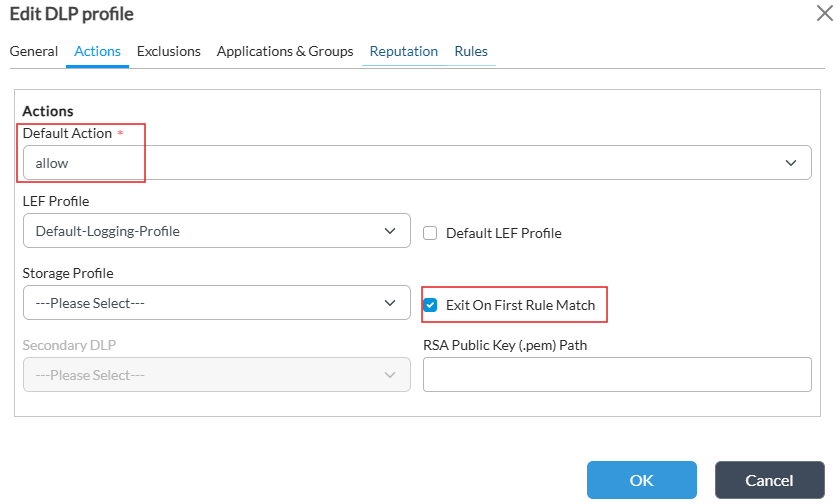
Configure the DLP profile in Services ->Security->Profiles->DLP->Data Profile. Make sure the default action is selected as Allow and blocks are done based on the rules.
Step 3
Create the Rules, matching the context protocol and File type, the rule component correlates to the type of DLP being induced in this case content analysis and the User defined data pattern profile we created earlier. Do not select "Header" in the rules unless required.
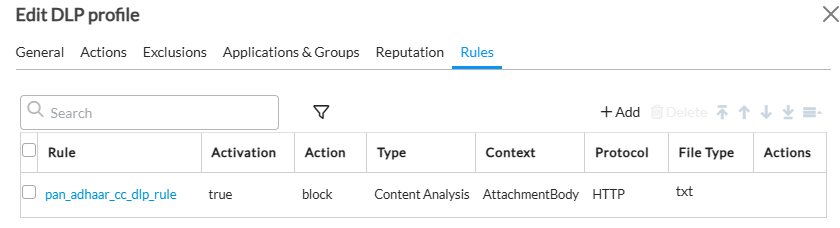
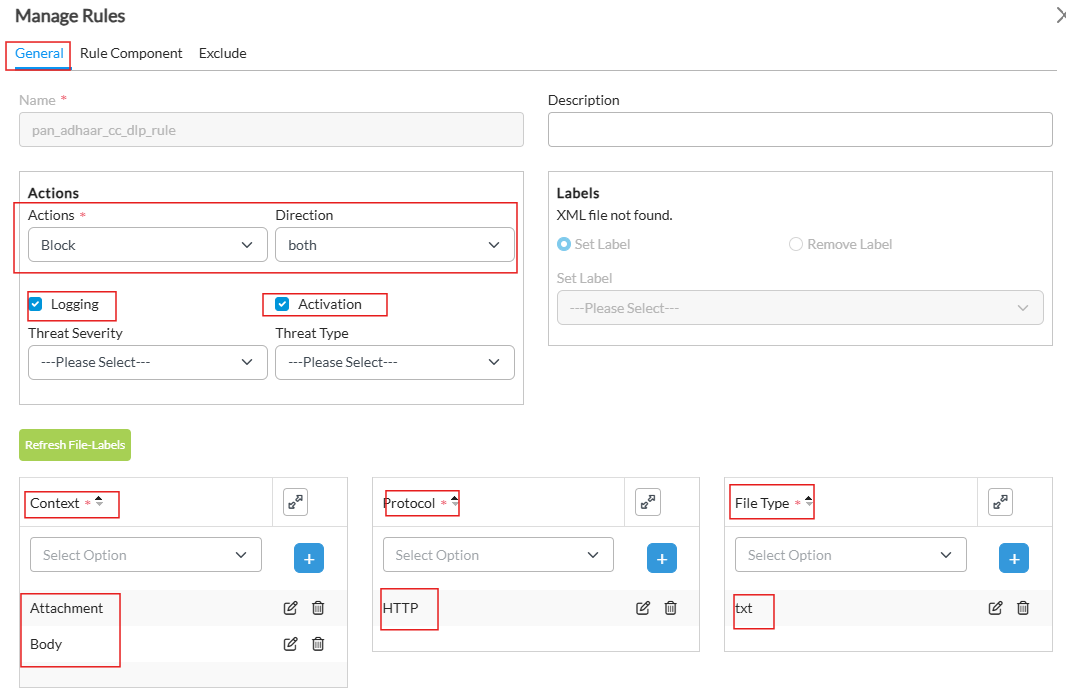
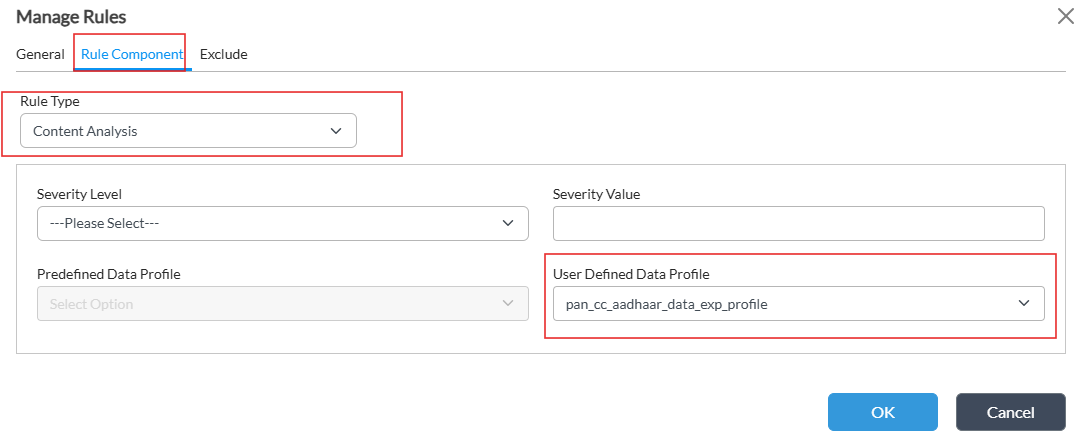
CLI config for reference
set orgs org-services Tenant1 security profiles dlp dlp-profiles pan_adhaar_cc default-action action allow
set orgs org-services Tenant1 security profiles dlp dlp-profiles pan_adhaar_cc exit-on-first-rule-match disabled
set orgs org-services Tenant1 security profiles dlp dlp-profiles pan_adhaar_cc rules pan_adhaar_cc_dlp_rule activation false
set orgs org-services Tenant1 security profiles dlp dlp-profiles pan_adhaar_cc rules pan_adhaar_cc_dlp_rule match protocol [ HTTP ]
set orgs org-services Tenant1 security profiles dlp dlp-profiles pan_adhaar_cc rules pan_adhaar_cc_dlp_rule match file-type [ txt ]
set orgs org-services Tenant1 security profiles dlp dlp-profiles pan_adhaar_cc rules pan_adhaar_cc_dlp_rule match context [ Attachment Body ]
set orgs org-services Tenant1 security profiles dlp dlp-profiles pan_adhaar_cc rules pan_adhaar_cc_dlp_rule match content-analysis enable true
set orgs org-services Tenant1 security profiles dlp dlp-profiles pan_adhaar_cc rules pan_adhaar_cc_dlp_rule match content-analysis user defined-data-profile pan_cc_aadhaar_data_exp_profile
set orgs org-services Tenant1 security profiles dlp dlp-profiles pan_adhaar_cc rules pan_adhaar_cc_dlp_rule set action block
set orgs org-services Tenant1 security profiles dlp dlp-profiles pan_adhaar_cc rules pan_adhaar_cc_dlp_rule set logging disabled
set orgs org-services Tenant1 security profiles dlp dlp-profiles pan_adhaar_cc reputation lookup disabled
set orgs org-services Tenant1 security profiles dlp dlp-profiles pan_adhaar_cc reputation logging enabled
Step 4
Apply the DLP profile to the security policy in via which you want to do DLP.
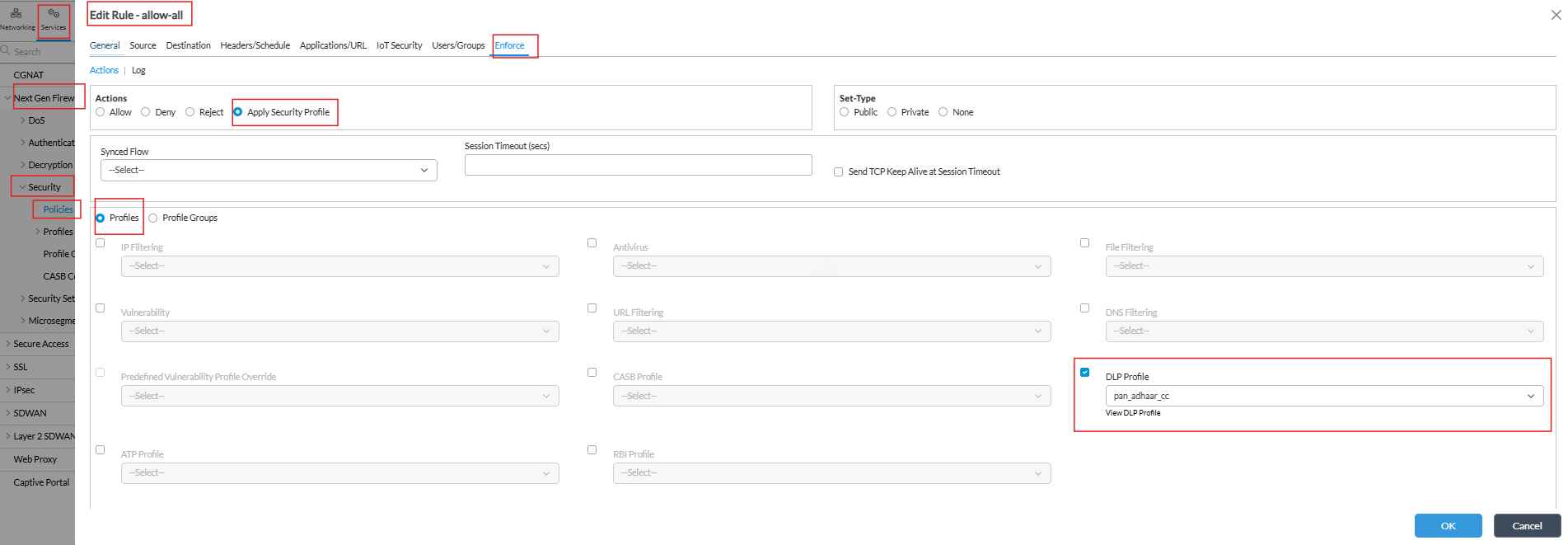
Key Points to keep in mind while configuring
- DLP kicks in when appid engine detects the application.
- DLP Caches the file which hits the scanner based on the sha256sum, once the cache is made if the same file is uploaded and the sha256sum matches it will apply the action based on cache.
- Predefined data patterns are updated via spack and have regex and keyword matching ,to see what they are you can use the below sqlite db command. Example to check for aadhar given below.
[admin@branch1: ~] $ sqlite3 /opt/versa/etc/spack/installed/current/config/predef_dlp.db "SELECT * FROM predef_dlp_data_pattern_list;" | grep -i aadhar

INDIA_AADHAAR_INDIVIDUAL|(aadhar|aadhaar|adhaar|aadhaar|aadhaar|aadhaar card)|\b([2-9]{1}[0-9]{11}|[2-9]{1}[0-9]{3}[\s-][0-9]{4}[\s-][0-9]{4})\b|200|71- Always use true data and not test data since there are multiple additional checks present. For example if you test a random aadhaar it will not work since aadhaar numbers are created based on verhoeff algorithm, so any random 12 digit will not work.
- You can decide to scan a file from the "start" or "anywhere" with a range. The Range Window (Bytes) parameter defines how many bytes around a detected keyword or regex match are inspected. A value of 100–200 bytes is generally recommended as it balances accuracy and performance; smaller windows (50–100 bytes) work well when patterns are close together, while larger windows (up to 500 bytes) may be needed if attributes are separated by more text. As a best practice, start with 100 bytes and adjust only if broader context is required. Default range is 8192 bytes.
- Do not select the default action in the DLP profile to block, id you do and the Rules are not explicitly allowing files then this will cause traffic blackhole.