This article explains how to configure DNS Proxy with the honour-pbf option to intelligently steer DNS queries based on SD-WAN policy decisions.
This is useful when DNS queries for:
- External domains
- Specific SaaS domains (for example: Office365, Salesforce, Dropbox)
need to follow the same SD-WAN path selection logic used for application traffic.
The goal is to ensure DNS queries are forwarded over the optimal path determined by SD-WAN policy (PBF), rather than being statically tied to a single SNAT egress path.
Overview
A DNS Proxy profile provides split DNS functionality.
Typically, DNS Proxy is configured to:
- Forward internal enterprise domains to an internal DNS server (for example, behind HQ)
- Forward external/public domains to public DNS resolvers (for example, Google DNS 8.8.8.8, OpenDNS)
By default, the path used to send the DNS query is determined by the SNAT pool associated with the DNS Proxy resolver.
Default Behavior
If the SNAT pool is associated with a specific WAN interface (for example, LBO1), DNS queries can only be sent through that interface.
This means:
- DNS path selection is static
- SD-WAN policy is not consulted
- DNS may not follow the same optimal path as application traffic
What honour-pbf Does
When honour-pbf is enabled in the DNS Proxy policy, the DNS Proxy performs an SD-WAN policy lookup before forwarding the DNS query.
This allows the DNS query to follow the same Policy-Based Forwarding (PBF) logic as application traffic.
Result
DNS Proxy can now:
- Inspect the DNS query
- Match the domain
- Consult SD-WAN policy
- Determine the preferred path
- Forward the DNS query over the correct WAN path
This ensures DNS queries for SaaS applications (such as Office365, Salesforce, Dropbox) are sent over the same preferred path that application traffic will later use.
Why This Matters
In traditional DNS steering, the DNS query and the application session are handled independently.
This can create sub-optimal traffic behavior.
Example Problem
For Salesforce traffic:
- DNS query may be sent over HUB/CBO
- Actual HTTP/HTTPS session may be sent over LBO1 or LBO2
This can result in:
- Non-optimal DNS resolution
- Incorrect CDN endpoint selection
- Increased latency
- Poor SaaS performance
Strict DNS Path Affinity
To solve this, enable Strict DNS Path Affinity.
Strict DNS Path Affinity ensures that:
- DNS query path selection
- Subsequent HTTP/HTTPS session path selection remain consistent.
How It Works
When enabled, Versa creates cache entries that bind:
- Client
- Resolved destination
- Path used for DNS query
Subsequent application sessions are then pinned to the same path.
This ensures:
- DNS and application traffic follow the same path
- Optimal SaaS edge selection
- Improved user experience
Use Case
DNS Proxy with honour-pbf enabled should:
- Redirect DNS queries for:
- Office365
- Salesforce
- Dropbox
- Match those domains against SD-WAN policy
- Determine the preferred path
- Forward the DNS query accordingly
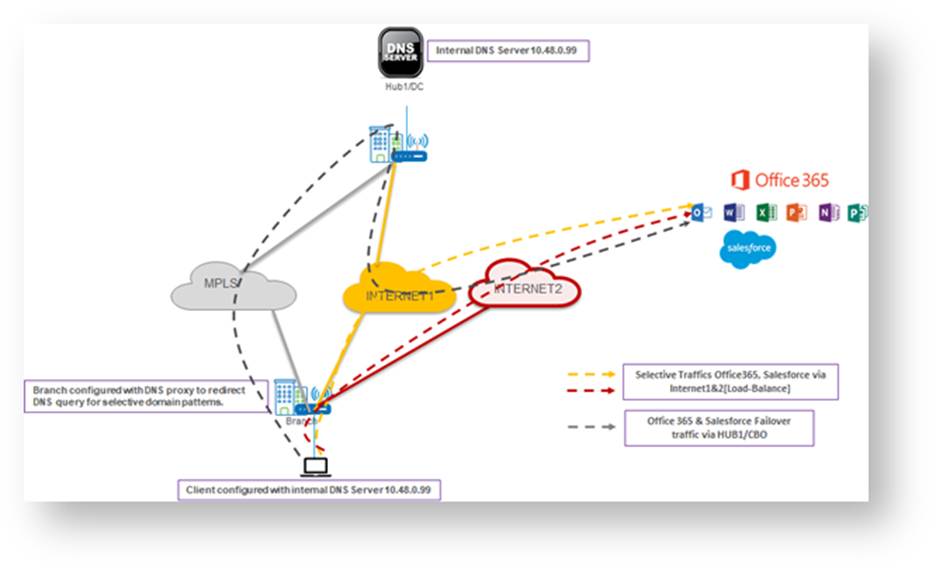
Traffic Steering Requirements
Office365 and Salesforce
- Primary paths: Internet1 and Internet2
- Behavior: Load-balanced across both links
- Failover path: HUB1/CBO
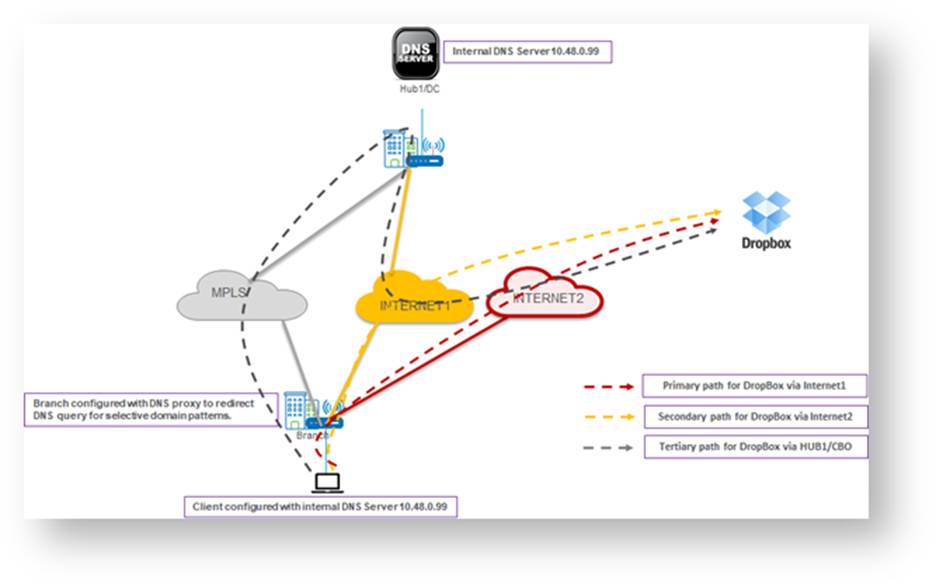
Dropbox
- Primary path: Internet2
- Secondary path: Internet1
- Tertiary path: HUB1/CBO
Configuration
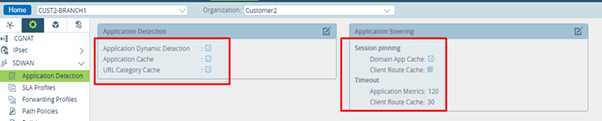
Step 1: Enable Application Detection and Application Steering
Enable:
- Application Detection
- Application Steering
Under Session Pinning, enable:
- Domain App Cache
This enables Strict DNS Path Affinity.
What This Does
Versa creates Client Route Cache (CRC) entries to preserve DNS-to-application path affinity.
Example:
- Client1 sends DNS query → destination resolved → DNS sent via Path1
- Client2 sends DNS query → destination resolved → DNS sent via Path2
Subsequent HTTP/HTTPS sessions matching the CRC entry will use the same path.
Benefit
This ensures:
- DNS query
- Subsequent application session
are sent over the same WAN path.
Note
CRC entries are created only when DNS Proxy is configured with honour-pbf.
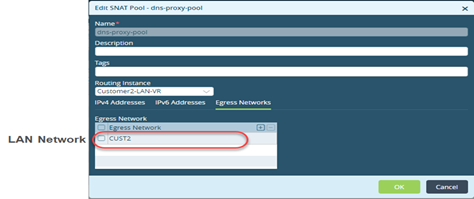
Step 2: Create SNAT Pool
Navigate to:
Configurations → Object & Connectors → Objects → SNAT Pool
Create an SNAT pool for DNS Proxy.
CLI Configuration
set orgs org-services Customer2 objects snat dns-proxy-pool egress-networks [ CUST2 ]
set orgs org-services Customer2 objects snat dns-proxy-pool routing-instance Customer2-LAN-VR
Step 3: Create DNS Proxy Profile
Navigate to:
Configurations → Networking → DNS → Proxy Profiles
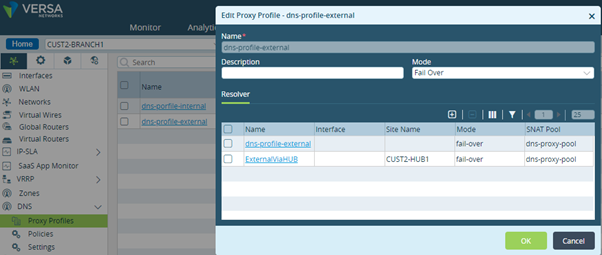
Create a DNS Proxy Profile with:
- Primary resolver via local breakout (LBO)
- Secondary resolver via HUB1/CBO
This ensures DNS resolution remains available regardless of path selection.
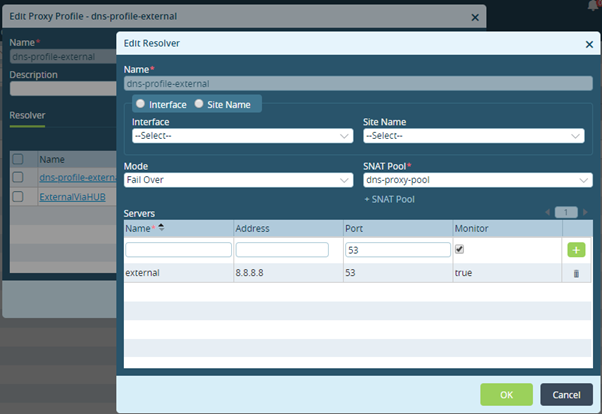
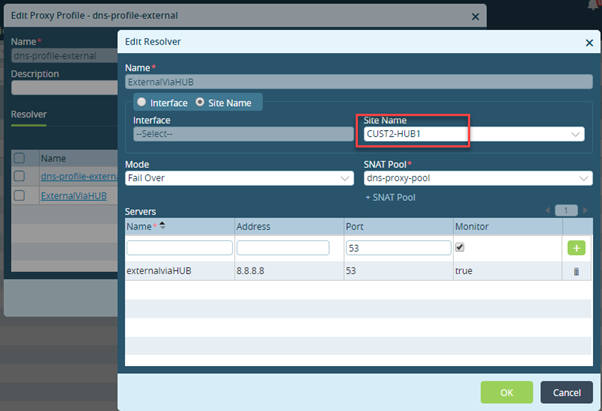
CLI Configuration
set orgs org-services Customer2 dns-proxy proxy-profiles dns-profile-external mode fail-over
set orgs org-services Customer2 dns-proxy proxy-profiles dns-profile-external resolver dns-profile-external mode round-robin
set orgs org-services Customer2 dns-proxy proxy-profiles dns-profile-external resolver dns-profile-external servers external address 8.8.8.8
set orgs org-services Customer2 dns-proxy proxy-profiles dns-profile-external resolver dns-profile-external servers external port 53
set orgs org-services Customer2 dns-proxy proxy-profiles dns-profile-external resolver dns-profile-external servers external monitor true
set orgs org-services Customer2 dns-proxy proxy-profiles dns-profile-external resolver dns-profile-external snat-pool dns-proxy-pool
set orgs org-services Customer2 dns-proxy proxy-profiles dns-profile-external resolver ExternalViaHUB site-name CUST2-HUB1
set orgs org-services Customer2 dns-proxy proxy-profiles dns-profile-external resolver ExternalViaHUB mode fail-over
set orgs org-services Customer2 dns-proxy proxy-profiles dns-profile-external resolver ExternalViaHUB servers externalviaHUB address 8.8.8.8
set orgs org-services Customer2 dns-proxy proxy-profiles dns-profile-external resolver ExternalViaHUB servers externalviaHUB port 53
set orgs org-services Customer2 dns-proxy proxy-profiles dns-profile-external resolver ExternalViaHUB servers externalviaHUB monitor true
set orgs org-services Customer2 dns-proxy proxy-profiles dns-profile-external resolver ExternalViaHUB snat-pool dns-proxy-pool
Step 4: Create DNS Proxy Redirection Policy
Navigate to:
Configurations → Networking → DNS → Policies
Configure a redirection policy to:
- Match DNS requests
- Redirect matching domains
- Apply DNS Proxy profile
- Enable honour-pbf
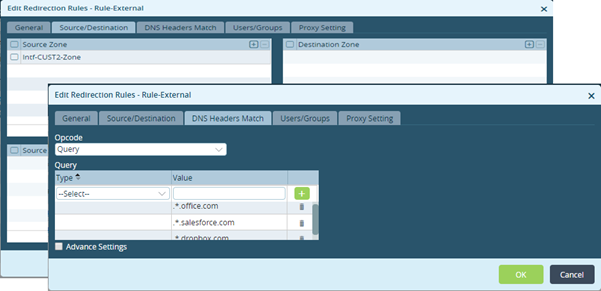
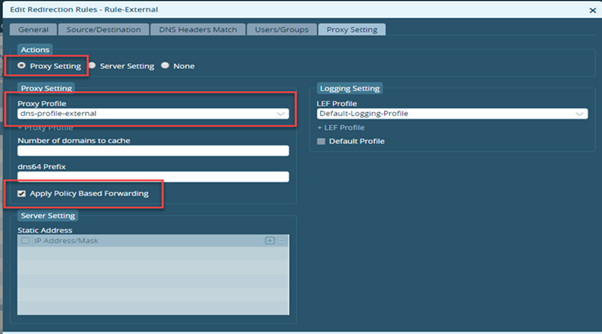
Matching Criteria
Leave DNS Headers Match as default to match all DNS queries, or specify selective domains for redirection.
Important
Enable:
- Apply Policy Based Forwarding
This is mandatory for DNS Proxy to consult SD-WAN policy before forwarding DNS traffic.
CLI Configuration
set orgs org-services Customer2 dns-proxy redirection-policy Default-Policy rules Rule-External match dns-header-matches opcode query qtype-domain-match match1 domain-name .*.office.com
set orgs org-services Customer2 dns-proxy redirection-policy Default-Policy rules Rule-External match dns-header-matches opcode query qtype-domain-match match2 domain-name .*.salesforce.com
set orgs org-services Customer2 dns-proxy redirection-policy Default-Policy rules Rule-External match dns-header-matches opcode query qtype-domain-match match3 domain-name .*.dropbox.com
set orgs org-services Customer2 dns-proxy redirection-policy Default-Policy rules Rule-External match source user user-type any
set orgs org-services Customer2 dns-proxy redirection-policy Default-Policy rules Rule-External match source zones [ Intf-CUST2-Zone ]
set orgs org-services Customer2 dns-proxy redirection-policy Default-Policy rules Rule-External set action proxy profile dns-profile-external
set orgs org-services Customer2 dns-proxy redirection-policy Default-Policy rules Rule-External set action proxy honour-pbf true
set orgs org-services Customer2 dns-proxy redirection-policy Default-Policy rules Rule-External set lef profile-default false
set orgs org-services Customer2 dns-proxy redirection-policy Default-Policy rules Rule-External set lef profile Default-Logging-Profile
Step 5: Create SD-WAN Policy
Create SD-WAN policy rules that define application-aware PBF behavior for:
- Office365
- Salesforce
- Dropbox
These SD-WAN rules determine which path DNS queries and application traffic should use.
Example Behavior
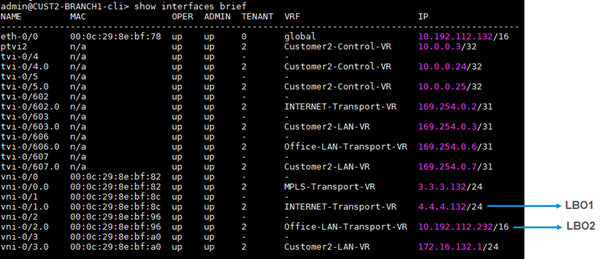
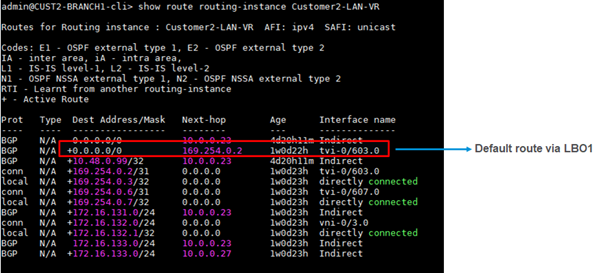
- Office365 / Salesforce → Load balance across LBO1 and LBO2, fail over to HUB1/CBO
- Dropbox → Prefer LBO2, then LBO1, then HUB1/CBO
Note
These DNS Proxy configurations also apply to SaaS DIA optimization over LBO and CBO.
Verification
DNS Proxy Profile Status
admin@CUST2-BRANCH1-cli> show orgs org-services Customer2 dns-proxy profile-monitor proxy-profile dns-profile-external
PROFILE NAME RESOLVER NAME SERVER NAME STATUS
--------------------------------------------------------------------
dns-profile-external dns-profile-external external UP
ExternalViaHUB externalviaHUB UP
DNS Proxy Statistics
admin@CUST2-BRANCH1-cli> show orgs org-services Customer2 dns-proxy statistics proxy-profiles dns-profile-external
FAILED
SESS FAILED FAILED
NO FAILED SESS SESS TOTAL TOTAL TOTAL TOTAL
SUCCESSFUL FAILED DEST SESS NO SERVER PKT BYTES PKT BYTES
PROFILE NAME SESS SESS SERVER NO MEM SNAT FAIL SENT SENT RCVD RCVD
------------------------------------------------------------------------------------------------------
dns-profile-external 22111 0 0 0 0 0 0 0 0 0
DNS Redirection Policy Statistics
admin@CUST2-BRANCH1-cli> show orgs org-services Customer2 dns-proxy statistics redirection-policy Default-Policy rules Rule-External
TCP UDP
HIT HIT HIT PBF CACHE
RULE NAME COUNT COUNT COUNT HONOURED HIT
-----------------------------------------------------
Rule-External 22390 0 22390 17905 0
Interpretation
- HIT COUNT confirms rule matches
- PBF HONOURED confirms SD-WAN policy lookup was applied
- This validates that DNS queries are being steered according to SD-WAN policy
Operational Verification
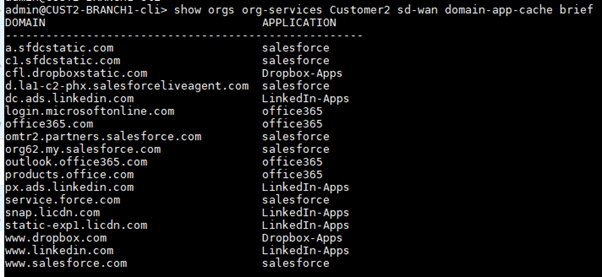
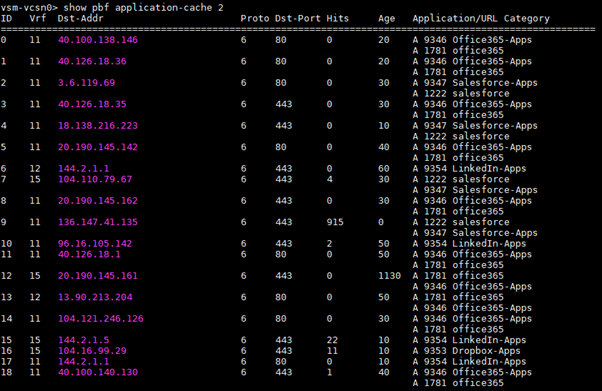
Domain Application Cache (DAC)
DAC entries bind:
- Domain name
- Application / URL category
This is used to map DNS domains to applications.
Application Route Cache (ARC)
ARC entries bind:
- Resolved destination IP
- Application / URL category
This allows Versa to classify subsequent traffic correctly.
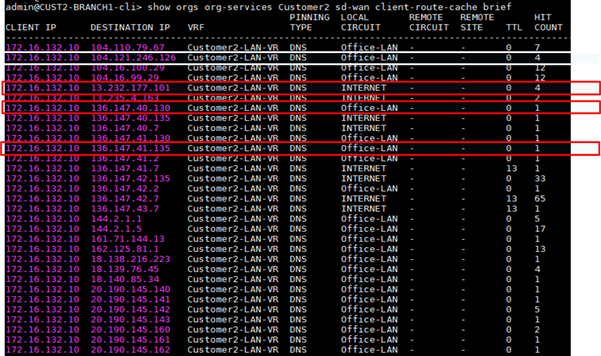
Client Route Cache (CRC)
CRC entries bind:
- Client
- Resolved destination
- Path used for DNS query
CRC is created because Domain App Cache session pinning is enabled.
This ensures:
- DNS query path
- HTTP/HTTPS session path
remain identical.
Note
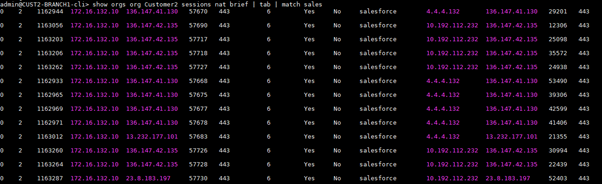
Office365 and Salesforce sessions should follow the same path indicated in CRC.
Traffic Flow Validation
Office365 and Salesforce
Expected result:
- Sessions load-balanced across LBO1 and LBO2
- Failover through HUB1/CBO
This confirms:
- DNS query honored PBF
- Application session followed CRC path affinity

Dropbox
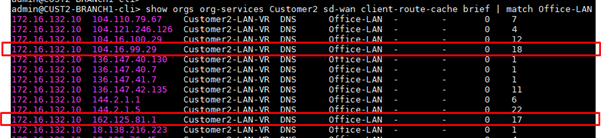
Expected result:
- Primary path: LBO2
- Secondary path: LBO1
- Tertiary path: HUB1/CBO
This confirms Dropbox traffic follows SD-WAN policy preference.
Note
CRC entries should reflect the same path used by Dropbox sessions.

Key Takeaways
- DNS Proxy with honour-pbf allows DNS traffic to follow SD-WAN path selection
- This removes static DNS forwarding limitations tied to SNAT-only path selection
- Strict DNS Path Affinity ensures DNS and application sessions follow the same path
- This improves SaaS performance and ensures optimal edge selection
- Particularly useful for:
- Office365
- Salesforce
- Dropbox
- Other SaaS applications using selective SD-WAN steering
Best Practices
- Always enable Apply Policy Based Forwarding in DNS redirection policy
- Enable Domain App Cache under Session Pinning for strict DNS path affinity
- Ensure DNS resolvers are reachable on all possible SD-WAN-selected paths
- Use CRC verification to confirm DNS/application path consistency
- Validate PBF HONOURED counters during troubleshooting
Summary
Enabling DNS Proxy with honour-pbf integrates DNS resolution with SD-WAN path selection logic.
This ensures:
- DNS queries are SD-WAN aware
- SaaS traffic uses optimal WAN paths
- DNS and application traffic maintain path consistency
- User experience improves through better SaaS routing and resolution
This is the recommended approach for SaaS-aware DNS steering in Versa SD-WAN.