This article describes How to Deploy Flex on GCE
Pre-requisite
Deploy a VM with Ubuntu 14.04 on GCE (By default, when a VM is created in GCE it assign /32 subnet IP on interface)
Configuration
- Create an Ubuntu VM
- Run “MULTI_IP_SUBNET” enable command, which in turn will create a new image:
gcloud compute images create flex-vnf-multi-ip-subnet<new_image name> --source-disk vm-ubuntu <running instance name> --source-disk-zone us-east1-b --guest-os-features MULTI_IP_SUBNET
- Launch instance with the newly created image which has MULTI_IP_SUBNET property and map appropriate network. While creating VM make sure IP Forwarding flag enabled on the VM as shown in below mentioned screenshot

- Once you have Ubuntu 14.04 VM ready, please run the below attached script:

- Please change file permission
chmod a+x gcp_prep.sh
- Please edit below mentioned line in the script with the relevant kernel version needed with respect to Flex VNF SW version going to be installed
readonly KVER=4.4.0-116-generic
- Run this script with the given arguments
./gcp_prep.sh -p <versa-flexvnf-xxxxx-xxxx-xxxx-16.1R2S8.deb> -n <Director SB IP>
- Before you run Staging script on VNF, few mandatory Flex Specific settings needs to be changed
- Need to disable broadcast flag in dhcp client option, otherwise the interface will not get DHCP IP
admin@vnf-harsh-cli(config)% show interfaces vni-0/0
unit 0 {
    family {
        inet {
            dhcp;
            dhcp-client-options {
                disable-broadcast-flag;
            }
        }
    }
}
- User need to add a static route in WAN routing for internet reachability
set routing-instances grt routing-options static route 0.0.0.0/0 10.193.0.1<First IP of the assigned subnet> vni-0/0.0
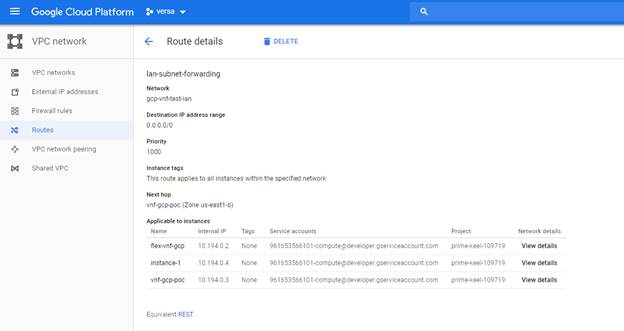
- Once Branch on-boarded, add a Custom route having Flex as a GW which is like UDR in Azure.
Screenshot of Custom route entry in GCP for Flex LAN network is attached below