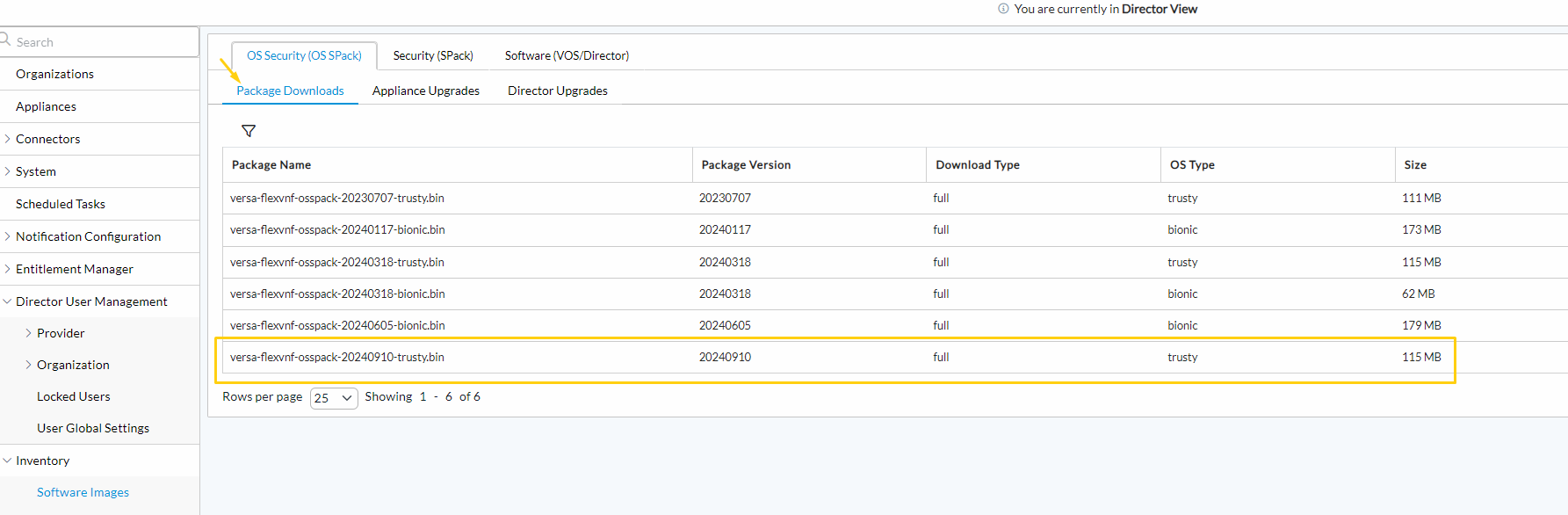
This article explains how to upload the OS SPack to Director in offline mode (No internet access to Director).
Step 1: Download the OS SPack from either of the below two links
https://versanetworks.app.box.com/v/osspack
(or)
https://upload.versa-networks.com/index.php/s/nEkF9xOO3e7BA9Z
Step 2: Rename the downloaded file
Naming Convention
VOS/Versa Flexvnf OS SPack
Trusty
versa-flexvnf-osspack-XXXXXXXX.bin --> versa-flexvnf-osspack-XXXXXXXX-trusty.bin
#Example
versa-flexvnf-osspack-20240910.bin --> versa-flexvnf-osspack-20240910-trusty.bin
Bionic
versa-flexvnf-osspack-B-XXXXXXXX.bin versa-flexvnf-osspack-XXXXXXXX-bionic.bin >>> Notice "B-" is removed
#Example
versa-flexvnf-osspack-B-20240910.bin versa-flexvnf-osspack-20240910-bionic.bin
Versa Director OS SPack
Bionic
versa-director-osspack-B-XXXXXXXX.bin --> versa-director-osspack-XXXXXXXX-bionic.bin >>> Notice "B-" is removed
versa-director-osspack-B-20240910.bin --> versa-director-osspack-20240910-bionic.bin
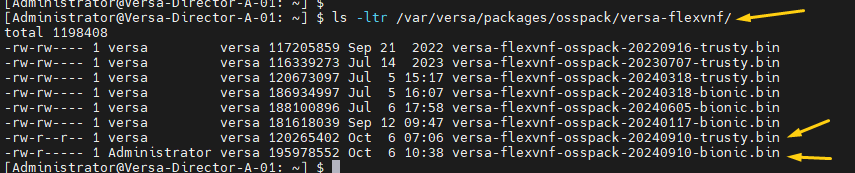
Step 3: Upload/SCP the renamed OS SPack file to Director in the appropriate directory
Upload directory for VOS/Versa-Flexvnf
/var/versa/packages/osspack/versa-flexvnf/
Upload directory for Versa Director
/var/versa/packages/osspack/versa-director/

Step 4: Gather the details required and prepare the query to update the Director Database.
VOS/Versa Flexvnf OS SPack
Trusty
Consider the OS SPack file is "versa-flexvnf-osspack-20240910-trusty.bin" in this example
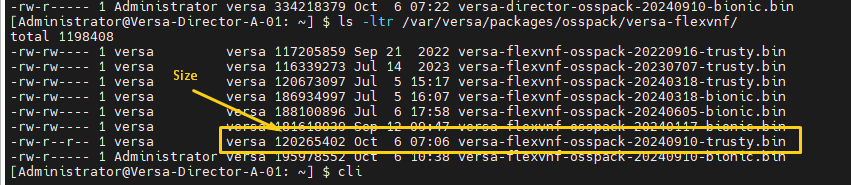
- package_name: versa-flexvnf-osspack-20240910-trusty.bin <<<< Complete filename
- version: 20240910 <<<< From the filename
- size: 120265402 <<<< From the above screenshot
- download_time: 2024-10-06 12:15:45.000 <<<< Download Time
- create_date: 2024-10-06 12:10:45.000 <<<< Download Start time
- modify_date: 2024-10-06 12:15:45.000 <<<< Download Completion time
- lastupdatedby: Administrator <<<< GUI Username
Note: download_time, create_date, and modify_date values have no significance but the format should be retained
PSQL Query
INSERT into osspack_device_updates (package_name,product,os_version,update_type,version,last_version, size, percentage, check_sum, download_time, status,create_date,modify_date,lastupdatedby) VALUES ('versa-flexvnf-osspack-20240910-trusty.bin','versa-flexvnf','trusty','full','20240910',NULL,'120265402','100',NULL, to_timestamp('2024-10-06 12:15:45.000','yyyy-mm-dd hh24:mi::ss:N'), 'Download_Succeed', to_timestamp('2024-10-06 12:10:45.000','yyyy-mm-dd hh24:mi::ss:N'), to_timestamp('2024-10-06 12:15:45.000','yyyy-mm-dd hh24:mi::ss:N'),'Administrator');
Bionic
Consider the OS SPack file is "versa-flexvnf-osspack-20240910-bionic.bin" in this example
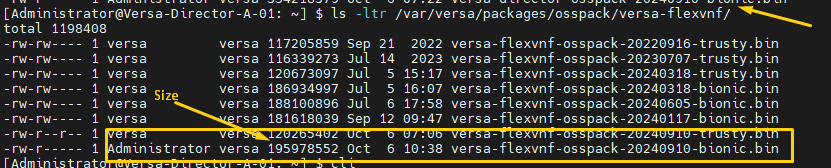
- package_name: versa-flexvnf-osspack-20240910-bionic.bin <<<< Complete filename
- version: 20240910 <<<< From the filename
- size: 195978552 <<<< From the above screenshot
- download_time: 2024-10-06 12:15:45.000 <<<< Download Time
- create_date: 2024-10-06 12:10:45.000 <<<< Download Start time
- modify_date: 2024-10-06 12:15:45.000 <<<< Download Completion time
- lastupdatedby: Administrator <<<< GUI Username
PSQL Query
INSERT into osspack_device_updates (package_name,product,os_version,update_type,version,last_version, size, percentage, check_sum, download_time, status,create_date,modify_date,lastupdatedby) VALUES ('versa-flexvnf-osspack-20240910-bionic.bin','versa-flexvnf','bionic','full','20240910',NULL,'195978552','100',NULL, to_timestamp('2024-10-06 12:15:45.000','yyyy-mm-dd hh24:mi::ss:N'), 'Download_Succeed', to_timestamp('2024-10-06 12:10:45.000','yyyy-mm-dd hh24:mi::ss:N'), to_timestamp('2024-10-06 12:15:45.000','yyyy-mm-dd hh24:mi::ss:N'),'Administrator');
Note: download_time, create_date, and modify_date values have no significance but the format should be retained
Versa Director OS SPack
Bionic
Consider the OS SPack file is "versa-director-osspack-20240910-bionic.bin" in this example

- package_name: versa-director-osspack-20240910-bionic.bin <<<< Complete filename
- version: 20240910 <<<< From the filename
- size: 334218379 <<<< From the above screenshot
- download_time: 2024-10-06 12:15:45.000 <<<< Download Time
- create_date: 2024-10-06 12:10:45.000 <<<< Download Start time
- modify_date: 2024-10-06 12:15:45.000 <<<< Download Completion time
- lastupdatedby: Administrator <<<< GUI Username
PSQL Query
INSERT into osspack_updates (package_name,product,os_version,update_type,version,last_version, size, percentage, check_sum, download_time, install_time, status,create_date,modify_date,lastupdatedby) VALUES ('versa-director-osspack-20240910-bionic.bin', 'versa-director', 'bionic', 'full','20240910', NULL, '334218379', '100', NULL, to_timestamp('2024-10-06 12:15:45.000', 'yyyy-mm-dd hh24:mi::ss:N'), NULL, 'Download_Succeed', to_timestamp('2024-10-06 12:15:45.000', 'yyyy-mm-dd hh24:mi::ss:N'), to_timestamp('2024-10-06 12:15:45.000', 'yyyy-mm-dd hh24:mi::ss:N'),'Administrator');
Step 5: Take a manual Director Backup
#From CLI
request system recovery backup include-package-dir false
#Example
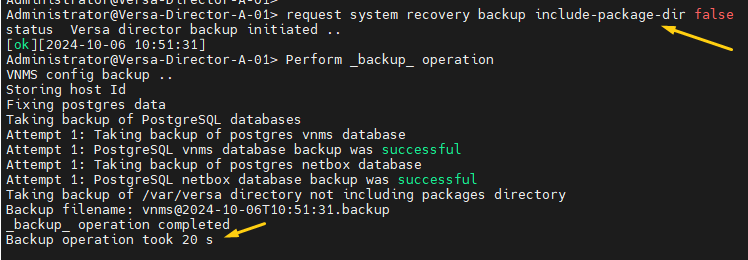
Step 6: Insert the OSS Pack Package entry in the database
#From Shell
sudo -u postgres psql -d vnms
Execute the Query from Step 4 in the PSQL prompt
Type "\q" to exit the PSQL prompt
VOS/Versa Flexvnf OS SPack
#Example

Versa Director OS SPack
#Example

Step 7: Verify the package is available in the GUI