What is IP SLA Monitor?
IP SLA monitor is generic monitoring framework developed for use with monitoring either a single or list of IP/FQDN destinations. Once defined and attached, the monitor will probe the liveness of the individual destinations specified by continuously sending probes and flagging the monitor object up or down accordingly. A monitor object can be attached to a static route or policy option. Once attached the status of the monitor will be notified to modules handling static route and policy option to take action accordingly. A single monitor object can be attached to multiple static routes and policy options simultaneously.
Configuring IP SLA
Follow these steps to configure and view the IP SLA:
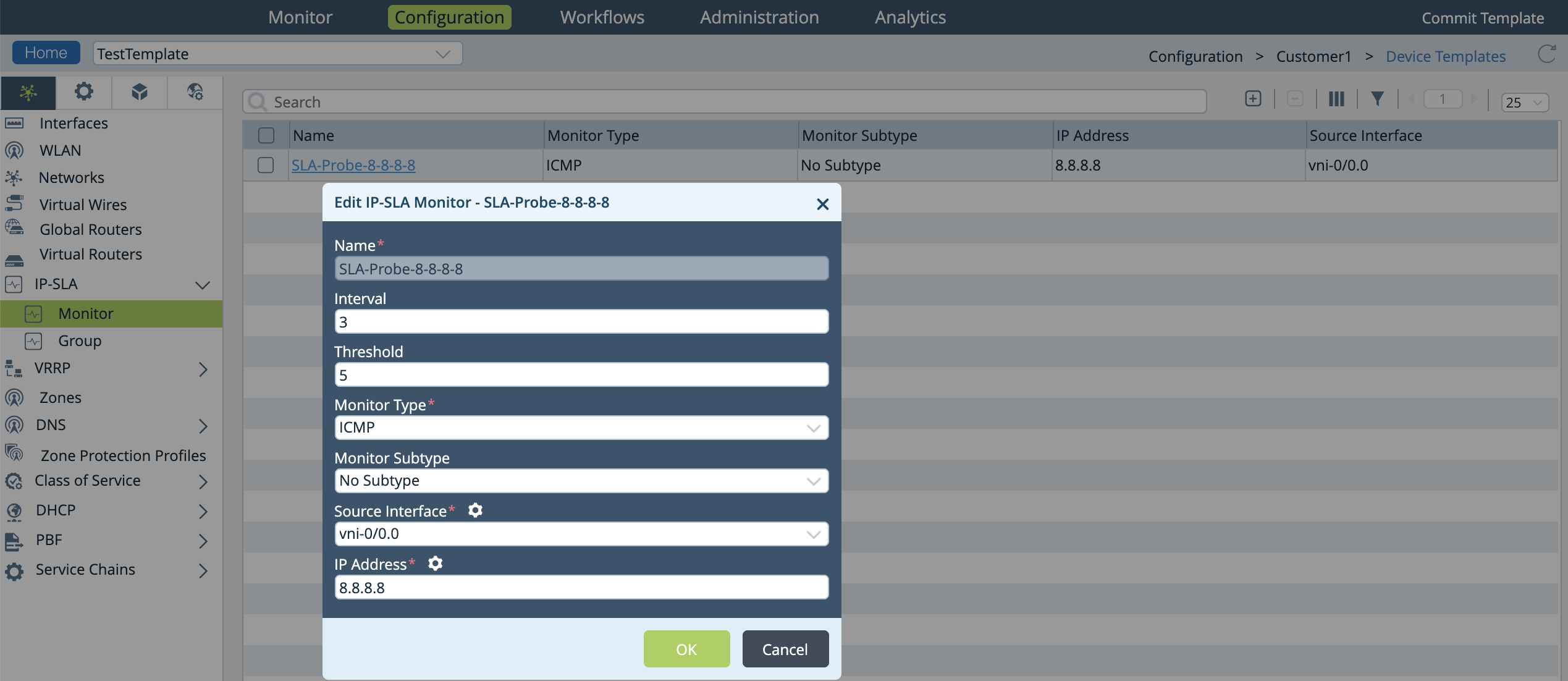
- Run the set monitor <monitor-name> ip-addresses <ip-address> type <icmp> source-interface <vni> interval <duration> threshold <duration> CLI command to create an IP SLA monitor.
Example:admin@branch-cli(config)% set monitor one ip-addresses 192.168.4.2 type icmp source-interface vni-0/1.0 interval 5 threshold 3
Example Template UI:
- Run the show monitor <monitor-name> CLI command to view the configured IP SLA monitor.
Example:admin@branch-cli(config)% show monitor one { type icmp; interval 5; threshold 3; source-interface vni-0/0.0; ip-addresses [ 192.168.4.2 ]; }where,
Field Description type The type of probe packet. Currently, only ICMP type probes are supported. interval This value determines the frequency (in seconds) at which the probe packets are sent. The value range from 3 - 60 sec. The default value is set to 3 sec. threshold This scalar value determines the loss of probe packets or non-receipt of probe reply, before declaring the monitor as down. The value range from 1 - 60. The default value is set to 5. source-interface This configuration derives the routing instance used for sending the probe packets.The routing instance that the source-interface belongs to is the target routing instance for the probe packets. ip-addresses The IP address that you want to monitor. NOTE: In the example above, the source-interface for monitor object one is configured to vni-0/0.0. Run the show interfaces brief CLI command to check the routing instance to which this interface belongs.
admin@VNF-1-cli> show interfaces brief
    NAME       MAC                OPER   ADMIN  TENANT  VRF      IP
    -------------------------------------------------------------------------------
    vni-0/0.0  62:54:00:75:02:03  up     up     1       rt1      192.168.4.1/24
Since this interface belongs to routing-instance rt1, the corresponding monitor object inherits this routing-instance and start sending the probe packets in rt1. - Run the show monitor brief CLI command to view the IP SLA monitoring information.
Example:admin@branch-cli> show monitor brief NAME ADDRESS VRF TENANT STATE TYPE ------------------------------------------------- one 192.168.4.2 rt1 org1 Down icmp
where,
Field Description Name The name of the monitor object. Address The IP address that the monitor is currently monitoring. VRF The routing-instance this monitor uses to check for reachability of the configured address. Tenant Tenant to which this monitor belongs. The tenant information is derived from routing instance. State The current state of the monitor. These are the values: - Inactive—Indicates that the monitor object is not currently applied anywhere. In this state, probe packets are not sent.
- Unknown—Indicate that the monitor object is currently applied and the system is in the process of determining the liveness of configured destination. This is a transient state and eventually, it should move out of this state.
- Up—Indicates that the monitor object is currently applied at least once and the system has determined the state to be Up.
- Down—Indicates that the monitor object is currently applied at least once and the system has determined the state to be Down.
Type The type of probe packet. Currently, only ICMP type probes are supported. - Run the show monitor detail CLI command to view the detailed information of the configured monitors
Example:admin@VNF-1-cli(config)% run show monitor detail LAST NAME ADDRESS VRF TENANT STATE TYPE INTERVAL THRESHOLD FLAPPED -------------------------------------------------------------------------------- one 192.168.4.2 rt1 org1 Down icmp 3 5 00:11:36
where,Field Description Name The name of the monitor object. Address The IP address that the monitor is currently monitoring. VRF The routing-instance this monitor uses to check for reachability of the configured address. Tenant Tenant to which this monitor belongs. The tenant information is derived from routing instance. State The current state of the monitor. These are the values: - Inactive—Indicates that the monitor object is not currently applied anywhere. In this state, probe packets are not sent.
- Unknown—Indicate that the monitor object is currently applied and the system is in the process of determining the liveness of configured destination. This is a transient state and eventually, it should move out of this state.
- Up—Indicates that the monitor object is currently applied at least once and the system has determined the state to be Up.
- Down—Indicates that the monitor object is currently applied at least once and the system has determined the state to be Down.
Type The type of probe packet. Currently, only ICMP type probes are supported. Interval This value determines the frequency (in seconds) at which the probe packets are sent. The value range from 3 - 60 sec. The default value is set to 3 sec. Threshold This scalar value determines the loss of probe packets or non-receipt of probe reply, before declaring the monitor as down. The value ranges from 1 - 60. The default value is set to 5. Last Flapped This displays the last time when the monitor changed its status.
Note : Do not use this option ( not recommended ) - Applying the Monitor Config to a Static Route
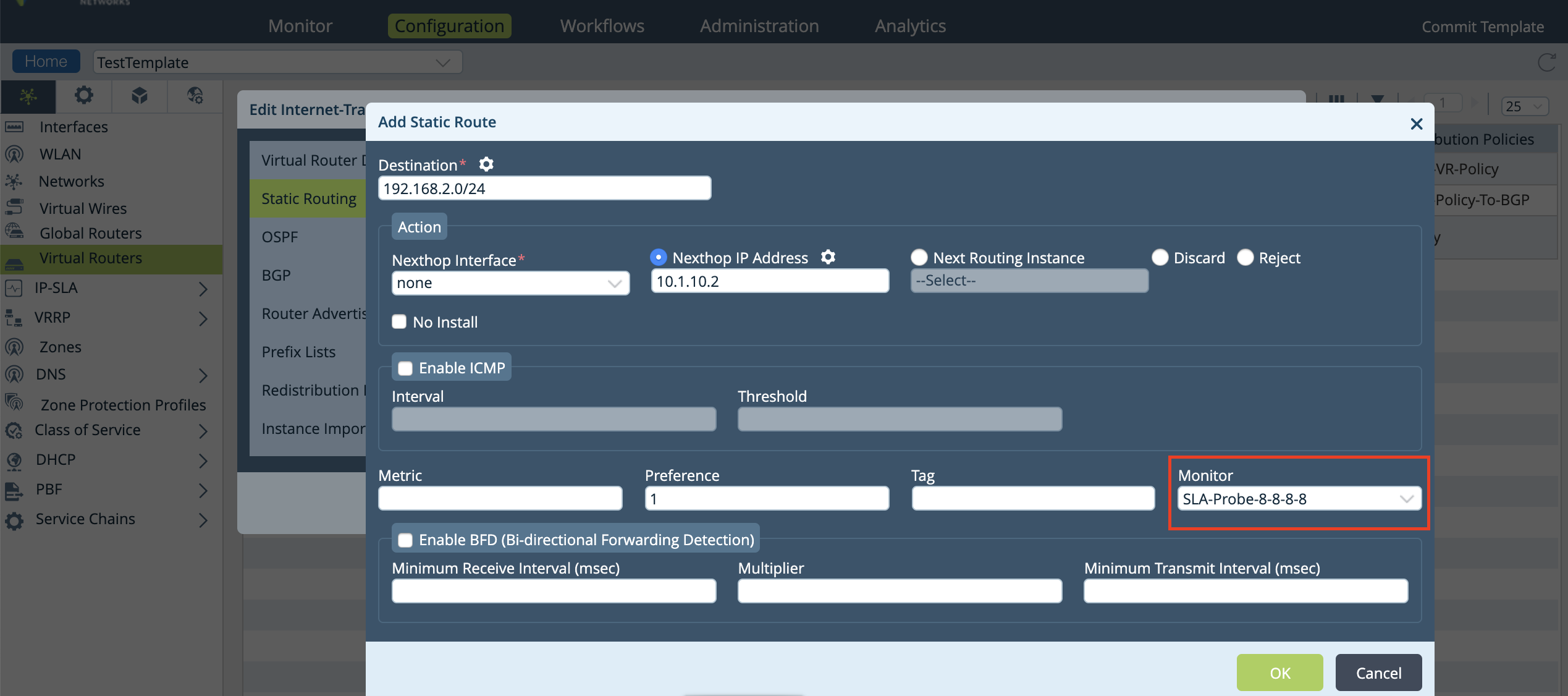
- Run the set routing-instances <routing-instance> routing-options <static> route <ip-address> monitor <monitor-name> CLI command to apply monitoring configuration to a static route.
Example:admin@branch-cli(config)% set routing-instances rt1 routing-options static route 0.0.0.0/0 11.1.1.2 monitor one
Example Template UI:
- Run the show routing-instances <routing-instance> routing-options <static> route CLI command to view the static route monitoring configuration details.
Example:admin@branch-cli(config)% show routing-instances rt1 routing-options static route routing-instances { rt1 { routing-options { static { route { 0.0.0.0/0 11.1.1.2 vni-0/0.0 { monitor one; } } } } } }
Since the monitor attached to the static route is Up, the route is installed in the corresponding routing instance. - Run the run show monitor detail CLI details to check the status of the monitor. An Up state indicates the route addition.
Example:admin@branch-cli(config)% run show monitor detail LAST NAME ADDRESS VRF TENANT STATE TYPE INTERVAL THRESHOLD FLAPPED -------------------------------------------------------------------------------- one 192.168.4.2 global default Up icmp 5 3 03:45:01
- Run the show route CLI command to check the route in use.
Example:admin@branch-cli> show route Routes for Routing instance : ISP1-Transport-VR AFI: ipv4 Codes: E1 - OSPF external type 1, E2 - OSPF external type 2 IA - inter area, iA - intra area, L1 - IS-IS level-1, L2 - IS-IS level-2 N1 - OSPF NSSA external type 1, N2 - OSPF NSSA external type 2 RTI - Learnt from another routing-instance + - Active Route Prot Type Dest Address/Mask Next-hop Age Interface name ---- ---- ----------------- -------- --- -------------- static N/A 0.0.0.0/0 11.1.1.2 1w4d05h Indirect
- Run the show route CLI command to check the route in use.
- Run the show monitor details CLI command to check the status of the monitor. If the status is displayed as Down then the route 0.0.0.0/0 is removed from the corresponding routing instance.
Example:admin@branch-cli(config)% run show monitor detail LAST NAME ADDRESS VRF TENANT STATE TYPE INTERVAL THRESHOLD FLAPPED -------------------------------------------------------------------------------- one 192.168.4.2 global default Down icmp 5 3 00:45:00
- Run the show route CLI command to check the route in use.
Example:admin@branch-cli> show route Routes for Routing instance : ISP1-Transport-VR AFI: ipv4 Codes: E1 - OSPF external type 1, E2 - OSPF external type 2 IA - inter area, iA - intra area, L1 - IS-IS level-1, L2 - IS-IS level-2 N1 - OSPF NSSA external type 1, N2 - OSPF NSSA external type 2 RTI - Learnt from another routing-instance + - Active Route Prot Type Dest Address/Mask Next-hop Age Interface name ---- ---- ----------------- -------- --- --------------
- Run the show route CLI command to check the route in use.
Applying the Monitor Config to a Redistribution Policy
You can apply the monitor objects under routing instance policy-options as one of the match conditions. In addition to the other match conditions, the
monitor state is also considered for the match condition.
Follow the steps in this example to configure the routing instance policy-options:
- Run the set routing-instances <routing-instance> policy-options redistribution-policy <policy-name> term <term-name> match monitor <monitor-name> CLI command to apply monitor configuration to a redistribution policy.
Example:set routing-instances rt1 policy-options redistribution-policy p1 term t1 match monitor one
Example Template UI: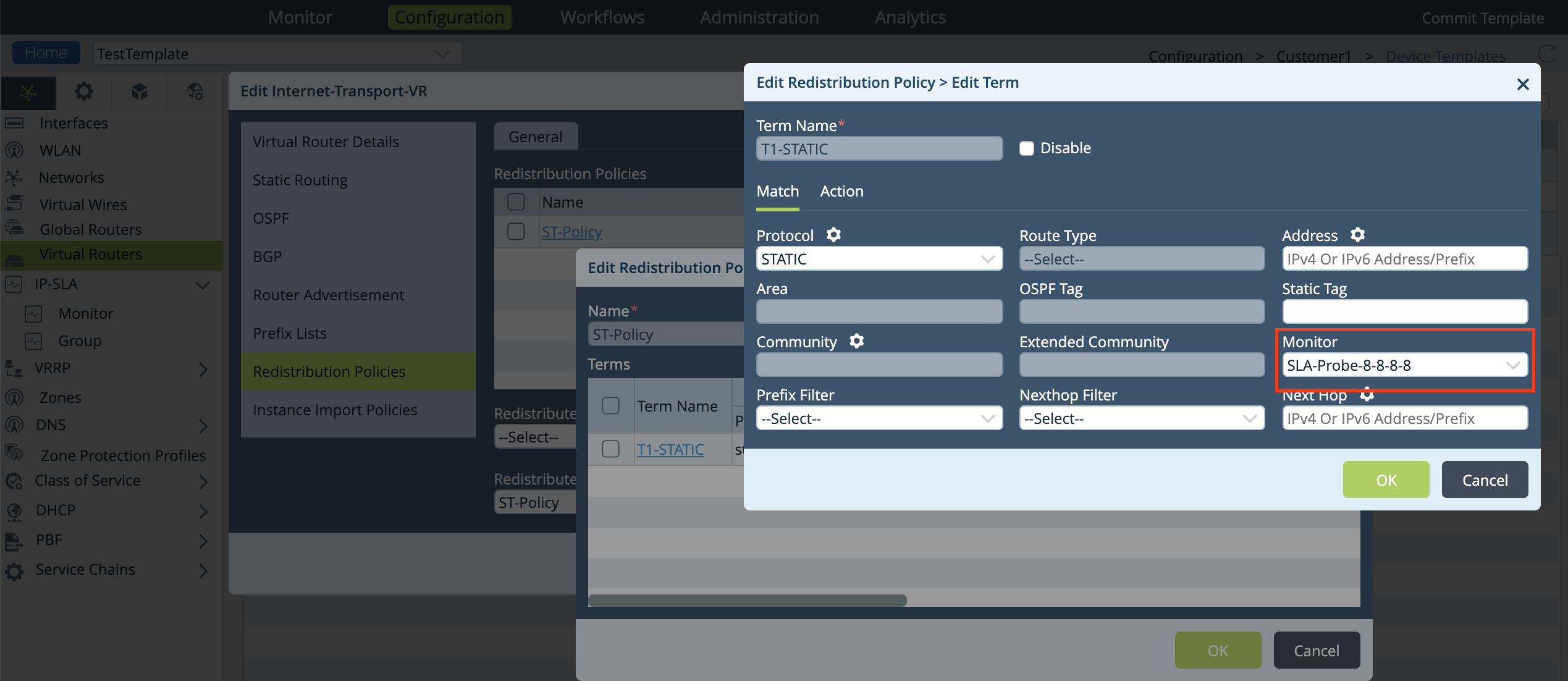
In this example, for policy p1, the local preference is set to 600 only if monitor one is configured as Up else the default local preference is advertised. - Run the show routing-instances <routing-name> policy-options CLI command to see the applied monitor configuration to a redistribution policy.
Example:admin@branch-cli(config)% show routing-instances rt1 policy-options redistribution-policy p1 { term t1 { match { protocol direct; monitor one; } action { accept; set-local-preference 600; } }
NOTE: With release 16.1, you can use IP SLA monitor to monitor only a single IP destination using ICMP probes. The support for multiple IP destinations, FQDN, HTTPS, TCP probe types will be available in future releases.