Tested: Flexvnf/Analytics/VD release 22.x.x
Question:
How to remove files/directories that are older than x number of days in order to clear space?
* Prerequisite: Considering you have checked the disk utilization and know the exact path of the files you want to remove.
* Please follow KB clearing-disk-space-on-vos for a quick sanity check.
Solution:
This user interactive script cleanup.sh will provide a reference to the top 10 directories/sub-directories consuming most disk space and also clear files/directories older than [x] days from any specified path [y]. (x and y are user defined)
Example:
Running cleanup.sh on the Search node
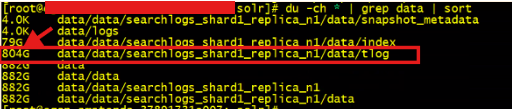
- On the appliance below, tlog folder is utilizing huge disk space which contains n number of transaction log files. /var/lib/solr/data/data/searchlogs_shard1_replica_n1/data/tlog/
- To remove log files that are older than 2 days, we run cleanup.sh as a root user (if permission denied as admin user)
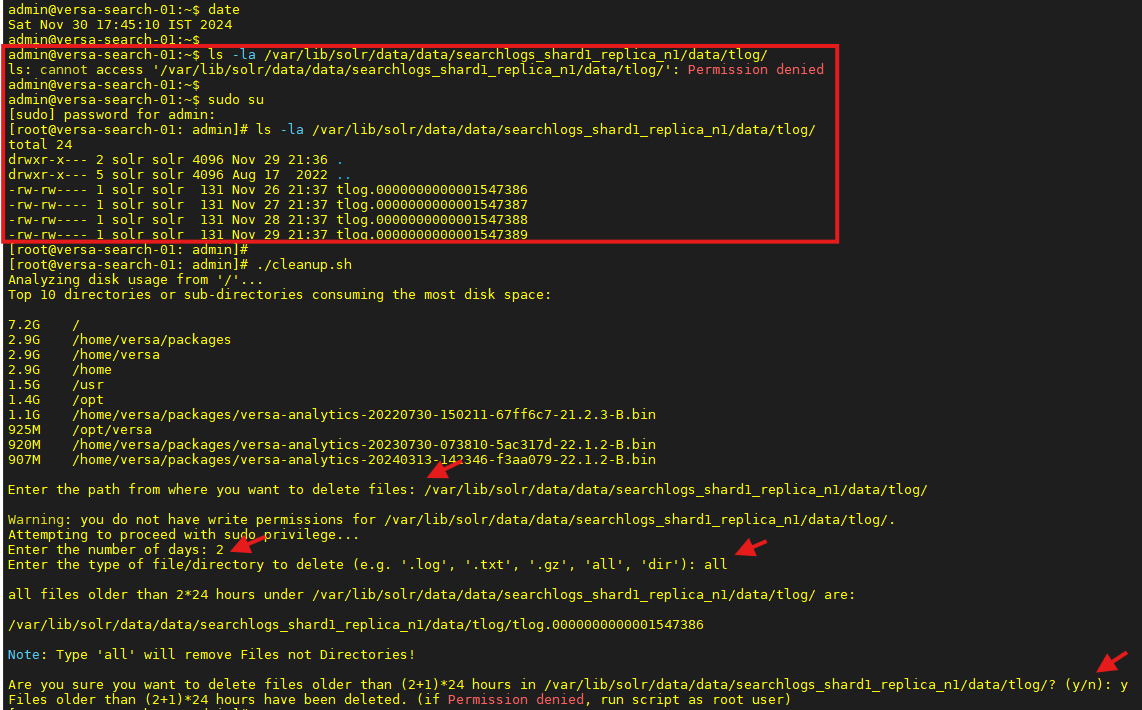
In above example we can see the script prompts user to define the path from where files or directories need to be removed
as well prompts to enter the number of days. The script then removes all the files that were modified > the specified days.
Here, it removed the log file modified more than 72 hours ago as the number of days specified was 2.

By default, the interpretation is as below: (n+1)*24
# day specified as 0 > all files modified more than 24 hours ago will be removed
# day specified as 1 > all files modified more than 48 hours ago will be removed
How to Use:
- Save the script under /home/<user>
- Give it execute permissions sudo chmod +x cleanup.sh
- Run the script ./cleanup.sh (Run as root user if permission denied error)
Script Prompts:
- Enter the path from where you want to delete files: </path>
- Enter the number of days: x
- Enter the type of file/directory to delete (e.g. '.log', '.txt', '.gz', 'all', 'dir'): <type>
- Are you sure you want to delete files older than x*24 hours: (y/n)
#####################################################################
Cleanup.sh v2.1 will be further enhanced.