This document covers common causes of Versa Director (VD) slowness and provides guidance for initial troubleshooting, data collection, and issue isolation.
1. Pre-Checks
Before proceeding with detailed troubleshooting, collect the following outputs from the Director shell:
lsblk
this will display the current available disks and partitionsdf -kh
Shows filesystem usage and available space
example :
admin@Director$ df -kh
Filesystem Size Used Avail Use% Mounted on
/dev/mapper/system-root 45G 4.8G 40.0G 8% /
none 4.0K 0 4.0K 0% /sys/fs/cgroup
udev 3.9G 12K 3.9G 1% /dev
tmpfs 799M 692K 798M 1% /run
none 5.0M 0 5.0M 0% /run/lock
none 3.9G 4.0K 3.9G 1% /run/shm
none 100M 0 100M 0% /run/user
/dev/sda1 922M 104M 771M 12% /boot
/dev/mapper/system-opt 30G 2.4G 26G 9% /opt
/dev/mapper/system-var 76G 8G 68G 11% /var
Verify that no filesystem is running low on available disk spacetop -H
Look for any specific process occupying high memory or CPUfree -h
Verify if the VD has enough allocated and free memoryvsh detailsvsh statuslscpu | grep "^Socket(s)"lscpu | grep "^CPU(s):"lscpu | egrep 'Thread|Core|Socket'
this will indicate if hyperthreading is enabled or notgrep -c ^processor /proc/cpuinfo
this will display number of Physical coresFrom cli > show device list | countCheck VNMS API Endpointcurl -v -k -u Administrator:Versa@1234 -X GET "https://10.192.220.193:9182/vnms/appliance/appliance?offset=0&limit=25" -H "Accept: application/json" -H "Content-Type: application/json"
Check some commit operation from NCS cli
Administrator@s2-vd-2>configure
Administrator@s2-vd-2% set system contact test
[ok][2018-08-27 07:44:20]
[edit]
Administrator@s2-vd-2% commit
Commit complete.- Check ncs status for wait/stuck operations
ncs --status | grep -i "waiting"
2. Verify Hardware and Software Requirements
Using the outputs collected above, verify that the Director deployment meets the minimum hardware and software requirements referring to the below guide :
3. Eliminate External Factors
Before investigating Director-specific issues, verify that the observed slowness is not caused by:
- Network latency or packet loss.
- Browser-related issues.
- Issue on client PC
- DNS resolution delays.
- Proxy or firewall-related delays.
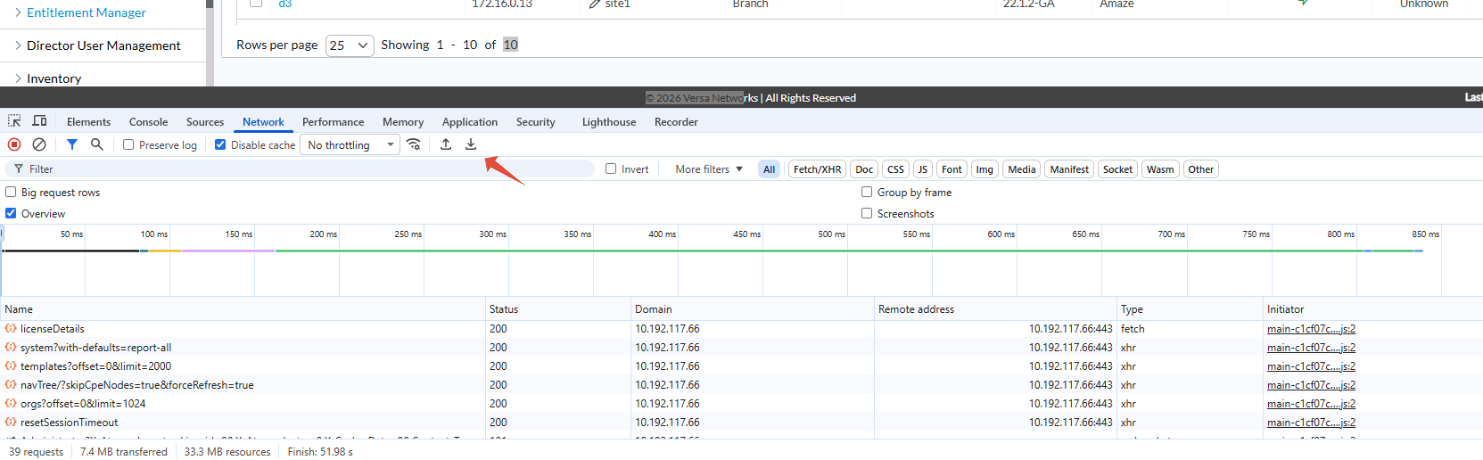
Collect a HAR file from the affected browser and provide it to Versa TAC along with the tech-support bundle.
4. Excessive External API Calls
One of the most common causes of Director GUI slowness is a high volume of external API requests.
The aggressive amount of external API call can strain the director thereby causing huge delays in completing the queries.
Relevant Logs to check :
/var/log/vnms/spring-boot/access_log.log
/var/log/vnms/spring-boot/vnms-spring-rest.log
Example Access Log Entry
https-jsse-nio-9183-exec-21 f7853419 - "GET /vnms/appliance/appliance/liteView?limit=25&offset=0&org=Test HTTP/1.1" 200 3809 42224ms 42223ms
The above example indicates that the API request required approximately 42 seconds to complete.
Analysis
Review the logs for:
- Excessive API request volume.
- Long-running API calls.
- Repeated polling from external monitoring tools
Custom scripts may be used to analyze API frequency and response times from the logs files.
Best Practices
- Avoid using Basic Authentication for REST API requests.
- Use OAuth-based authentication instead
- Avoid using Live Status API calls.
- Use live_commands instead
- Offload the live commands to the Standby Director whenever possible.
For additional guidance, refer to:
5. PostgreSQL Table Bloat (22.1.4)
A known issue in release 22.1.4 can result in PostgreSQL table bloating, leading to degraded Director performance.
To investigate, collect the following database outputs and provide them to Versa TAC along with the technical support bundle.
Access PostgreSQL
sudo -Hu postgres psql -d vnms
Query 1
SELECT
table_name,
pg_size_pretty(table_size) AS table_size,
pg_size_pretty(indexes_size) AS indexes_size,
pg_size_pretty(total_size) AS total_size
FROM (
SELECT
table_name,
pg_table_size(table_name) AS table_size,
pg_indexes_size(table_name) AS indexes_size,
pg_total_relation_size(table_name) AS total_size
FROM (
SELECT ('"' || table_schema || '"."' || table_name || '"') AS table_name
FROM information_schema.tables
) AS all_tables
ORDER BY total_size DESC
) AS pretty_sizes;
Query 2
SELECT pid, datname, usename, state, now() - xact_start AS xact_age, query
FROM pg_stat_activity
WHERE state != 'idle' AND now() - xact_start > interval '5 minutes'
ORDER BY xact_age DESC;
Query 3
SELECT
relname AS table_name,
n_live_tup,
n_dead_tup,
last_vacuum,
last_autovacuum,
vacuum_count,
autovacuum_count
FROM pg_stat_all_tables
WHERE relname = 'appliance';
Query 4
SELECT
now() AS checked_at,
schemaname,
relname,
ROUND(100.0 * n_dead_tup / (n_live_tup + 1), 2) AS dead_pct
FROM pg_stat_all_tables
WHERE n_live_tup > 0
ORDER BY dead_pct DESC
LIMIT 10;
quit.
6. OCSP Certificate Revocation Checks
In deployments where Director has restricted or no Internet access, Online Certificate Status Protocol (OCSP) checks may introduce delays.
If certificate revocation checking is enabled, the validation attempt may introduce approximately 5 seconds of delay.
This will translate to visible delay in pages being loaded.
Verification
Run the following command from the Director shell to confirm if its impacting :
time openssl s_client --connect localhost:9183 --status
Example
if there is an issue with reachability to the Internet to check the certificate revocation status, it will hang after the below line
time openssl s_client --connect localhost:9183 --status
CONNECTED(00000005) <<< hangs for 5 seconds. and then continues to show more output
Resolution
As part of security hardening, OCSP checking was enabled by default. When Internet access is unavailable, this will cause the TLS connection in the backend to timeout, hence to bypass OCSP check :
Start with the Standby Director.
Edit:
sudo vi /opt/versa/vnms/scripts/env-util.py
Locate the following lines:
java_mem_opts = "-server -Xmx%sg -Xms%sg -Djdk.tls.server.enableStatusRequestExtension=true" %(max_mem, min_mem)
java_opts = "$JAVA_OPTS -server -Xmx%sg -Xms%sg -Djdk.tls.server.enableStatusRequestExtension=true" %(max_mem, min_mem)
Remove only the highlighted part without removing the ending comma.
Perform vsh stop on the standby.
Perform vsh restart on the active, wait and then restart the standby Director