Question:
How to use heat template with OpenStack to instantiate Versa Headend (Versa Director, Versa Controller, and Versa Analytics)?
Answer:
Versa provides "Heat Template" to automate and instantiate the Versa Headend (HE) setup on an OpenStack in standalone mode.
Pre-requisites
These are the pre-requisites required for using the heat template:
- OpenStack—Images available and added in OpenStack for:
- Versa Director
- Versa Controller
- Versa Analytics
- Project/Tenant—It is recommended to use non-admin project for setting up Versa HE set up.
- Role—"admin" level role is provided to the OpenStack user used to run this template.
- Key Pair—Key Pair should be available to the OpenStack user/project used to run this template and this key pair is used for Versa HE set up.
- Public Network—Public Network should be available as part of the installation of OpenStack. Floating IPs will be assigned from this public network to management ports of Versa HE instances.
OpenStack required these two files to run the Heat template:
- Environment file.
- Main heat template file.
NOTE: This article provides a sample of both the files that you can use in your deployment.
Environment File
This file provides information in key-value pair format. Please don't change the key name in the environment file. It has this information:
- key_name—Specify the key pair name here.
- image_director—Specify the name of the Versa Director Image here.
- image_controller—Specify the Versa controller/FlexVNF image name here.
- image_analytics—Specify the Versa Analytics image name here.
- public_nets—Specify the Public network name here which will be used to get the Floating IPs.
- management_cidr—Specify the management network's Classless Inter-Domain Routing (CIDR) that is used for the management network of Versa HE instances.
The default network used is, "10.234.1.0/24". You can change this if required. Please enter the CIDR value inside " " - dir_ctrl_van_cidr—Specify the network's CIDR this is used for communication between Versa Director Southbound, Versa Controller Northbound, and Versa Analytics Southbound.
The default network used if "10.234.2.0/24". You can change this as per the requirements. Please enter the CIDR value inside " ". - ctrl_branch_cidr—Specify the network's CIDR that is used for communication between Versa Controller Southbound and Versa Branches/FlexVNFs.
The default network used is "10.234.3.0/24". You can change this as per the requirements. Please enter the CIDR value inside " ". - hostname— Use this when you want to change the hostname of Versa Director.
The default, "versa-director" hostname is used. You can change this as per the requirements. Please enter the hostname inside " ".
Main Heat Template File
Run the Heat template file. It performs these actions/activities:
- Provision Security group with firewall rules required for Versa HE set up.
- Provision 3 different networks: (By default, 10.234.1.0/24, 10.234.2.0/24 & 10.234.3.0/24 networks are used. You can pass the parameters in the environment file to change these.)
- First network (10.234.1.0/24) is used for management of all the Versa HE instances. The floating IP is assigned to each port from the public network (provided as a parameter in the environment file).
- Second network (10.234.2.0/24) is used for Director South Bound, Controller North Bound, and Analytics South Bound ports.
- Third network (10.234.3.0/24) will be for Controller South Bound and branch connectivity.
- Provision router for floating IP communication to the management network.
- Provision Flavor for each instance of Versa HE set up.
- Install Versa Director instance and run the cloud-initscript for:
- Updating the /etc/network/interface file.
- Updating the /etc/hosts and hostname file.
- Generate new certificates.
- Run the vnms-startup script.
- Install Versa Controller instance and run the cloud-initscript for:
- Updating /etc/network/interface file.
- Install Versa Analytics instance and run the cloud-init script for:
- Updating the /etc/network/interface file.
- Updating the /etc/hosts file.
- Copy certificates from Versa Director and install this certificate into Analytics.
Refer to this topology that is brought up as part of this heat template:
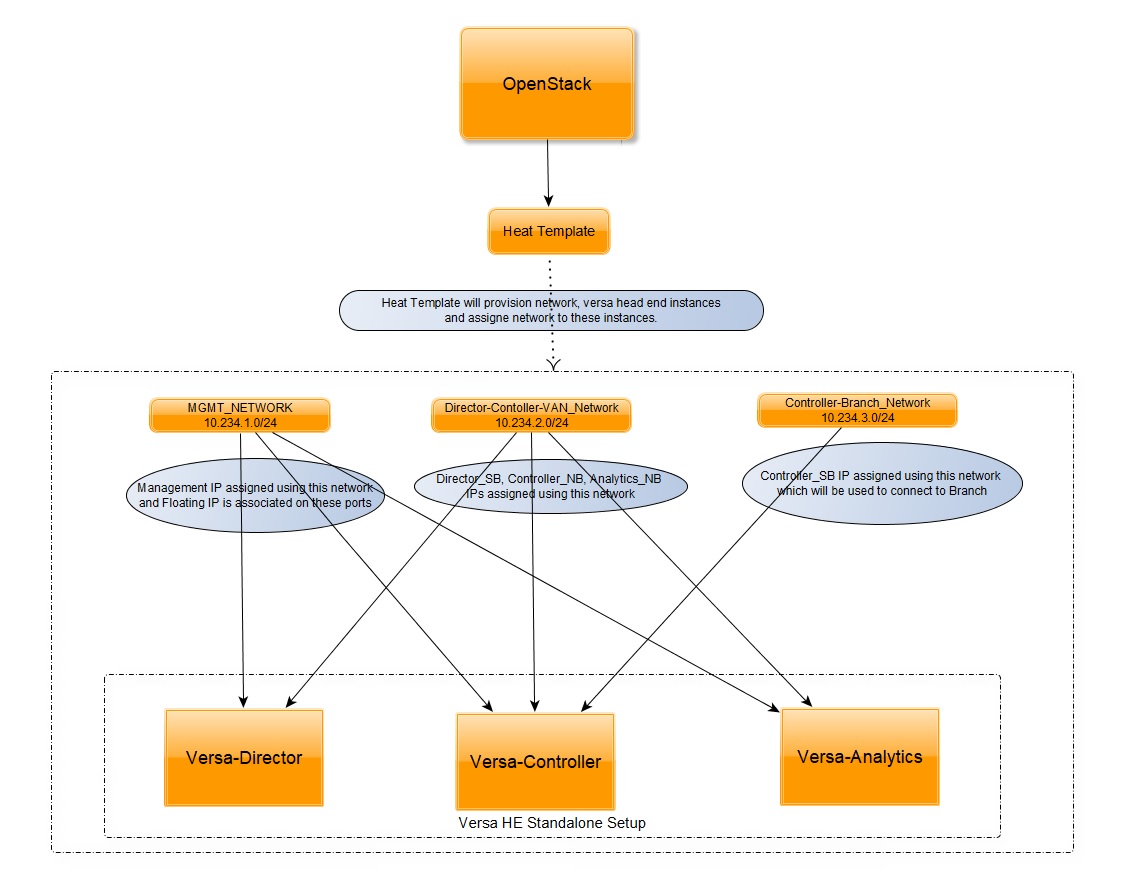
NOTE: Due to Anti-spoofing, port security is disabled on both ports (North Bound and South Bound) of Controller for any passthrough traffic via Controller.