This article describes how to configure SNMP v3 on Versa FlexVNF CPE using Config Templates when the SNMP server is reachable on overlay network.
Prerequisites
- Versa Headend is installed, configured and running.
- SNMP server is behind the Versa SDWAN Controller (within Data Centre) and is reachable from Versa FlexVNF CPE via the Provider-Control-VR
- In this example, SNMP server is reachable on 172.16.2.100 and standard SNMP ports 161 and 162 (trap) are opened on the underlay network.
NOTE: SNMP polling is not supported over dhcp wan interfaces on VOS and is not configurable from workflow either.
Setup Details
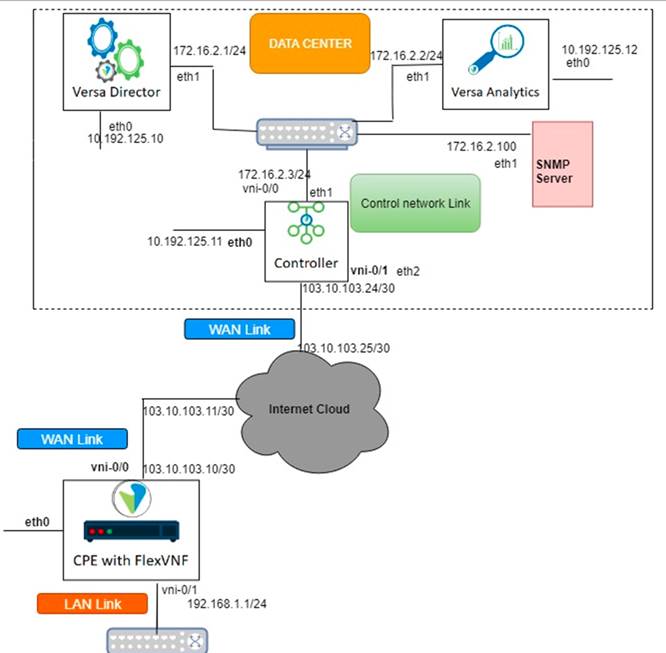
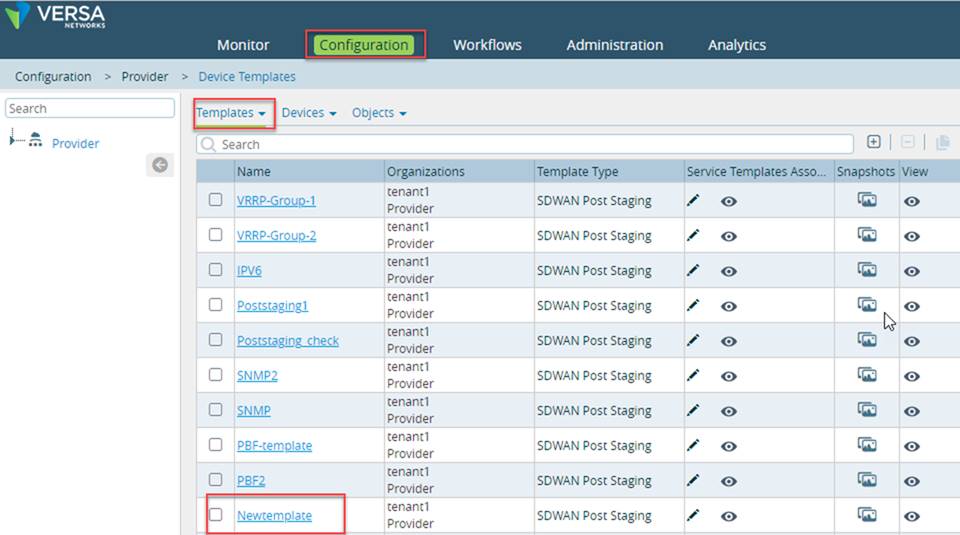
First login into the Versa Director -> Go to the configuration -> Template -> Edit the Template associated with the branch
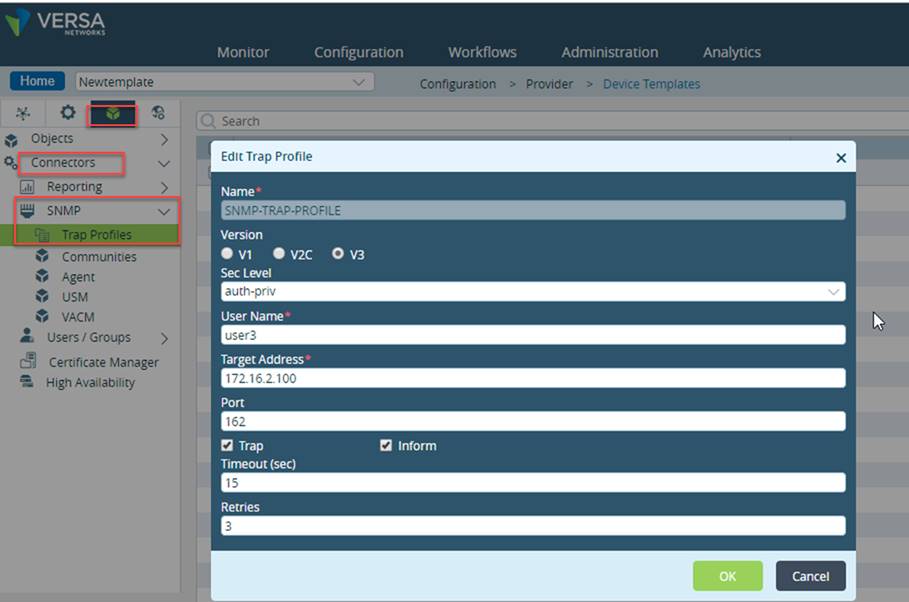
Configuring SNMP Trap Profiles
SNMP traps are alert messages sent from one or more remote SNMP-enabled devices to a central device, the “SNMP manager.” A trap communicates the health and performance warnings to the SNMP manager. For information on how to configure the profile, refer below steps.
- On the branch template go to the tab -> Objects & Connectors -> Connector -> SNMP -> Click on Trap profile -> Click on (+) symbol to create new trap profile
Field | Description |
Name | Name of the trap profile. |
Version | Version of the trap profile: V1 V2C V3 |
Community Name | Community string identifies a community of SNMP managers and monitored devices and serves as a password to authenticate the community members to each other. |
Target Address | IP address of the SNMP manager. |
Port | Port number assigned to the SNMP manager. |
Trap | Select if SNMP simply sends a message. |
Inform | Select if SNMP sends and gets an acknowledgment for the message sent |
- Click OK once you enter value for required fields.
Configuring SNMP Agent
An agent interacts with SNMP and enables the flow of information between the monitored devices, the applications, and the monitoring device. For information on how to configure the profile, refer below steps to Configuring SNMP agent in the Versa VNF.
- On Branch template go to Objects & Connectors -> connectors -> SNMP -> SNMP Agent -> click (+) symbol to edit configure the follow fields.
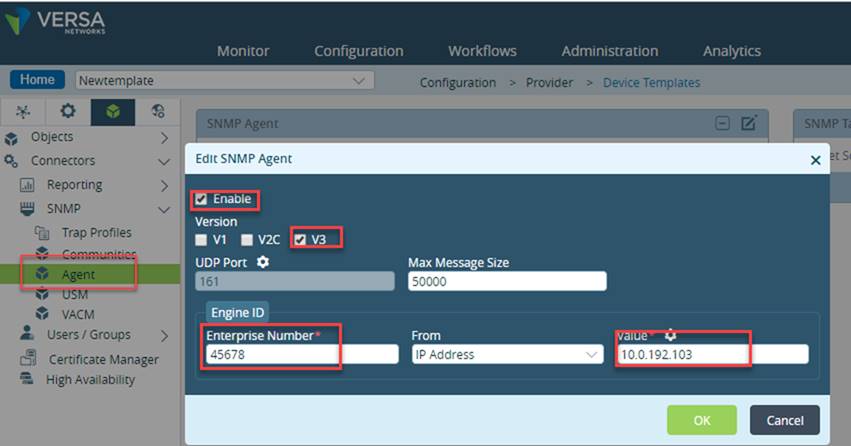
- Click OK
Please Note: Enterprise number is organisation registered number, which is allocated by IANA. - Then click on edit SNMP target source and enter the IP Address of Branch which SNMP server will be polling and click OK
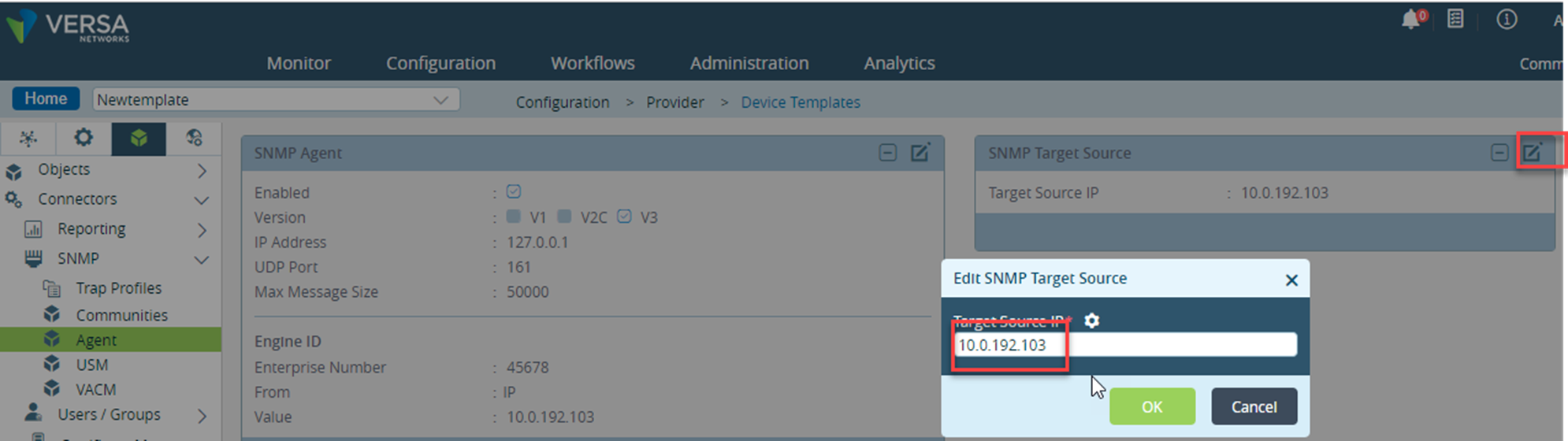
Configuring USM (User-based Security Model)
SNMPv3 uses user-based security model (USM) for securing messages. USM uses the concept of a user for which security parameters (levels of security, authentication, privacy protocols, and keys) are configured for both the agent and the manager. Messages sent using USM are highly secure.
The security model is configured for:
- Local users
- Remote users
Configuring USM for Local Users
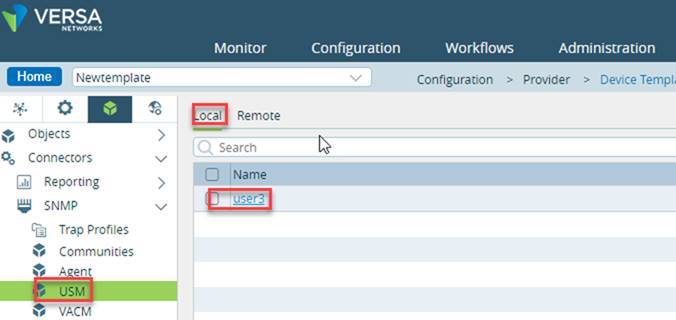
- In the Director view, go to Configuration > Templates > Device Templates. In the Appliance view, go to Configuration > Objects & Connectors > Connectors > SNMP > USM. Click the Local tab
- Click (+) symbol to add a Local user security model
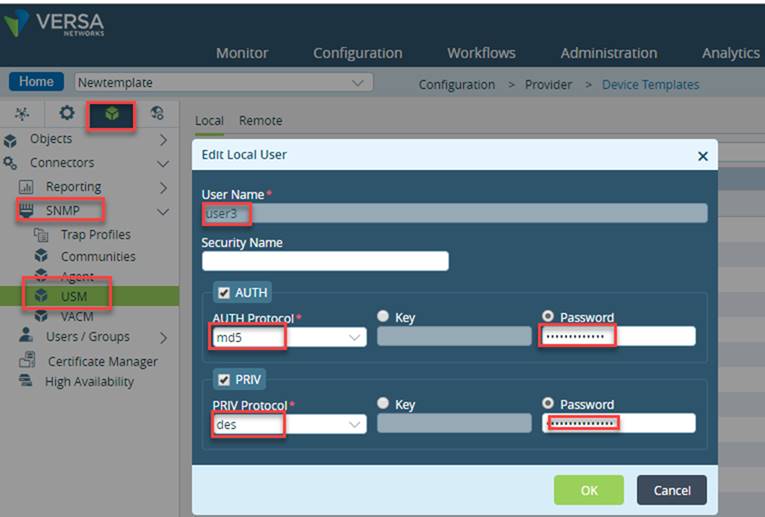
Field | Description |
User Name | Local user name. |
Security Name | Secure name of the user. |
Auth | Indicates whether an authorization protocol is required for messaging. |
Authorization Protocol | Type of protocol: o md5 o sha |
Key | Indicates whether a key is required for messaging. |
Key | Key to be used. |
Password | Indicates whether a password is required for messaging. |
Password | Password to be used. |
PRIV | Indicates whether a privacy protocol is required. |
PRIV Protocol | Type of protocol: o aes o des |
Key | Indicates whether a key is required. |
Key | Key to be used. |
Password | Indicates whether a password is required for messaging. |
Password | Password to be used. |
- Click OK.
This configures a user-based security model for the Local user.
Configuring VACM (View-based Access Control Model)
SNMPv3 uses view-based access control model (VACM), which allows you to configure the access privileges granted to a group. All access control within VACM operates on groups, which are collections of users defined by USM.
The security model is configured for:
- Views
- Groups
Configuring VACM Views:
- In the Director view, go to Configuration > Templates > Device Templates. Select an organization in the left navigation panel and a template from the dashboard.
- In the Appliance view, go to Configuration > Objects & Connectors > Connectors > SNMP > VACM.
- Click (+) symbol to add a view.
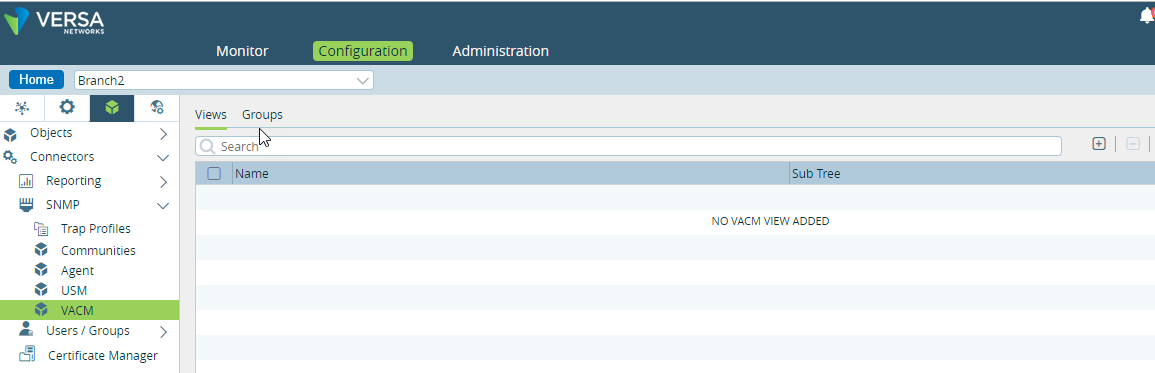
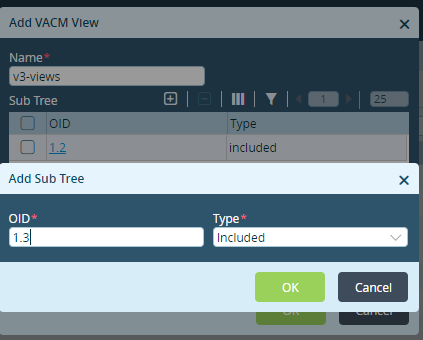
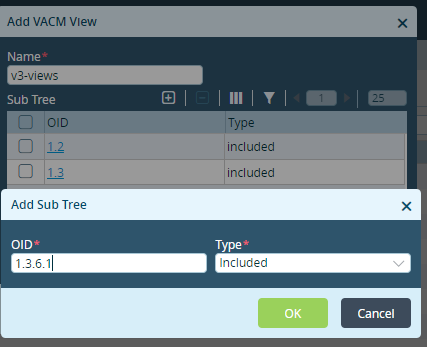
- Click OK.
This configures a VACM view.
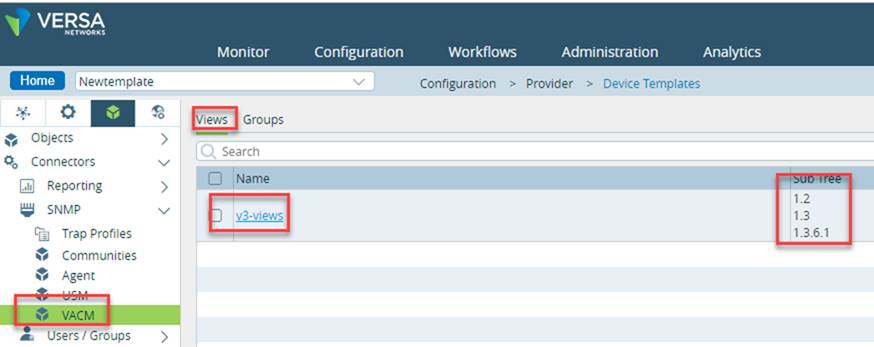
Configuring VACM Groups:
- In the Director view, go to Configuration > Templates > Device Templates. Select an organization in the left navigation panel and a template from the dashboard.
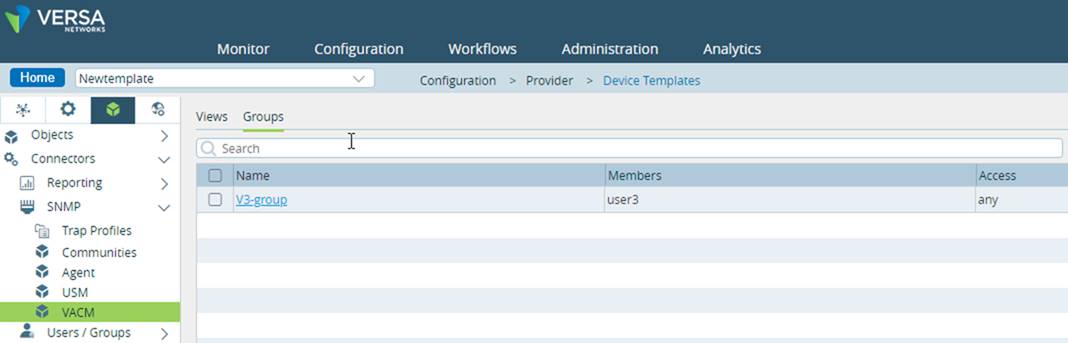
- In the Appliance view, go to Configuration > Objects & Connectors > Connectors > SNMP > VACM. Click the Group tab.
- Click (+) to add a group.
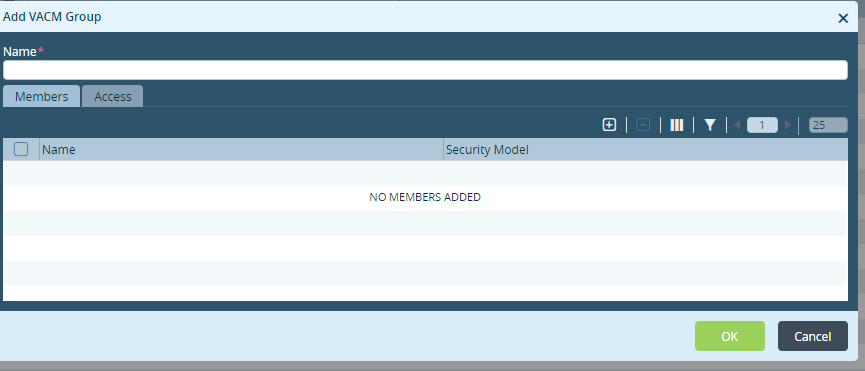
- Click on (+) to add member
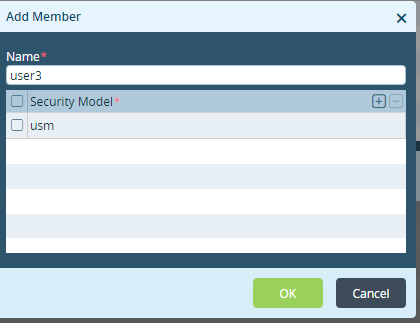
Field | Description |
Name | Name of the member. |
a.
- Click (+) to add a security model. NOTE: Make sure the VACM Groups "Members Name" is same as community "Security Name" (sec-name), if configured in step 5.
- Click the Access tab on the pop-up window
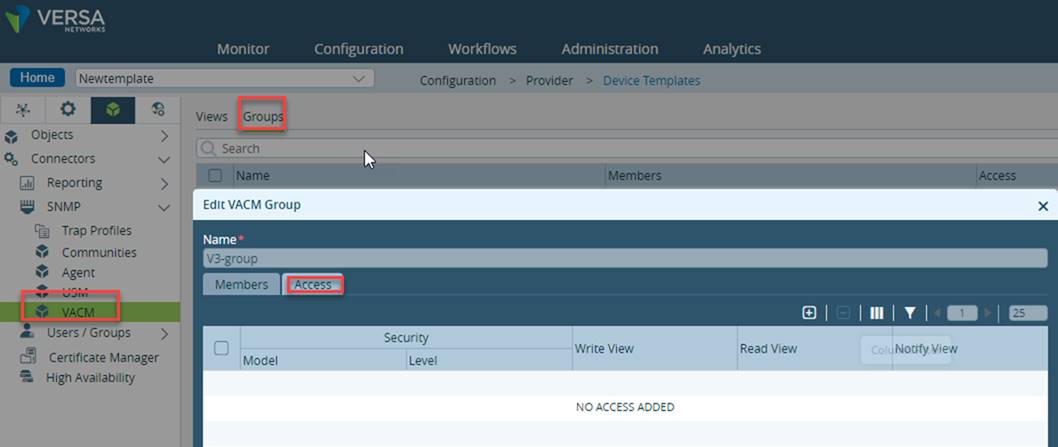
- Click (+) to add an access model.
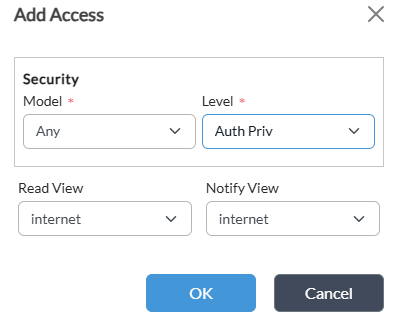
Field | Description |
Security Model | Name of the security model. |
Security Level | Type of security: § Auth No Priv § Auth Priv § No Auth No Priv |
Read View | Object on which to grant read view. |
Notify View | Object on which to grant notify view. |
- Click Ok
- Click Ok
This configures VACM Group.
Configure VNF Manager
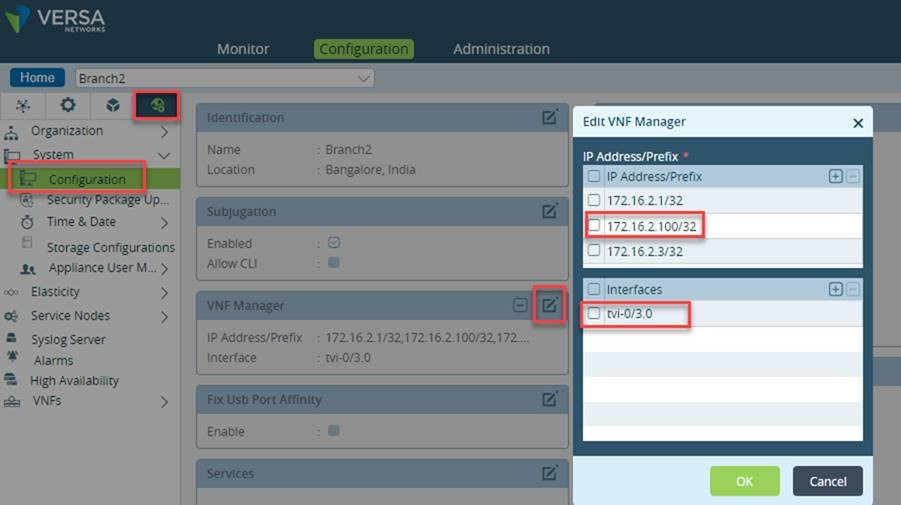
For SNMP server to be able to poll the FlexVNF and receive the SNMP traps, we need to add SNMP server as VNF Manager settings.
We also need to select Interface using which the Branch will be able to reach the SNMP server. In this case, SNMP server (172.16.2.100 is reachable for Branch from tvi-0/3.0 interface)
Once have done the above steps commit the template to the branch.
For executing snmpwalk command, you need to know the SNMP Engine ID. This can be found like this:
- Releases Prior to 16.1R2S5, use cli command
> show configuration snmp agent engine-id - From release 16.1R2S5 onwards
$ vsh engine-id
Validate the configuration from FlexVNF CLI
admin@B2-cli> show configuration | display set | match snmp

set confdConfig logs snmpLog

set confdConfig logs snmpLog enabled

set confdConfig logs snmpLog file

set confdConfig logs snmpLog file enabled

set confdConfig logs snmpLog file name /var/log/versa/confd/snmp.log

set snmp agent enabled

set snmp agent ip 127.0.0.1

set snmp agent udp-port 161

set snmp agent version v3

set snmp agent engine-id

set snmp agent engine-id enterprise-number 45678

set snmp agent engine-id from-ip 10.0.192.103

set snmp agent max-message-size 50000

set snmp system contact ""

set snmp system name B2

set snmp system location "Bangalore, India"

set snmp target SNMP-TRAP-PROFILE ip 172.16.2.100           <<<<<< This should be the SNMP server address

set snmp target SNMP-TRAP-PROFILE udp-port 162

set snmp target SNMP-TRAP-PROFILE tag [ std_v3_inform std_v3_trap ]

set snmp target SNMP-TRAP-PROFILE timeout 15

set snmp target SNMP-TRAP-PROFILE retries 3

set snmp target SNMP-TRAP-PROFILE usm user-name user3

set snmp target SNMP-TRAP-PROFILE usm sec-level auth-priv

set snmp notify std_v1_trap tag std_v1_trap

set snmp notify std_v1_trap type trap

set snmp notify std_v2_inform tag std_v2_inform

set snmp notify std_v2_inform type inform

set snmp notify std_v2_trap tag std_v2_trap

set snmp notify std_v2_trap type trap

set snmp notify std_v3_inform tag std_v3_inform

set snmp notify std_v3_inform type inform

set snmp notify std_v3_trap tag std_v3_trap

set snmp notify std_v3_trap type trap

set snmp target-source 10.0.192.103                                   <<<<< This should be the interface address on our branch router which will be used

set snmp vacm group V3-group member user3 sec-model [ usm ]

set snmp vacm group V3-group access any auth-priv read-view v3-views

set snmp vacm group V3-group access any auth-priv notify-view v3-views

set snmp vacm view v3-views subtree 1.2 included

set snmp vacm view v3-views subtree 1.3 included

set snmp vacm view v3-views subtree 1.3.6.1 included

set snmp usm local user user3 auth

set snmp usm local user user3 auth md5

set snmp usm local user user3 auth md5 password user3password

set snmp usm local user user3 priv

set snmp usm local user user3 priv des

set snmp usm local user user3 priv des password user3encryption

[ok][2018-12-24 08:28:23]

admin@B2-cli>