Question
How to modify volume in AWS?
Solution
Perform the following steps:
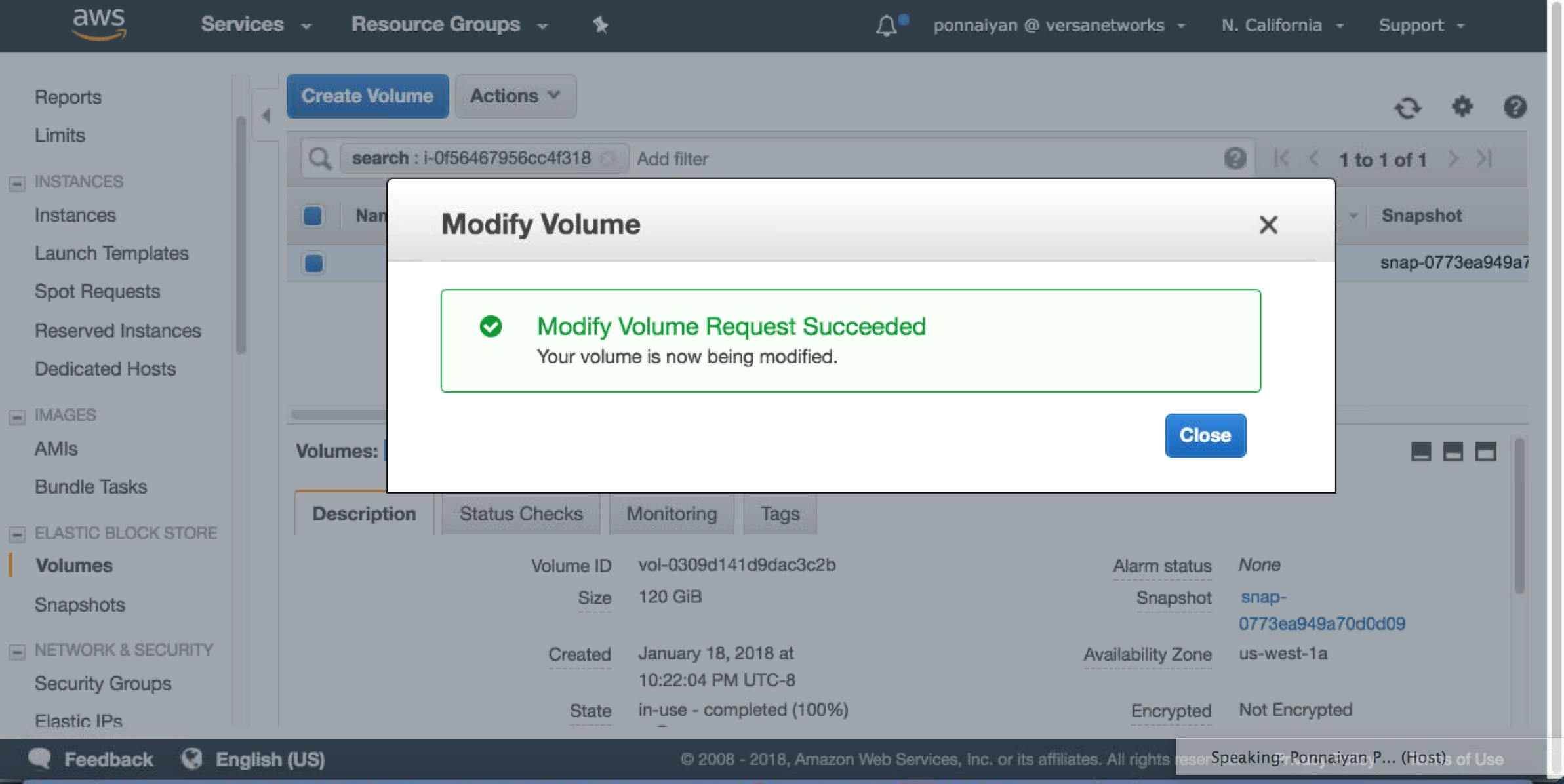
- Find the volume attached to the AWS instance using the instance ID.
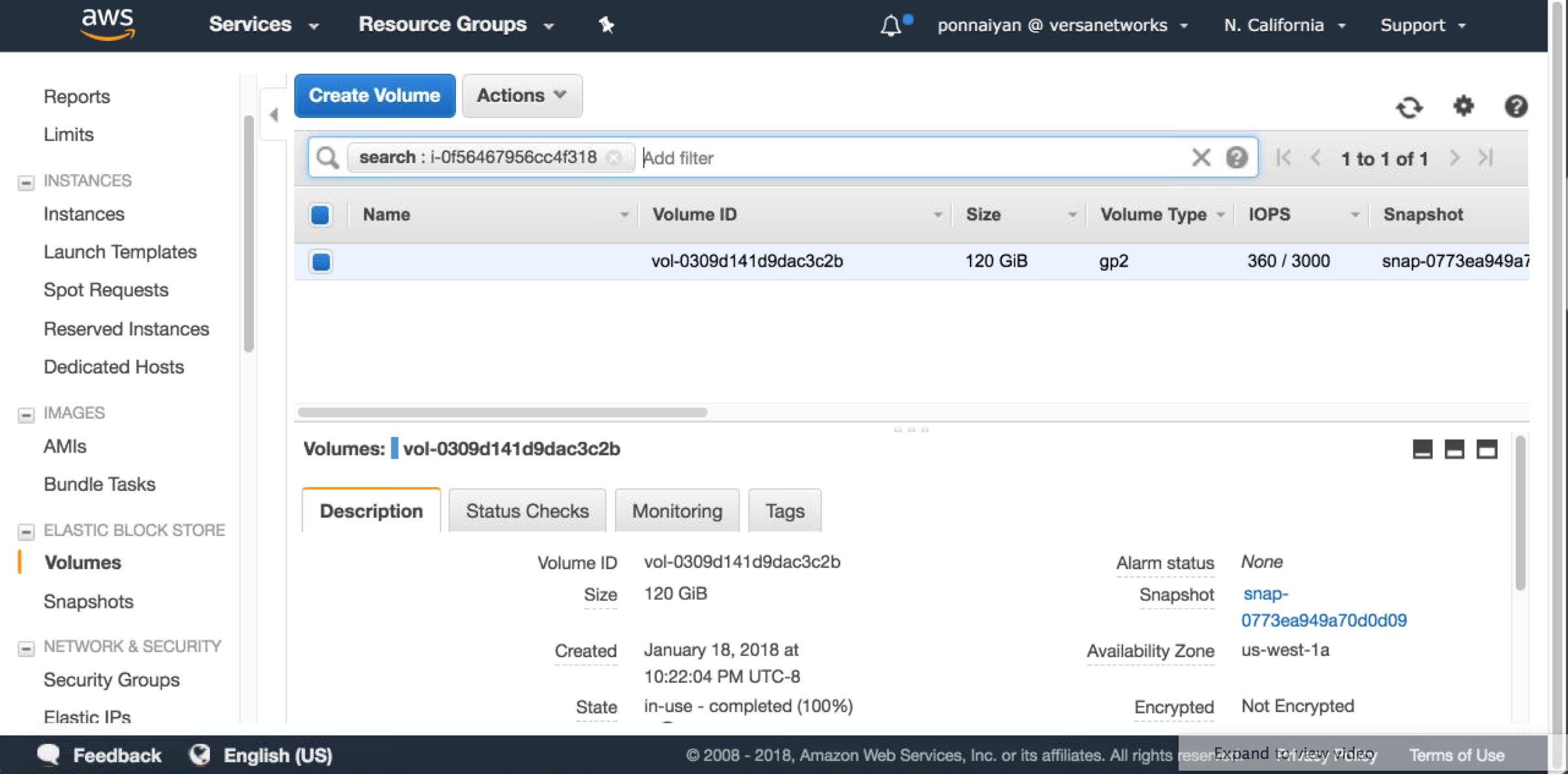
- Select Modify Volume.
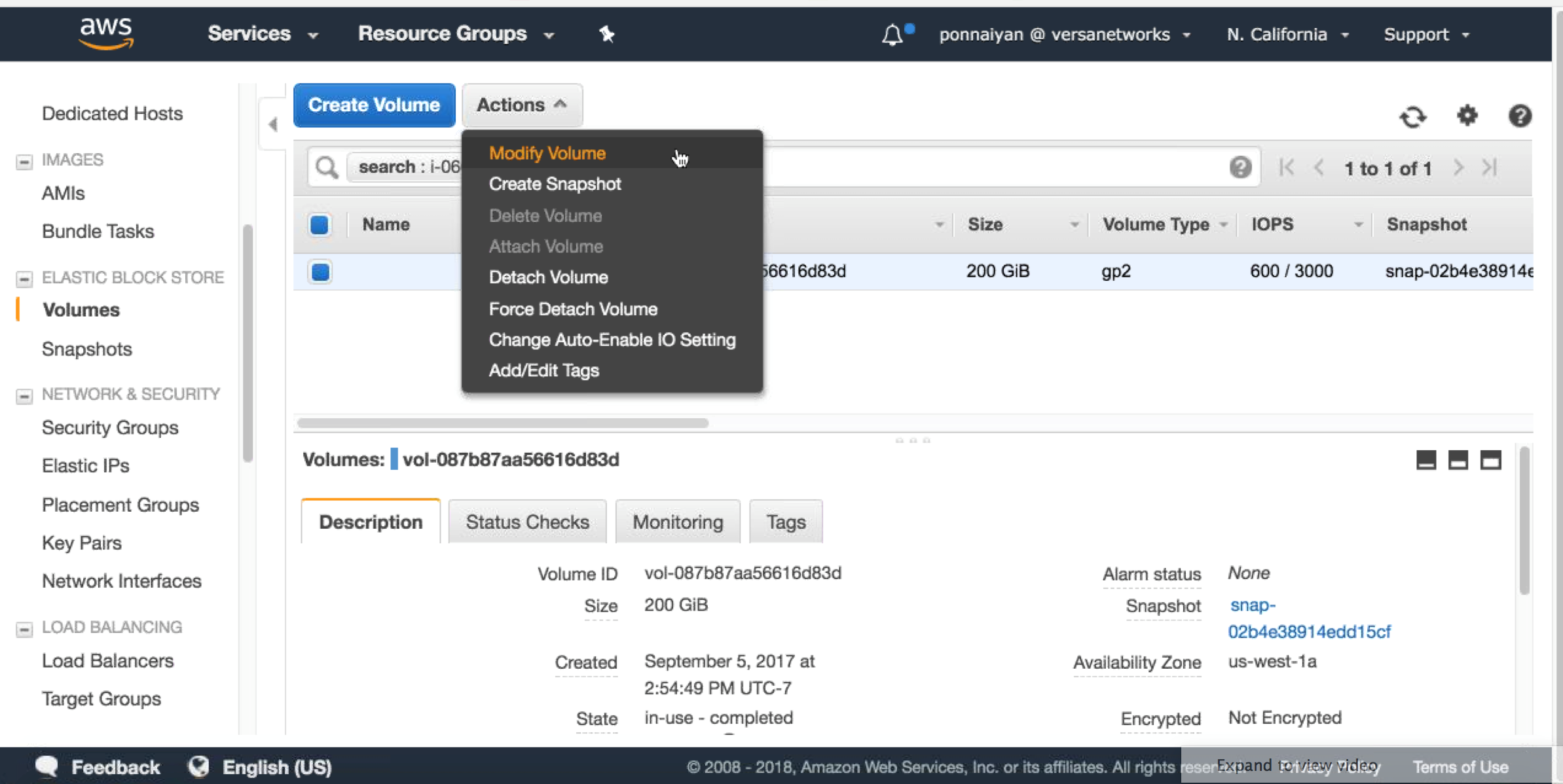
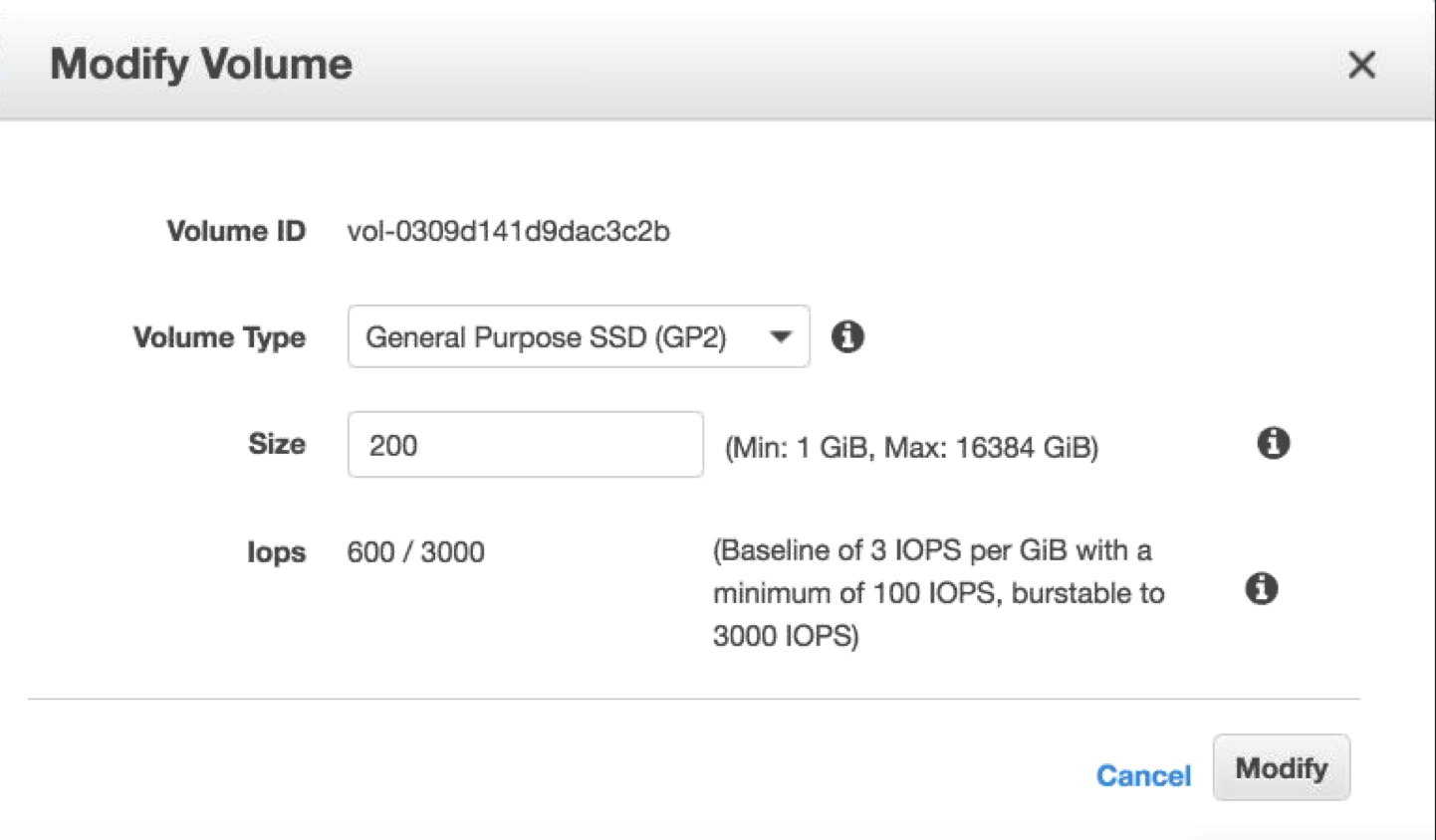
- Increase the size.
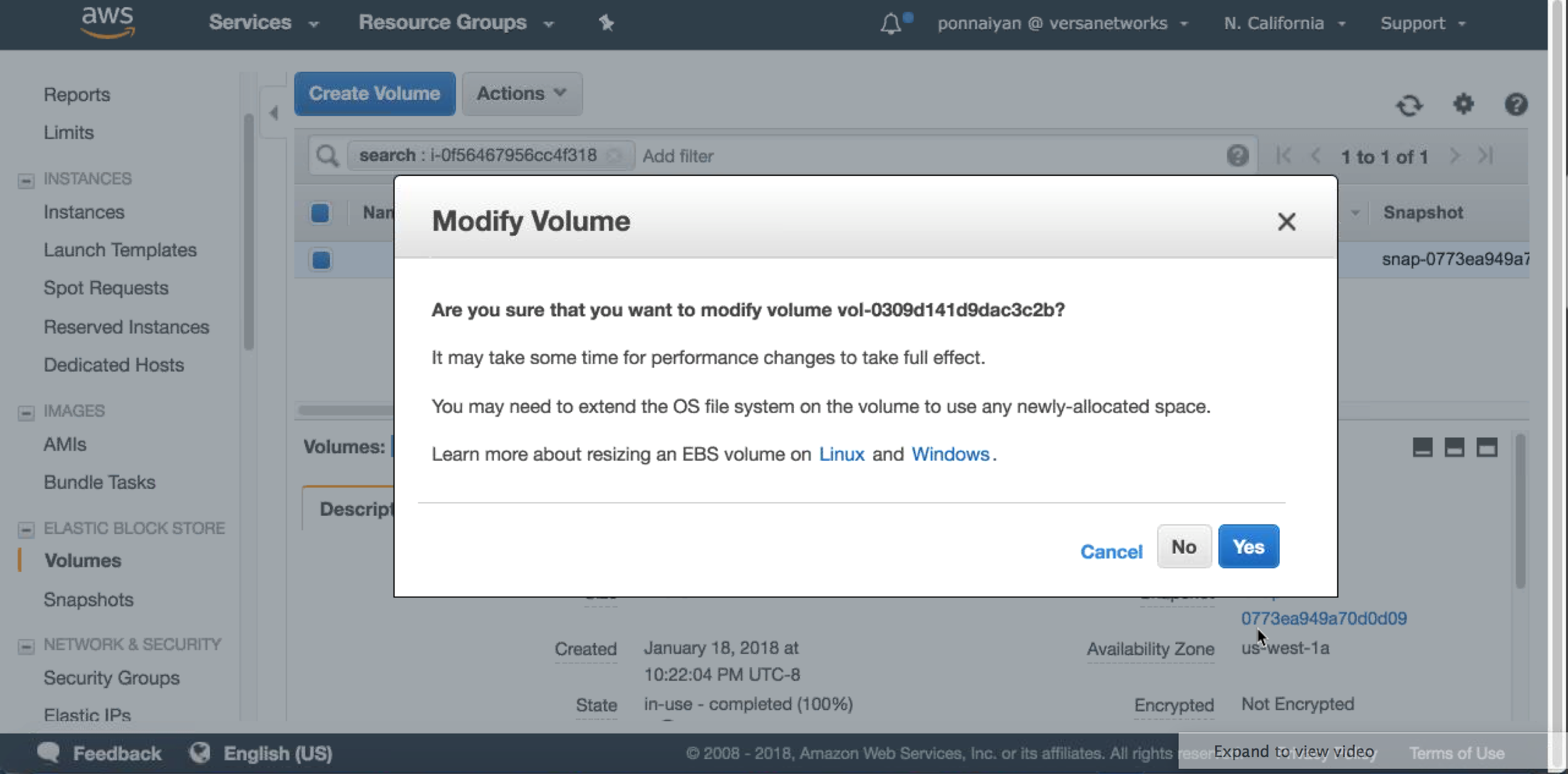
- Check your instance and make sure you see new size using lsblk command
.---., ( ``. _ \ ) __ ________ _____ _____ ( `. \ / \ \ / / ____| __ \ / ____| /\ \ `. ) / \ \ / /| |__ | |__) | (___ / \ \ | / \ \/ / | __| | _ / \___ \ / /\ \ \ | / \ / | |____| | \ \ ____) / ____ \ \ | / \/ |______|_| \_\_____/_/ \_\ \ | / \_|/ ___ ___ ___ ___ ___ _____ ___ ___ | \_ _| _ \ __/ __|_ _/ _ \| _ \ | |) | || / _| (__ | || (_) | / |___/___|_|_\___\___| |_| \___/|_|_\ Release : 16.1R1 Release date: 20171013 Package ID : 68201c8 Last login: Wed Jan 17 18:22:01 2018 from 12.50.146.147 ubuntu@director-1:~$ lsblk NAME MAJ:MIN RM SIZE RO TYPE MOUNTPOINT xvda 202:0 0 512G 0 disk |-xvda1 202:1 0 953M 0 part /boot |-xvda2 202:2 0 1K 0 part `-xvda5 202:5 0 79.1G 0 part |-system-swap_1 (dm-0) 252:0 0 29.8G 0 lvm [SWAP] |-system-opt (dm-1) 252:1 0 9.3G 0 lvm /opt |-system-var (dm-2) 252:2 0 28G 0 lvm /var `-system-root (dm-3) 252:3 0 12G 0 lvm / - We now need to run cfdisk utility to create new partition. LVM will then be resized to this disk. Follow the given steps in the screenshots, and create a logical volume.
ubuntu@director-1:~$ sudo cfdisk /dev/xvda
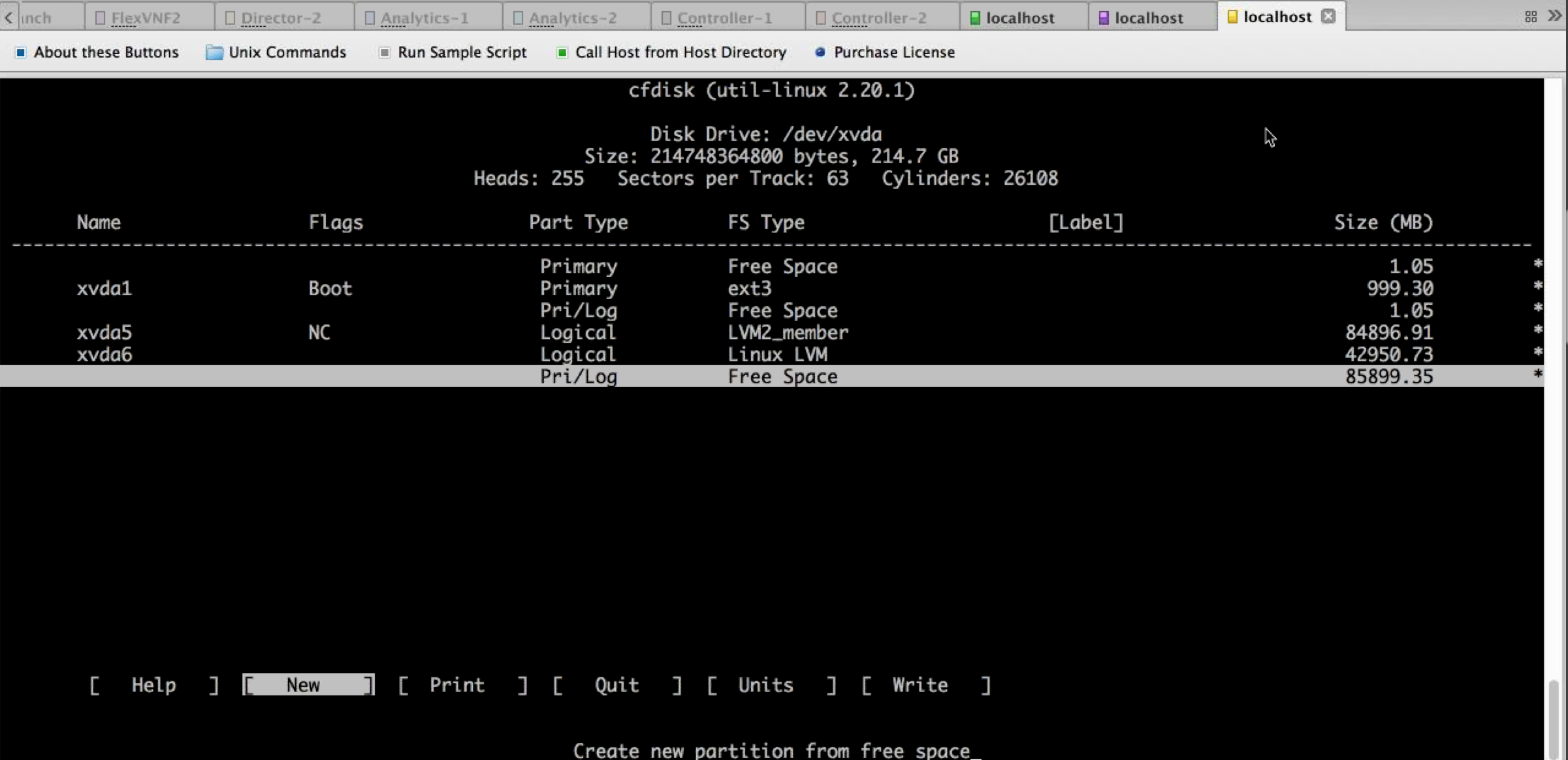
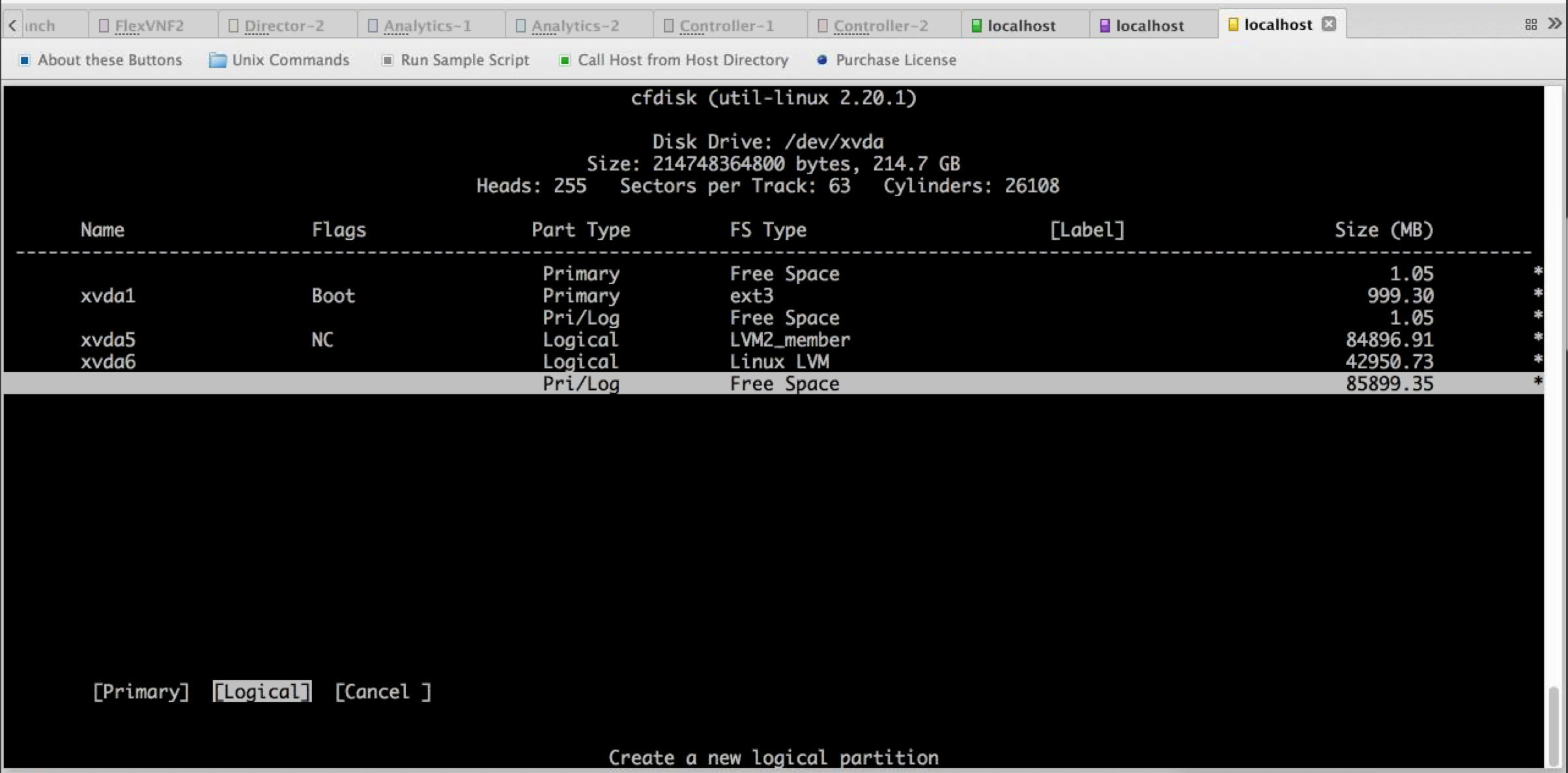
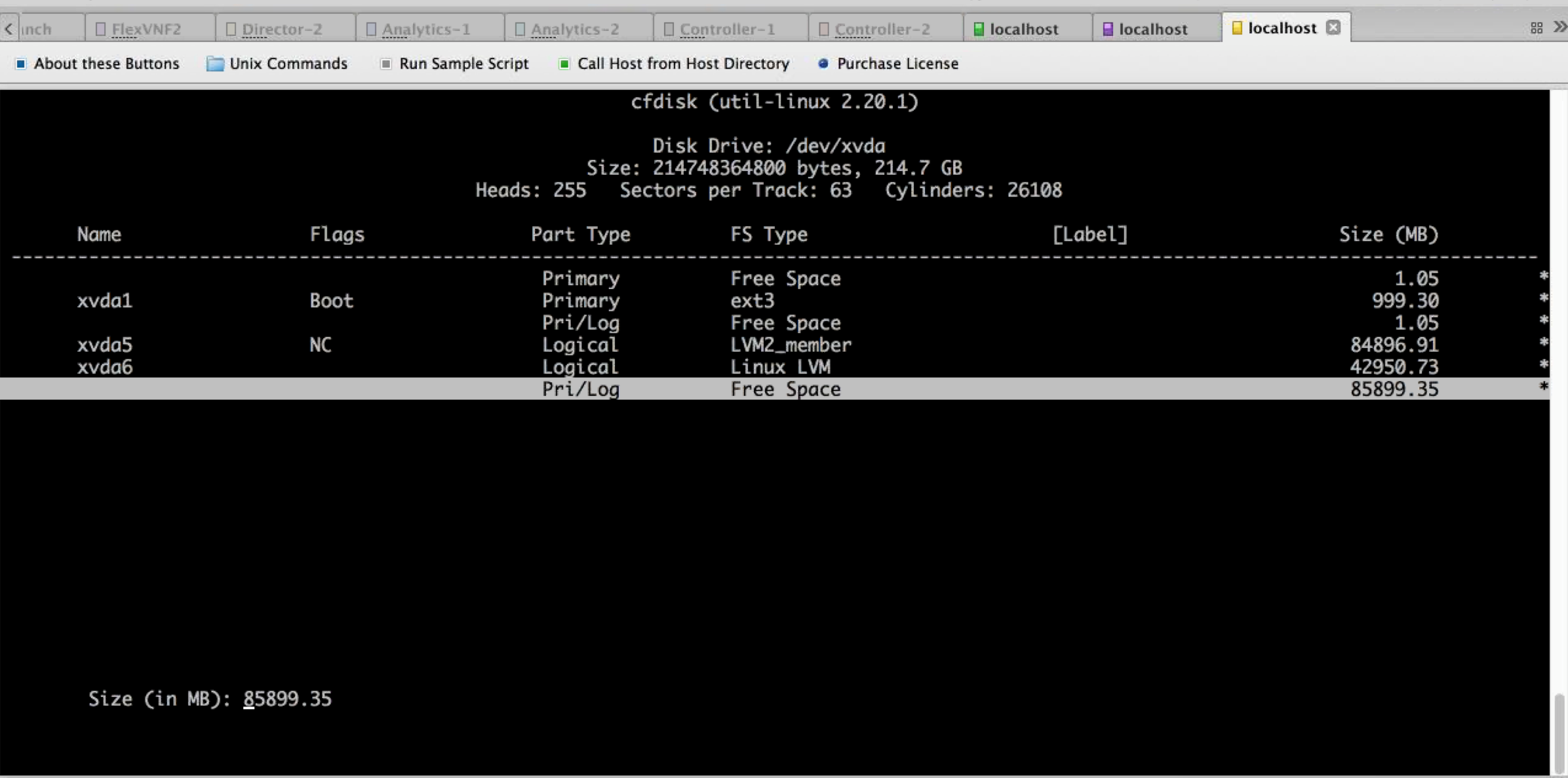
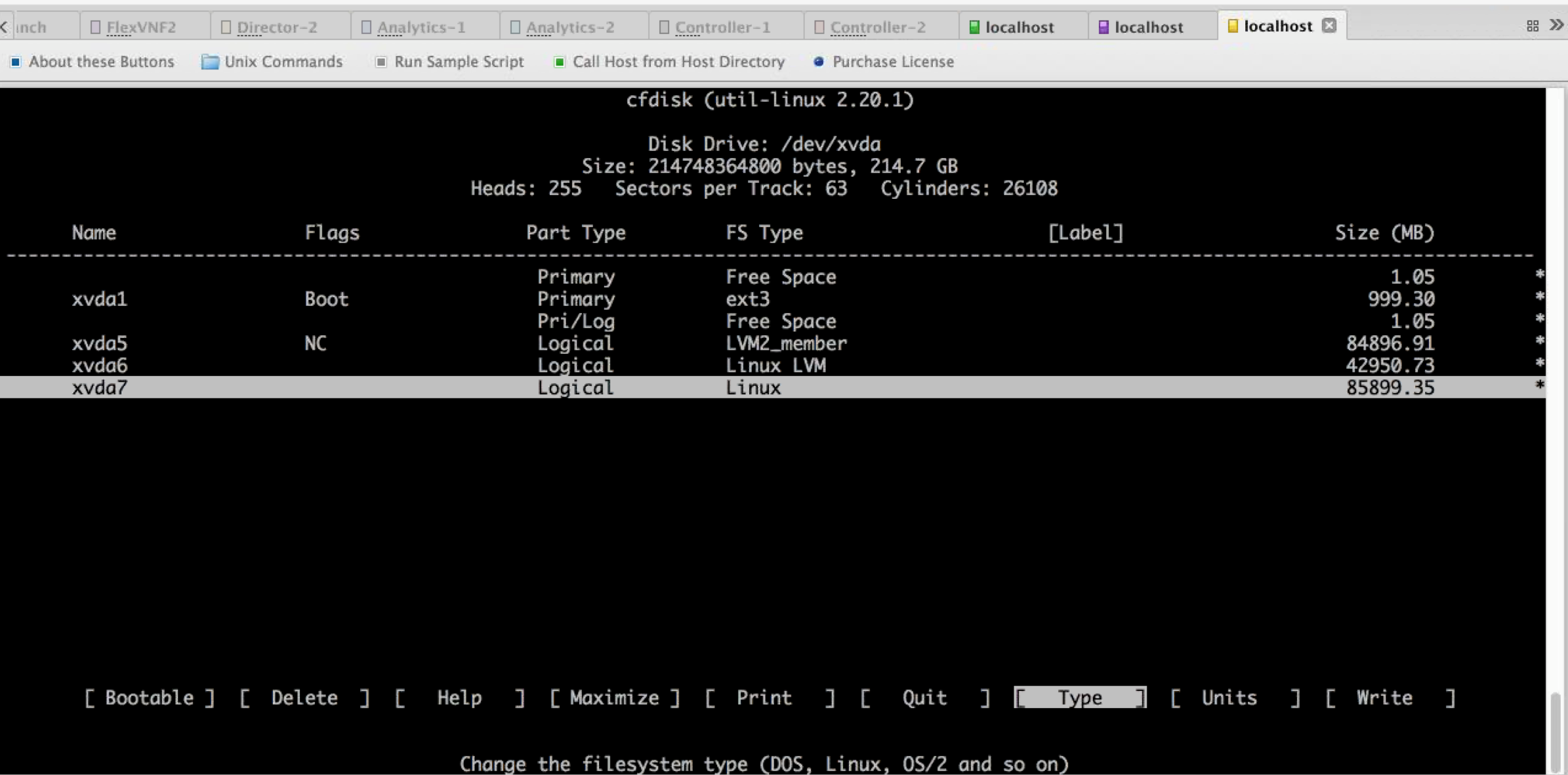
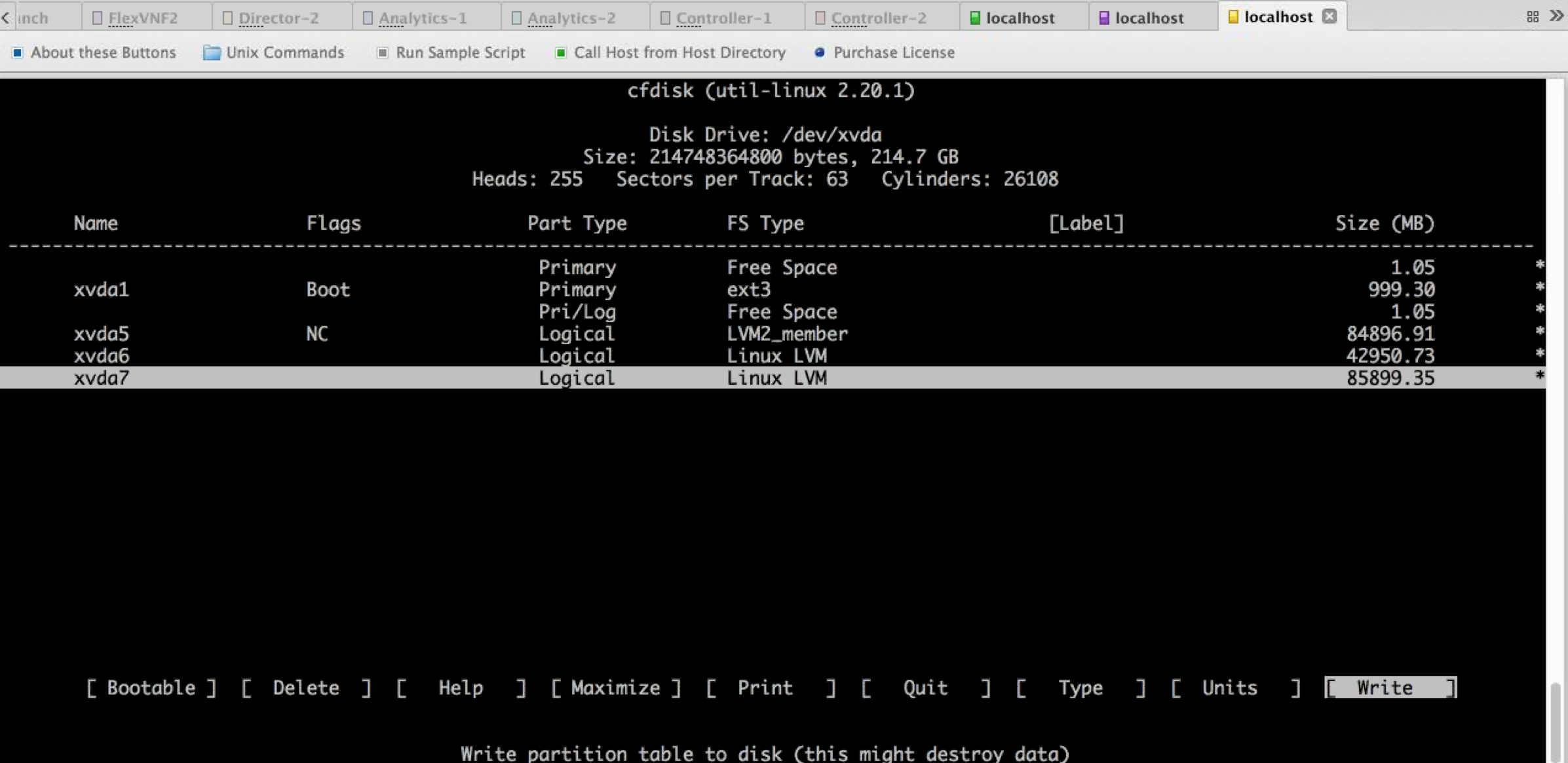
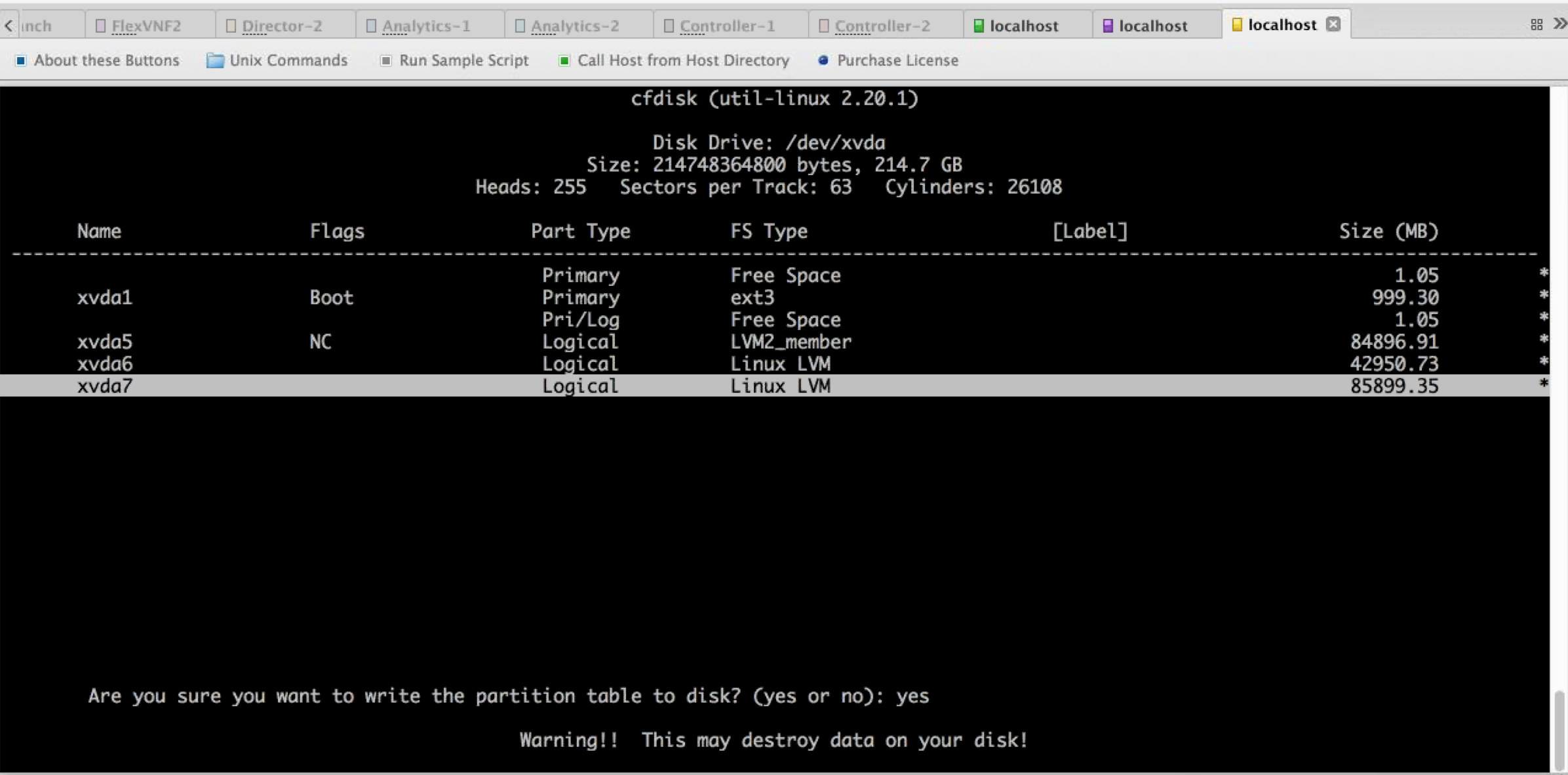
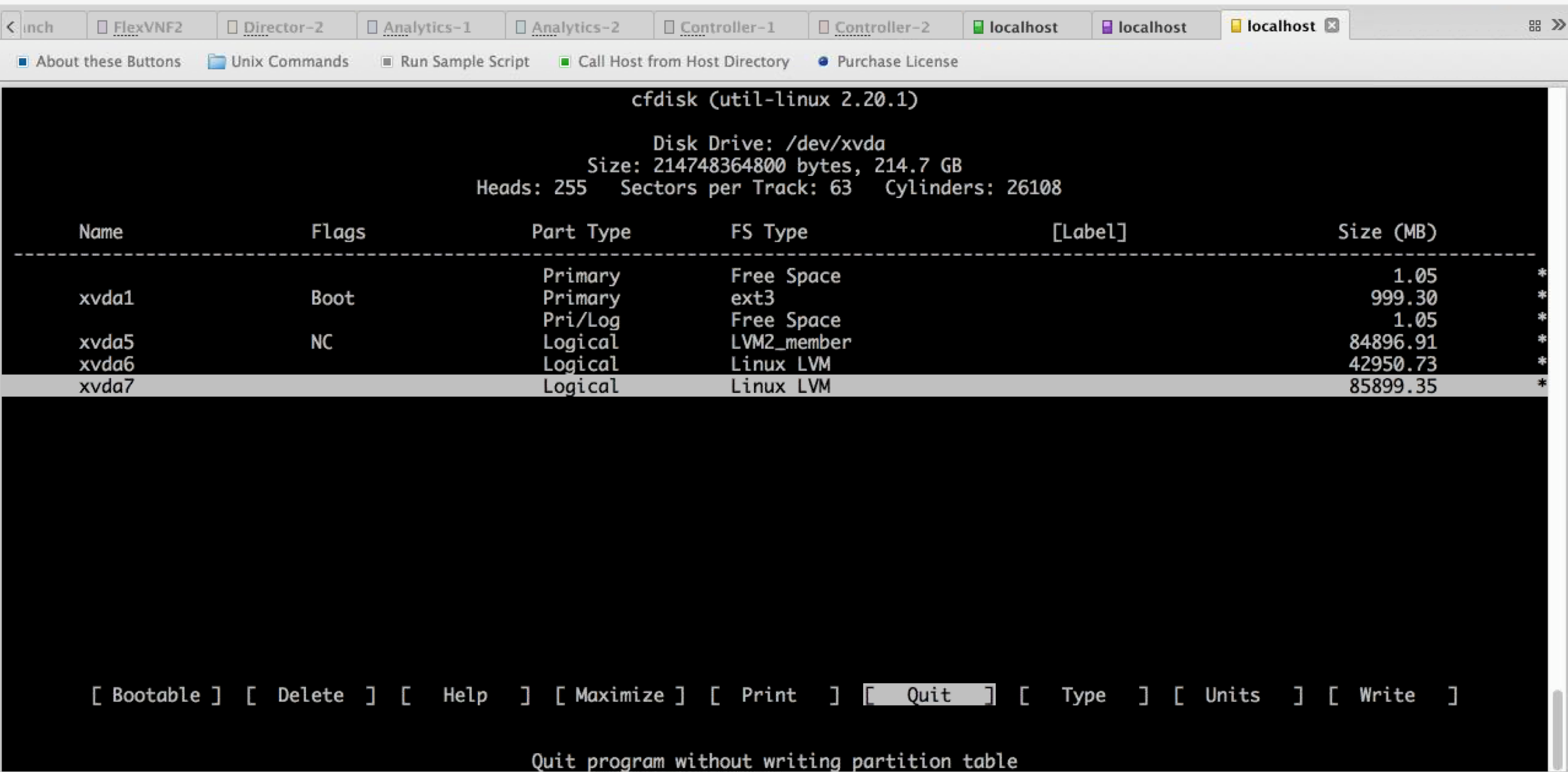
- Reload the box
ubuntu@director-1:~$ sudo reboot


After the box is up, verify you see new parition (xvda6 in this case)

ubuntu@director-1:~$ lsblk
NAME                     MAJ:MIN RM   SIZE RO TYPE MOUNTPOINT
xvda                     202:0    0   512G  0 disk
|-xvda1                  202:1    0   953M  0 part /boot
|-xvda2                  202:2    0     1K  0 part
|-xvda5                  202:5    0  79.1G  0 part
| |-system-swap_1 (dm-0) 252:0    0  29.8G  0 lvm  [SWAP]
| |-system-opt (dm-1)    252:1    0   9.3G  0 lvm  /opt
| |-system-var (dm-2)    252:2    0    28G  0 lvm  /var
| `-system-root (dm-3)   252:3    0    12G  0 lvm  /
`-xvda6                  202:6    0   432G  0 part
- Execute the script to extend the volume.
Versa Analytics /opt/versa/scripts/lvm-extend.sh Versa Director /opt/versa/vnms/scripts/lvm-extend.sh Versa FlexVNF /opt/versa/scripts/lvm-extend.sh [Administrator@ip-10-236-1-80: scripts] $ sudo ./lvm-extend.sh --hdd-location /dev/nvme1n1p1 --lv-name var --percentage 80 sudo: unable to resolve host ip-10-236-1-80 => Creating partition on /dev/nvme1n1p1 Device contains neither a valid DOS partition table, nor Sun, SGI or OSF disklabel Building a new DOS disklabel with disk identifier 0xf0af0a1c. Changes will remain in memory only, until you decide to write them. After that, of course, the previous content won't be recoverable. Warning: invalid flag 0x0000 of partition table 4 will be corrected by w(rite) Command (m for help): Partition type: p primary (0 primary, 0 extended, 4 free) e extended Select (default p): Partition number (1-4, default 1): First sector (2048-629145567, default 2048): Using default value 2048 Last sector, +sectors or +size{K,M,G} (2048-629145567, default 629145567): Using default value 629145567 Command (m for help): The partition table has been altered! Calling ioctl() to re-read partition table. WARNING: Re-reading the partition table failed with error 22: Invalid argument. The kernel still uses the old table. The new table will be used at the next reboot or after you run partprobe(8) or kpartx(8) Syncing disks. mke2fs 1.42.9 (4-Feb-2014) Filesystem label= OS type: Linux Block size=4096 (log=2) Fragment size=4096 (log=2) Stride=0 blocks, Stripe width=0 blocks 19660800 inodes, 78643196 blocks 3932159 blocks (5.00%) reserved for the super user First data block=0 Maximum filesystem blocks=4294967296 2400 block groups 32768 blocks per group, 32768 fragments per group 8192 inodes per group Superblock backups stored on blocks: 32768, 98304, 163840, 229376, 294912, 819200, 884736, 1605632, 2654208, 4096000, 7962624, 11239424, 20480000, 23887872, 71663616 Allocating group tables: done Writing inode tables: done Creating journal (32768 blocks): done Writing superblocks and filesystem accounting information: done => Initializing partition /dev/nvme1n1p1 for LVM use => Adding partition /dev/nvme1n1p1 to volume group => Extending logical volume lvextend -l+80%FREE /dev/system/var => Extending filesystem => Success extending LVM Filesystem Size Used Avail Use% Mounted on udev 3.8G 12K 3.8G 1% /dev tmpfs 764M 428K 763M 1% /run /dev/dm-3 45G 2.7G 40G 7% / none 4.0K 0 4.0K 0% /sys/fs/cgroup none 5.0M 0 5.0M 0% /run/lock none 3.8G 4.0K 3.8G 1% /run/shm none 100M 0 100M 0% /run/user /dev/nvme0n1p1 1.5G 78M 1.4G 6% /boot /dev/mapper/system-opt 30G 1.2G 28G 4% /opt /dev/mapper/system-var 304G 1.4G 289G 1% /var [Administrator@ip-10-236-1-80: scripts] $ [Administrator@ip-10-236-1-80: scripts] $ [Administrator@ip-10-236-1-80: scripts] $ sudo lsblk sudo: unable to resolve host ip-10-236-1-80 NAME MAJ:MIN RM SIZE RO TYPE MOUNTPOINT nvme0n1 259:1 0 150G 0 disk ├─nvme0n1p1 259:2 0 1.5G 0 part /boot ├─nvme0n1p2 259:3 0 1K 0 part └─nvme0n1p5 259:4 0 148.5G 0 part ├─system-swap_1 (dm-0) 252:0 0 4.6G 0 lvm [SWAP] ├─system-opt (dm-1) 252:1 0 30.3G 0 lvm /opt ├─system-var (dm-2) 252:2 0 308.2G 0 lvm /var └─system-root (dm-3) 252:3 0 45.5G 0 lvm / nvme1n1 259:0 0 300G 0 disk └─nvme1n1p1 259:5 0 300G 0 part └─system-var (dm-2) 252:2 0 308.2G 0 lvm /var [Administrator@ip-10-236-1-80: scripts] $ [Administrator@ip-10-236-1-80: scripts] $ sudo df -kh sudo: unable to resolve host ip-10-236-1-80 Filesystem Size Used Avail Use% Mounted on udev 3.8G 12K 3.8G 1% /dev tmpfs 764M 428K 763M 1% /run /dev/dm-3 45G 2.7G 40G 7% / none 4.0K 0 4.0K 0% /sys/fs/cgroup none 5.0M 0 5.0M 0% /run/lock none 3.8G 4.0K 3.8G 1% /run/shm none 100M 0 100M 0% /run/user /dev/nvme0n1p1 1.5G 78M 1.4G 6% /boot /dev/mapper/system-opt 30G 1.2G 28G 4% /opt /dev/mapper/system-var 304G 1.4G 289G 1% /var [Administrator@ip-10-236-1-80: scripts] $ [Administrator@ip-10-236-1-80: scripts] $ Later, for rest of the 20% if you want to extend whole unused to /root then use below command: [Administrator@ip-10-236-1-80: scripts] $ sudo ./lvm-extend.sh --extend-only --hdd-location /dev/nvme1n1p1 --lv-name root --percentage 20 sudo: unable to resolve host ip-10-236-1-80 => Extending logical volume lvextend -l+20%FREE /dev/system/root => Extending filesystem => Success extending LVM Filesystem Size Used Avail Use% Mounted on udev 3.8G 12K 3.8G 1% /dev tmpfs 764M 428K 763M 1% /run /dev/dm-3 57G 2.7G 52G 5% / none 4.0K 0 4.0K 0% /sys/fs/cgroup none 5.0M 0 5.0M 0% /run/lock none 3.8G 4.0K 3.8G 1% /run/shm none 100M 0 100M 0% /run/user /dev/nvme0n1p1 1.5G 78M 1.4G 6% /boot /dev/mapper/system-opt 30G 1.2G 28G 4% /opt /dev/mapper/system-var 304G 1.4G 289G 1% /var [Administrator@ip-10-236-1-80: scripts] $ [Administrator@ip-10-236-1-80: scripts] $ sudo lsblk sudo: unable to resolve host ip-10-236-1-80 NAME MAJ:MIN RM SIZE RO TYPE MOUNTPOINT nvme0n1 259:1 0 150G 0 disk ├─nvme0n1p1 259:2 0 1.5G 0 part /boot ├─nvme0n1p2 259:3 0 1K 0 part └─nvme0n1p5 259:4 0 148.5G 0 part ├─system-swap_1 (dm-0) 252:0 0 4.6G 0 lvm [SWAP] ├─system-opt (dm-1) 252:1 0 30.3G 0 lvm /opt ├─system-var (dm-2) 252:2 0 308.2G 0 lvm /var └─system-root (dm-3) 252:3 0 57.5G 0 lvm / nvme1n1 259:0 0 300G 0 disk └─nvme1n1p1 259:5 0 300G 0 part ├─system-var (dm-2) 252:2 0 308.2G 0 lvm /var └─system-root (dm-3) 252:3 0 57.5G 0 lvm / [Administrator@ip-10-236-1-80: scripts] $ [Administrator@ip-10-236-1-80: scripts] $ [Administrator@ip-10-236-1-80: scripts] $ sudo ./lvm-extend.sh --extend-only --hdd-location /dev/nvme1n1p1 --lv-name opt --percentage 100 sudo: unable to resolve host ip-10-236-1-80 => Extending logical volume lvextend -l+100%FREE /dev/system/opt => Extending filesystem => Success extending LVM Filesystem Size Used Avail Use% Mounted on udev 3.8G 12K 3.8G 1% /dev tmpfs 764M 428K 763M 1% /run /dev/dm-3 57G 2.7G 52G 5% / none 4.0K 0 4.0K 0% /sys/fs/cgroup none 5.0M 0 5.0M 0% /run/lock none 3.8G 4.0K 3.8G 1% /run/shm none 100M 0 100M 0% /run/user /dev/nvme0n1p1 1.5G 78M 1.4G 6% /boot /dev/mapper/system-opt 77G 1.2G 73G 2% /opt /dev/mapper/system-var 304G 1.4G 289G 1% /var [Administrator@ip-10-236-1-80: scripts] $ [Administrator@ip-10-236-1-80: scripts] $ [Administrator@ip-10-236-1-80: scripts] $ sudo lsblk sudo: unable to resolve host ip-10-236-1-80 NAME MAJ:MIN RM SIZE RO TYPE MOUNTPOINT nvme0n1 259:1 0 150G 0 disk ├─nvme0n1p1 259:2 0 1.5G 0 part /boot ├─nvme0n1p2 259:3 0 1K 0 part └─nvme0n1p5 259:4 0 148.5G 0 part ├─system-swap_1 (dm-0) 252:0 0 4.6G 0 lvm [SWAP] ├─system-opt (dm-1) 252:1 0 78.3G 0 lvm /opt ├─system-var (dm-2) 252:2 0 308.2G 0 lvm /var └─system-root (dm-3) 252:3 0 57.5G 0 lvm / nvme1n1 259:0 0 300G 0 disk └─nvme1n1p1 259:5 0 300G 0 part ├─system-opt (dm-1) 252:1 0 78.3G 0 lvm /opt ├─system-var (dm-2) 252:2 0 308.2G 0 lvm /var └─system-root (dm-3) 252:3 0 57.5G 0 lvm / [Administrator@ip-10-236-1-80: scripts] $ [Administrator@ip-10-236-1-80: scripts] $
Below is the recommendation for disk partition in Director:/var 60%
/opt 15%
/ 25%