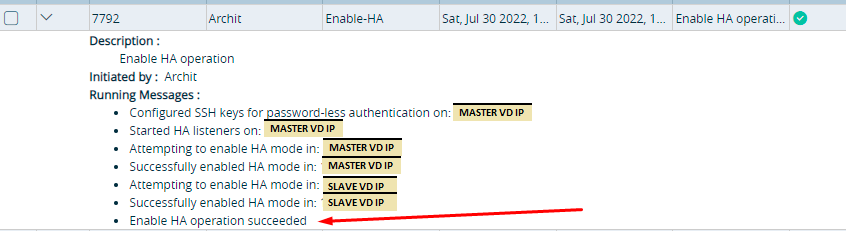
This article describes, How to fix the HA failing issue on SLAEV Director if UI is throwing the "Postgres operation failed " error.
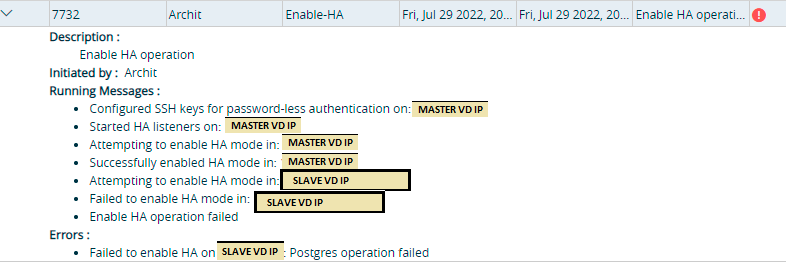
Director task Error-
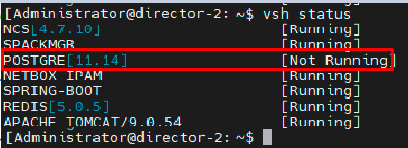
Postgres service also will go down on the Director-
Log file:
/var/log/postgresql/postgresql-11-main.log
/var/log/vnms/ha/postgre-ha.log
Error Pattern:
/var/log/postgresql/postgresql-11-main.log
2022-07-29 07:43:57.217 PDT [17101] vnms@vnms ERROR: current transaction is aborted, commands ignored until end of transaction block
2022-07-29 07:43:57.217 PDT [17101] vnms@vnms STATEMENT: select 1
2022-07-29 07:44:05.257 PDT [17133] repmgr@repmgr ERROR: relation "repmgr.nodes" does not exist at character 214
2022-07-29 07:44:05.257 PDT [17133] repmgr@repmgr STATEMENT: SELECT n.node_id, n.type, n.upstream_node_id, n.node_name, n.conninfo, n.repluser, n.slot_name, n.location, n.priority, n.active, n.config_file, un.node_name AS upstream_node_name, NULL AS attached FROM repmgr.nodes n LEFT JOIN repmgr.nodes un ON un.node_id = n.upstream_node_id WHERE n.node_id = 1
2022-07-29 07:44:05.291 PDT [17138] repmgr@repmgr ERROR: relation "repmgr.nodes" does not exist at character 214
2022-07-29 07:44:05.291 PDT [17138] repmgr@repmgr STATEMENT: SELECT n.node_id, n.type, n.upstream_node_id, n.node_name, n.conninfo, n.repluser, n.slot_name, n.location, n.priority, n.active, n.config_file, un.node_name AS upstream_node_name, NULL AS attached FROM repmgr.nodes n LEFT JOIN repmgr.nodes un ON un.node_id = n.upstream_node_id WHERE n.node_id = 1
2022-07-29 07:44:05.325 PDT [17142] postgres@postgres ERROR: role "repmgr" already exists
2022-07-29 07:44:05.325 PDT [17142] postgres@postgres STATEMENT: CREATE ROLE repmgr SUPERUSER CREATEDB CREATEROLE INHERIT LOGIN;
2022-07-29 07:44:05.358 PDT [17145] postgres@postgres ERROR: database "repmgr" already exists
2022-07-29 07:44:05.358 PDT [17145] postgres@postgres STATEMENT: CREATE DATABASE repmgr OWNER repmgr;
2022-07-29 07:44:05.686 PDT [15853] LOG: received fast shutdown request
2022-07-29 07:44:05.689 PDT [15853] LOG: aborting any active transactions
2022-07-29 07:44:05.689 PDT [16113] vnms@vnms FATAL: terminating connection due to administrator command
2022-07-29 07:44:05.689 PDT [16061] vnms@vnms FATAL: terminating connection due to administrator command
2022-07-29 07:44:05.691 PDT [15853] LOG: background worker "logical replication launcher" (PID 15860) exited with exit code 1
2022-07-29 07:44:05.691 PDT [15855] LOG: shutting down
2022-07-29 07:44:05.704 PDT [15853] LOG: database system is shut down
2022-07-29 07:45:06.562 PDT [17570] LOG: listening on IPv4 address "0.0.0.0", port 5432
2022-07-29 07:45:06.562 PDT [17570] LOG: listening on IPv6 address "::", port 5432
2022-07-29 07:45:06.563 PDT [17570] LOG: listening on Unix socket "/var/run/postgresql/.s.PGSQL.5432"
2022-07-29 07:45:06.580 PDT [17571] LOG: database system was interrupted; last known up at 2022-07-29 07:44:57 PDT
2022-07-29 07:45:06.614 PDT [17571] FATAL: syntax error in file "recovery.conf" line 4, near token "repmgr_slot_2"
2022-07-29 07:45:06.616 PDT [17570] LOG: startup process (PID 17571) exited with exit code 1
2022-07-29 07:45:06.616 PDT [17570] LOG: aborting startup due to startup process failure
2022-07-29 07:45:06.617 PDT [17570] LOG: database system is shut down
pg_ctl: could not start server
/var/log/vnms/ha/postgre-ha.log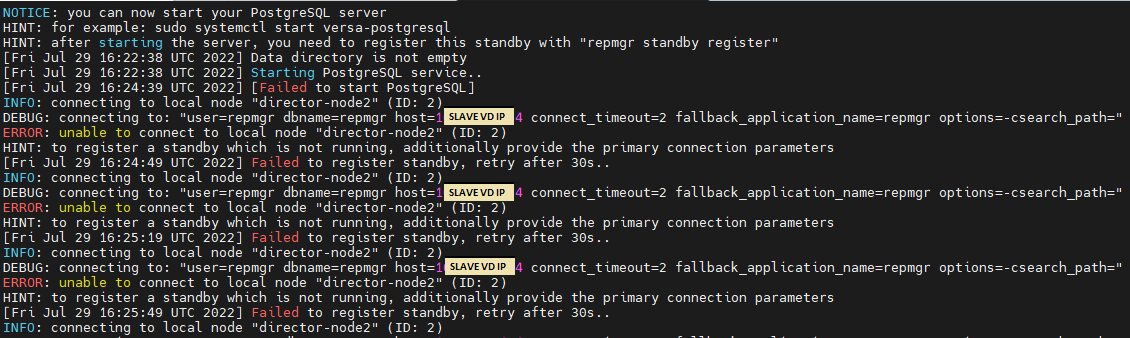
Issue due to Bug-82751
Workaround to be followed:
The below workaround needs to be performed within few mins ~5 mins and only after once we see Step-1 PostgreSQL service start log
1. In /var/log/vnms/ha/postgre-ha.log once you see the PostgreSQL service is getting started
[Sat Jul 30 05:10:41 UTC 2022] Drop and recreate repmgr database
NOTICE: database "repmgr" does not exist, skipping
[Sat Jul 30 05:10:42 UTC 2022] Stopping PostgreSQL service..
[Sat Jul 30 05:10:44 UTC 2022] [Stopped PostgreSQL]
[Sat Jul 30 05:10:54 UTC 2022] Modify repmgr configuration..
[Sat Jul 30 05:10:54 UTC 2022] Starting PostgreSQL service..
2. go to the /var/lib/postgresql/11/main/recovery.conf file and edit below changes-
[Administrator@director-2: ~] $ sudo su
root@director-2:/home/Administrator# vi /var/lib/postgresql/11/main/recovery.conf

3. restart the postgresql service using below command-
"sudo systemctl restart postgresql"
4. Check the HA status in /var/log/vnms/ha/postgre-ha.log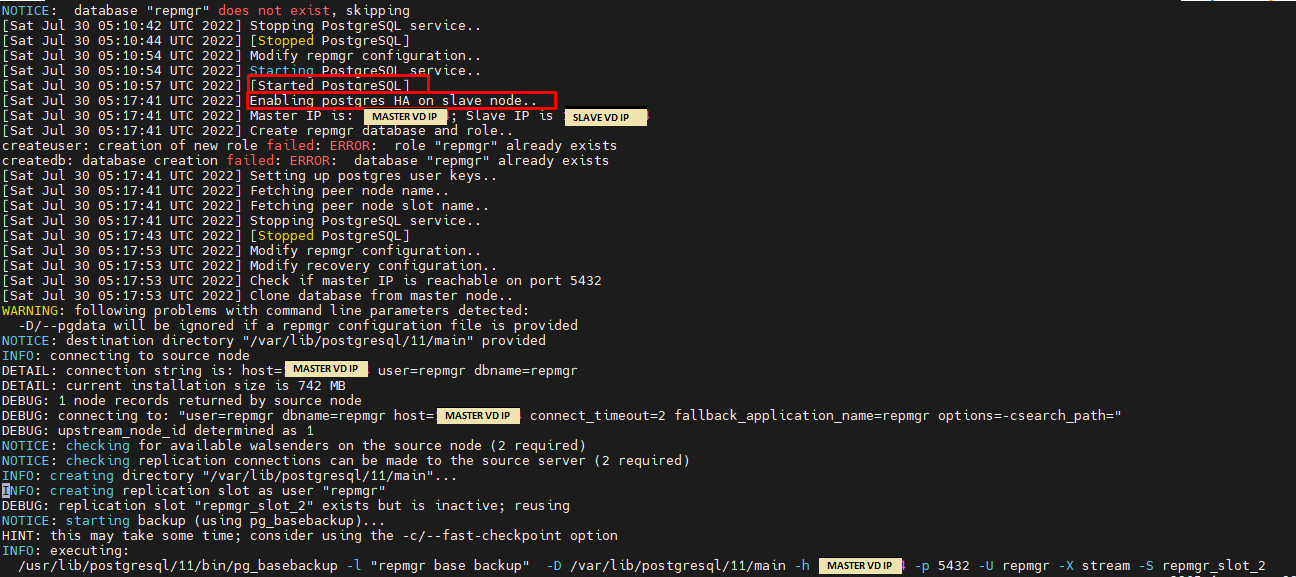
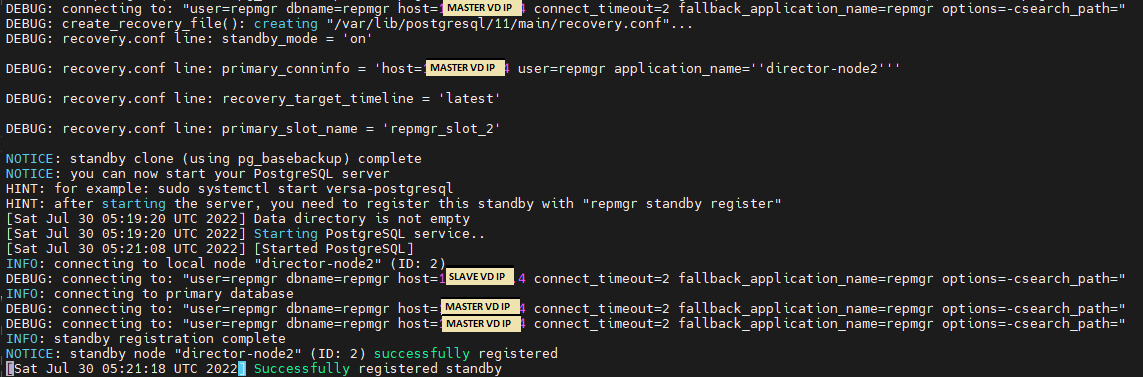
UI Status-