We will discuss various steps to troubleshoot cloud lookup issues:
Verify cloud lookup configuration:
SNAT should be configured so that the branch can initiate a query towards the cloud lookup server using the interface IP mentioned in the SNAT config.
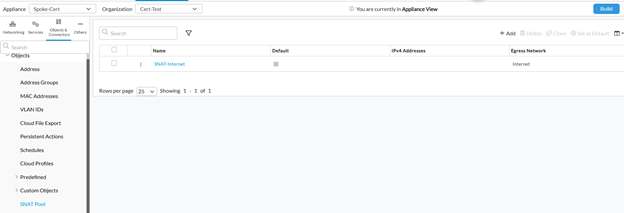
admin@Spoke-Cert-cli> show configuration orgs org-services Cert-Test objects snat | display set
set orgs org-services Cert-Test objects snat SNAT-Internet egress-networks [ Internet ]
set orgs org-services Cert-Test objects snat SNAT-Internet routing-instance Internet-Transport-VR
Cloud profile should refer to the correct SNAT object and it should be enabled (activation enabled)
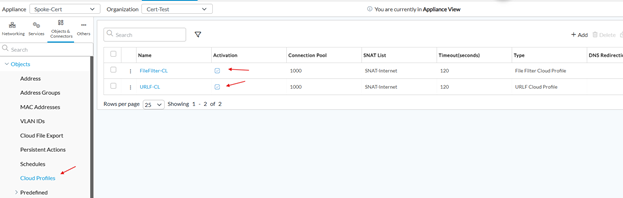
admin@Spoke-Cert-cli> show configuration orgs org-services Cert-Test objects cloud-profile | display set
set orgs org-services Cert-Test objects cloud-profile FileFilter-CL activation enabled
set orgs org-services Cert-Test objects cloud-profile FileFilter-CL connection-pool 1000
set orgs org-services Cert-Test objects cloud-profile FileFilter-CL timeout 120
set orgs org-services Cert-Test objects cloud-profile FileFilter-CL type fileflter-cloud-profile
set orgs org-services Cert-Test objects cloud-profile FileFilter-CL snat-pool SNAT-Internet
set orgs org-services Cert-Test objects cloud-profile FileFilter-CL snat-list [ SNAT-Internet ]
set orgs org-services Cert-Test objects cloud-profile URLF-CL activation enabled
set orgs org-services Cert-Test objects cloud-profile URLF-CL connection-pool 1000
set orgs org-services Cert-Test objects cloud-profile URLF-CL timeout 120
set orgs org-services Cert-Test objects cloud-profile URLF-CL type urlf-cloud-profile
set orgs org-services Cert-Test objects cloud-profile URLF-CL snat-pool SNAT-Internet
set orgs org-services Cert-Test objects cloud-profile URLF-CL snat-list [ SNAT-Internet ]
The following URL filtering settings in NGFW are needed to load the cloud lookup profile.
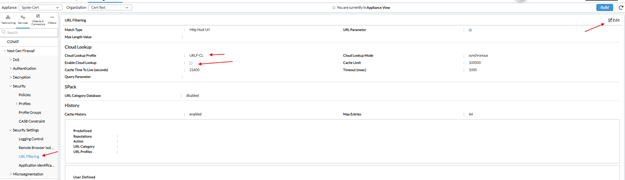
admin@Spoke-Cert-cli> show configuration orgs org-services Cert-Test url-filtering | display set
set orgs org-services Cert-Test url-filtering settings match-type http-host-uri
set orgs org-services Cert-Test url-filtering settings logging url-parameter disabled
set orgs org-services Cert-Test url-filtering settings cloud-lookup state enabled
set orgs org-services Cert-Test url-filtering settings cloud-lookup mode synchronous
set orgs org-services Cert-Test url-filtering settings cloud-lookup cloud-lookup-profile URLF-CL
set orgs org-services Cert-Test url-filtering settings cloud-lookup cache-limit 100000
set orgs org-services Cert-Test url-filtering settings cloud-lookup cache-time-to-live 21600
set orgs org-services Cert-Test url-filtering settings cloud-lookup timeout 1000
set orgs org-services Cert-Test url-filtering settings spack url-category-database disabled
set orgs org-services Cert-Test url-filtering settings history cache-history enabled
set orgs org-services Cert-Test url-filtering settings history max-entries 64
Check if the dns-proxy setting is configured via the correct WAN transport.
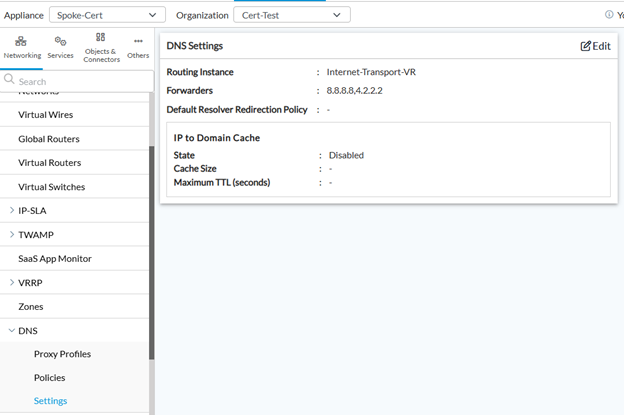
admin@Spoke-Cert-cli> show configuration orgs org-services Cert-Test dns-proxy | display set
set orgs org-services Cert-Test dns-proxy settings routing-instance Internet-Transport-VR
set orgs org-services Cert-Test dns-proxy settings forwarders [ 8.8.8.8 4.2.2.2 ]
set orgs org-services Cert-Test dns-proxy settings ip-to-domain-cache state disabled
Check if DNS name servers are configured.
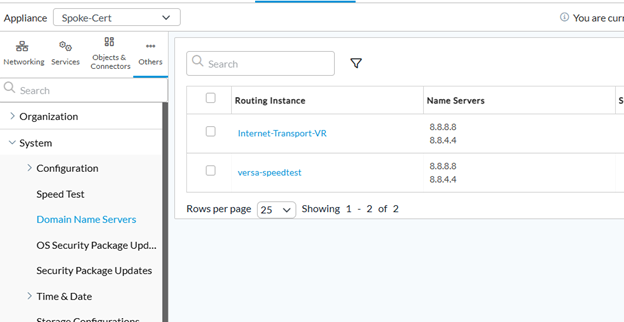
admin@Spoke-Cert-cli> show configuration system dns name-servers | display set
set system dns Internet-Transport-VR name-servers [ 8.8.8.8 8.8.4.4 ]
set system dns versa-speedtest name-servers [ 8.8.8.8 8.8.4.4 ]
Check connectivity to Versa cloud server.
If the customer has a firewall connected to the WAN (after Versa), they need to allow urm.versanow.net (applicable for release 22.1.3 with SPACK 2177 and above), or service.brightcloud.com (applicable for older releases).
For the file filtering cloud profile, access to frm.versanow.net must be allowed.
Queries sent to URM are processed in the following order > local cache (in URM), local DB, real time query to Brightcloud/(other sources).
Queries sent to FRM are processed in the following order > local cache (in FRM), DB (feeds), real time query to Virustotal.
Check if query is blocked by any security policy.
If you are using LAN-VR in SNAT, DNS proxy settings, then you will need appropriate CGNAT and security policies to NAT and allow this traffic (to DNS servers and urm, frm, brightcloud).
Check cloud lookup profile status.
If NGFW > Security Settings > URL Filtering is not configured properly, no cloud profile will be loaded here.
admin@DC2-CPE2-c> show orgs org-services LM url-filtering cloud-lookup status
TOTAL
CACHE
ENTRIES CLOUD PROFILE LAST REQUEST STATUS
------------------------------------------------------------------
142 VALID 'URLF-CL' profile SUCCESS (urm.versanow.net:443)
Test if cloud lookup is working fine:
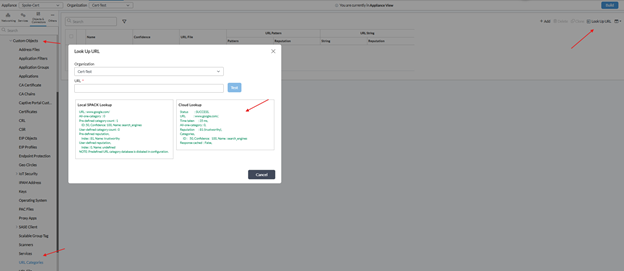
admin@Spoke-Cert-cli> request orgs org-services Cert-Test url-filtering cloud-lookup lookup url login-axisdirect.com
clookup_result Status : SUCCESS,
URL : login-axisdirect.com/,
Time taken : 309 ms,
All-one-category : 0,
Reputation : 40 (suspicious),
Response cached : False,
Debugs
Enable debug to troubleshoot cloud lookup results or connectivity
Login to device via SSH
Go to shell mode
vsh allow-cli (this is to allow commit via CLI, you can enable this via Director too by going to Appliance > Configuration > Others > System > Configuration > Configuration > Subjugation (on right side) > Allow CLI (this should be checked)
Go to config mode
set debug urlf all-flags level all send to file name /var/tmp/urlf.debug
set debug sslcloud all-flags level debug send to file name /var/tmp/sslcloud.debug (helpful if you are troubleshooting connectivity to cloud lookup server, it also shows the queries sent to URM and FRM but not the response)
commit
Rollback the debugs
config
delete debug
commit
Note: Monitor the CPU just after enabling debug to see if it is going high, if yes, then delete debugs immediately.
URL Filtering Cloud Lookup Statistics
We can use following command to check the statistics
show orgs org-services <org-name> security url-filtering statistics cloud-lookup
show orgs org-services <org-name> objects cloud-profile statistics
Counter name | Description |
SNAT (SOURCE NAT) | |
sslcld-snat-req-sent-cnt | Number of SNAT resolution requests sent. Each new connection attempt to the cloud service triggers a SNAT lookup to determine the correct egress IP address. |
sslcld-snat-resolved-cnt | Number of SNAT requests successfully resolved and completed through the egress interface. Should equal sslcld-snat-req-sent-cnt under normal operation. |
slcld-snat-pool-not-exists-cnt | Number of SNAT failures because the configured SNAT pool does not exist. |
sslcld-snat-port-null-cnt | Number of SNAT failures due to no available port in the SNAT pool (port exhaustion). |
DNS RESOLUTION | |
sslcld-dns-query-sent-cnt | Number of DNS queries sent to resolve the cloud service FQDN to an IP address. Triggered once per new connection attempt, after SNAT resolution. |
sslcld-dns-resolved-cnt | Number of DNS queries that received a successful resolution response. Should closely match sslcld-dns-query-sent-cnt. |
sslcld-dns-failure-cnt | Number of DNS queries that failed to resolve the cloud FQDN. |
TCP / TLS CONNECTION STATE | |
sslcld-state-connecting-cnt | Total number of TCP connection attempts initiated to the cloud server after successful DNS resolution. Represents cumulative outbound connection volume. |
sslcld-state-connected-cnt | Number of TCP connections that successfully reached the connected state (TLS handshake complete and session established). A high ratio relative to sslcld-state-connecting-cnt indicates a healthy path. |
sslcld-syn-request-timeout-cnt | Number of TCP connections where the SYN was sent but no SYN-ACK was received before the timeout expired. |
sslcld-session-closed-cnt | Number of sessions closed gracefully via a FIN exchange. Represents normal closure after a completed request-response cycle. |
sslcld-session-drop-cnt | Number of sessions terminated abruptly (RST or error-based drop). Expected to be high for short-lived URL lookup sessions; increments on every non-graceful termination. |
sslcld-session-timeout-cnt | Number of established sessions that expired because no data was exchanged within the inactivity timeout window. |
sslcld-session-not-available-cnt | Number of URL lookup requests that could not be sent because no session slot was available in the connection pool. |
sslcld-session-connect-failed-cnt | Number of TLS connection attempts that failed. Includes TLS handshake failures, certificate validation errors, refused connections, and network-level errors. |
CLOUD REQUEST / RESPONSE | |
sslcld-cloud-req-sent-cnt | Number of URL lookup requests successfully sent to the cloud service at the HTTP/application layer, over an established TLS session. |
sslcld-cloud-rsp-recvd-cnt | Number of responses received from the cloud service. Should closely match sslcld-cloud-req-sent-cnt. A gap indicates requests that timed out or received no reply. |
sslcld-cloud-req-timeout-cnt | Number of sent requests where no cloud response was received within the configured request timeout. |
sslcld-cloud-req-null-rsp-cnt | Number of requests where the cloud returned an empty or null response (no verdict data included). |
URLF debug outputs showing cloud lookup query and response. (working)
2026-06-08 12:33:59.767 DEBUG [0x101] urlf_itc_event_process_wt: processing URLF_TLV_LOOKUP_QUERY
2026-06-08 12:33:59.767 DEBUG [0x101] vs_urlf_extract_hostname: Extracted hostname: 'login-axisdirect.com' from URL: 'login-axisdirect.com/'
2026-06-08 12:33:59.767 DEBUG [0x101] vs_urlf_clookup_start_sdata_timer: called
2026-06-08 12:33:59.767 DEBUG [0x101] vs_urlf_spack_scanner_log_cb: (vs_urlf_gen_vcloud_clookup_req:1086): http-req : POST /urm/v1/lookup/ HTTP/1.1
Content-type: application/json
Host: urm.versanow.net
Content-Length: 184
Connection: Keep-Alive
Authorization: Basic dS92ZXJzYTpraWFQaDZ6YQ==
{ "id": 862, "request": { "spack_version": 2349, "tenant_name": "Cert-Test", "versa_release": "versa-release: 22.1.4", "device_id": "Versa OS", "urls": [ "login-axisdirect.com\/" ] } }
2026-06-08 12:33:59.769 DEBUG [0x101] urlf_itc_handle_clookup_query: clookup query req processed, status : SUCCESS, url_len : 21, url : login-axisdirect.com/
2026-06-08 12:33:59.769 DEBUG [0x101] urlf_itc_event_process_wt: processing URLF_TLV_LOOKUP_QUERY done
2026-06-08 12:34:00.235 DEBUG [0x101] vs_urlf_clookup_process_sync_response: called
2026-06-08 12:34:00.235 DEBUG [0x101] vs_urlf_clookup_process_sync_response: CL response : HTTP/1.1 200 OK
content-type: application/json
vary: Origin
date: Mon, 08 Jun 2026 08:52:11 GMT
Content-Length: 107
via: 1.1 google
Alt-Svc: h3=":443"; ma=2592000,h3-29=":443"; ma=2592000
{"id":862,"keyid":"","response":{"result":[{"category":[{"id":0,"confidence":0}],"rep":40,"a1cat":false}]}}
2026-06-08 12:34:00.235 DEBUG [0x101] vs_urlf_clookup_process_response: called
2026-06-08 12:34:00.235 DEBUG [0x101] vs_urlf_spack_scanner_log_cb: (vs_urlf_handle_clookup_resp_v3:1172): resp [login-axisdirect.com/][304] : HTTP/1.1 200 OK
content-type: application/json
vary: Origin
date: Mon, 08 Jun 2026 08:52:11 GMT
Content-Length: 107
via: 1.1 google
Alt-Svc: h3=":443"; ma=2592000,h3-29=":443"; ma=2592000
{"id":862,"keyid":"","response":{"result":[{"category":[{"id":0,"confidence":0}],"rep":40,"a1cat":false}]}}
2026-06-08 12:34:00.235 DEBUG [0x101] vs_urlf_spack_scanner_log_cb: (vs_urlf_handle_clookup_resp_v3:1222): cnt_len:107 body_len:107
2026-06-08 12:34:00.235 DEBUG [0x101] vs_urlf_clookup_process_response: Cloud lookup URL : login-axisdirect.com/
2026-06-08 12:34:00.235 DEBUG [0x101] vs_urlf_clookup_process_response: Cloud lookup A1CAT : 0
2026-06-08 12:34:00.235 DEBUG [0x101] vs_urlf_clookup_process_response: Cloud lookup reputation : 40
File Filter Cloud Lookup Statistics:
Execute the following command from the Spoke/Hub CLI to retrieve file filtering statistics for a specific organization and profile:
show orgs org-services Cert-Test security profiles file-filtering statistics
Files that miss the local cache are submitted to the Versa cloud (frm.versanow.net) for reputation and malware analysis. These counters describe the cloud interaction outcomes.
Statistic name | Description |
CACHE | |
ff-cache-hit-cnt | Number of files whose cloud verdict was served from the local cache. A cache hit means no round-trip to the cloud was needed — the file hash was seen before and the result was stored locally. Higher cache-hit counts reduce latency and cloud API consumption. |
ff-cache-miss-cnt | Number of files not found in the local cache. Each cache miss triggers a bypass-condition evaluation and, if not bypassed, a new cloud lookup request. |
CLOUD REQUESTS & RESPONSES | |
ff-cloud-req-cnt | Total number of cloud lookup requests sent to the Versa cloud sandbox. This will be less than or equal to ff-cache-miss-cnt, since some cache misses are bypassed before a request is sent. |
ff-cloud-req-fail-cnt | Number of cloud lookup requests that failed to send (network error, cloud unreachable, connection refused). |
ff-cloud-null-resp-cnt | Number of cloud requests where the cloud returned an empty or null response — no verdict data was included. The file typically falls to the configured default or unknown-verdict action. |
ff-cloud-resp-clean-cnt | Number of files the cloud sandbox determined to be clean and benign. These files are permitted according to the profile's allow action. |
ff-cloud-resp-malicious-cnt | Number of files the cloud sandbox identified as malicious. These files trigger the profile's block action. |
ff-cloud-resp-suspicious-cnt | Number of files the cloud sandbox flagged as suspicious but not definitively malicious. The action applied depends on the profile's suspicious-verdict configuration. |
ff-cloud-resp-unknown-cnt | Number of files where the cloud could not determine a definitive verdict (unseen file, insufficient data, dynamic content). Files receive the action configured for unknown verdicts in the profile. A high count is normal for environments with heavy JavaScript and JSON traffic. |
CLOUD LOOKUP BYPASS — FQDN | |
ff-cloud-lookup-fqdn-check-cnt | Number of files where the destination FQDN was evaluated against the cloud-lookup FQDN list (a list of FQDNs that must always trigger a cloud lookup, overriding other bypass conditions). |
ff-cloud-lookup-fqdn-match-cnt | Number of files where the destination FQDN matched the cloud-lookup FQDN list, enforcing a cloud lookup for that file. |
ff-cloud-bypass-fqdn-check-cnt | Number of files where the destination FQDN was evaluated against the bypass-FQDN list (a list of trusted domains for which cloud lookups should be skipped). |
ff-cloud-bypass-fqdn-match-cnt | Number of files skipped from cloud lookup because the destination FQDN matched the bypass-FQDN list. |
CLOUD LOOKUP BYPASS — APPLICATION ID (APPID) | |
ff-cloud-bypass-userdef-appid-check-cnt | Number of files evaluated against user-defined application bypass rules. User-defined AppID rules are created by the administrator to exclude specific custom applications from cloud scanning. |
ff-cloud-bypass-userdef-appid-match-cnt | Number of files bypassed from cloud lookup because the traffic matched a user-defined AppID bypass rule. |
ff-cloud-bypass-predef-appid-check-cnt | Number of files evaluated against Versa predefined application bypass rules. Predefined AppIDs are built-in application signatures maintained by Versa. |
ff-cloud-bypass-predef-appid-match-cnt | Number of files bypassed from cloud lookup because the traffic matched a Versa predefined AppID bypass rule. |
ff-cloud-bypass-appid-spack-check-cnt | Number of files evaluated against AppID bypass rules sourced from Security Packs (spack). Security Pack AppID rules are automatically distributed content updates from Versa. |
ff-cloud-bypass-appid-spack-match-cnt | Number of files bypassed from cloud lookup because the traffic matched a Security Pack AppID bypass rule. |
CLOUD LOOKUP BYPASS — FILE SIZE | |
ff-cloud-bypass-filesize-check-cnt | Number of files evaluated against the static file-size bypass threshold configured in the profile. Files above this threshold may be excluded from cloud scanning to limit resource consumption. |
ff-cloud-bypass-filesize-match-cnt | Number of files bypassed from cloud lookup because their size exceeded the configured static file-size threshold. |
ff-cloud-bypass-filesize-spack-check-cnt | Number of files evaluated against file-size bypass thresholds defined in Security Packs. Spack file-size rules are automatically maintained by Versa and may differ from the manually configured threshold. |
ff-cloud-bypass-filesize-spack-match-cnt | Number of files bypassed from cloud lookup because they matched a Security Pack file-size bypass rule. These files are not sent to the cloud even if they were a cache miss. |
CLOUD LOOKUP BYPASS — PRIVATE IP | |
ff-cloud-bypass-private-ip-check-cnt | Number of files evaluated to determine whether the destination IP address is a private/RFC-1918 address. Lookups for internal destinations are typically not sent to the cloud sandbox. |
ff-cloud-bypass-private-ip-match-cnt | Number of files bypassed from cloud lookup because the destination was a private IP address. |
File filter query and response to FRM for a malicious file (working)
2026-06-09 07:43:38.213 DEBUG [0x101] filefilter_get_buffer 842: Returning file buffer "0x7fed4eb6b4b4" of length 0, filename = eicar_com2.zip
2026-06-09 07:43:38.213 DEBUG [0x101] filefilter_detect_and_notify_filetype 3003: scnr_st->fm_buf_len= 308
2026-06-09 07:43:38.213 DEBUG [0x101] filefilter_scanner_calculate_sha256sum 1102: Update
2026-06-09 07:43:38.213 DEBUG [0x101] filefilter_scanner_calculate_sha256sum 1113: Final, md_len = 32
2026-06-09 07:43:38.213 DEBUG [0x101] filefilter_scanner_calculate_sha256sum 1119: digest = e1105070ba828007508566e28a2b8d4c65d192e9eaf3b7868382b7cae747b397
2026-06-09 07:43:38.213 DEBUG [0x101] filefilter_scan_reputation 1687: scnr_st->sha256_digest = e1105070ba828007508566e28a2b8d4c65d192e9eaf3b7868382b7cae747b397
2026-06-09 07:43:38.214 DEBUG [0x101] ff_get_cloud_data 337: digest = e1105070ba828007508566e28a2b8d4c65d192e9eaf3b7868382b7cae747b397, scnr_st->device_name = Spoke-Cert
2026-06-09 07:43:38.214 DEBUG [0x101] ff_get_cloud_data 339: scnr_st->cld_req_cnt = 0
2026-06-09 07:43:38.214 DEBUG [0x101] ff_get_cloud_data 341: domain_name: frm.versanow.net api_key: dS92ZXJzYTpraWFQaDZ6YQ== uri:
2026-06-09 07:43:38.214 DEBUG [0x101] ff_get_cloud_data 344: scnr_st->clookup_vdetect_enable = 1, tenant_uuid: file_type: zip
2026-06-09 07:43:38.214 DEBUG [0x101] ff_get_cloud_data 482: data to send =
GET /frm/malware_presence/query/sha256/e1105070ba828007508566e28a2b8d4c65d192e9eaf3b7868382b7cae747b397?format=json&tenant_name=Cert-Test&device_name="Spoke-Cert"&file_type=zip HTTP/1.1
Authorization: Basic dS92ZXJzYTpraWFQaDZ6YQ==
Host: frm.versanow.net
2026-06-09 07:43:38.214 DEBUG [0x101] ff_get_cloud_data 484: req_obj.userdef_request = 0, scnr_st->vdetect: 1
2026-06-09 07:43:38.214 DEBUG [0x101] filefilter_hold_packet 1149: scnr_st = 0x7fed5d0aac00 Returned to the main context -action set to VS_HOLD
2026-06-09 07:43:38.252 DEBUG [0x101] ff_cloud_cb 1120: cookie = 0x7feda1237a00 resp_len = 448 scnr_st = 0x7fed5d0aac00
2026-06-09 07:43:38.252 DEBUG [0x101] ff_cloud_cb 1136: response =
HTTP/1.1 200 OK
content-type: application/json
vary: Origin
x-response-gennum: 2606
x-response-source: vt-db
date: Tue, 09 Jun 2026 04:01:49 GMT
Content-Length: 200
via: 1.1 google
Alt-Svc: h3=":443"; ma=2592000,h3-29=":443"; ma=2592000
{"rl":{"malware_presence":{"status":"MALICIOUS","query_hash":{"sha256":"e1105070ba828007508566e28a2b8d4c65d192e9eaf3b7868382b7cae747b397"},"threat_name":"eicar_test_file.e110","threat_type":"virus"}}}
2026-06-09 07:43:38.252 DEBUG [0x101] ff_cloud_cb 1155: scnr_st->clookup_vdetect_enable = 1
2026-06-09 07:43:38.252 DEBUG [0x101] ff_cloud_cb 1204: malware_name: eicar_test_file.e110 malware_type: virus
2026-06-09 07:43:38.252 DEBUG [0x101] ff_cloud_cb 1363: resp_obj.userdef_response = 0, scnr_st->vdetect: 1
2026-06-09 07:43:38.252 DEBUG [0x101] ff_cloud_action 676: ALERT: File has found on cloud
Note: If cloud lookup is not returning correct category/reputation, then it should be escalated to Versa engineering (do not contact Brightcloud/VirusTotal directly).