
Summary
Starting with VOS image build 22.1.4-20260224, TACACS-authenticated users will no longer be elevated to the admin role unless the TACACS server explicitly returns the VERSA_USER_GROUP AV pair. Users without this AV pair are now mapped to the read-only oper role.
Why this change?
Earlier, VOS would default the privilege to admin level if AAA attributes were mis-configured or omitted. This new behavior to default-deny aligns with security best practices and prevents unintended access. This is not a defect.
Hardening is implemented from:
- VOS 22.1.4, image build dated 24 February 2026 or later.
Symptom
After upgrade, TACACS users who previously received admin shell access land in oper (read-only) and cannot elevate privileges, even though the same TACACS configuration worked before the upgrade.
Root cause
Earlier VOS releases defaulted to admin when the TACACS server did not return a VERSA_USER_GROUP AV pair, or returned it empty. This default-allow behavior could let read-only TACACS users reach an admin shell.
Post-fix behavior: missing or empty VERSA_USER_GROUP now maps to oper. admin requires the AV pair to be set explicitly.
Resolution
- On your TACACS server, configure each user or group to return the
VERSA_USER_GROUPAV pair. - Set the value to match the Versa role you intend to grant (for example, an admin or oper ).
- Re-test login; the user should now be elevated to the configured role.
Refer to the official AV pair documentation: Configure AV Pairs for TACACS+.

Sample reference:
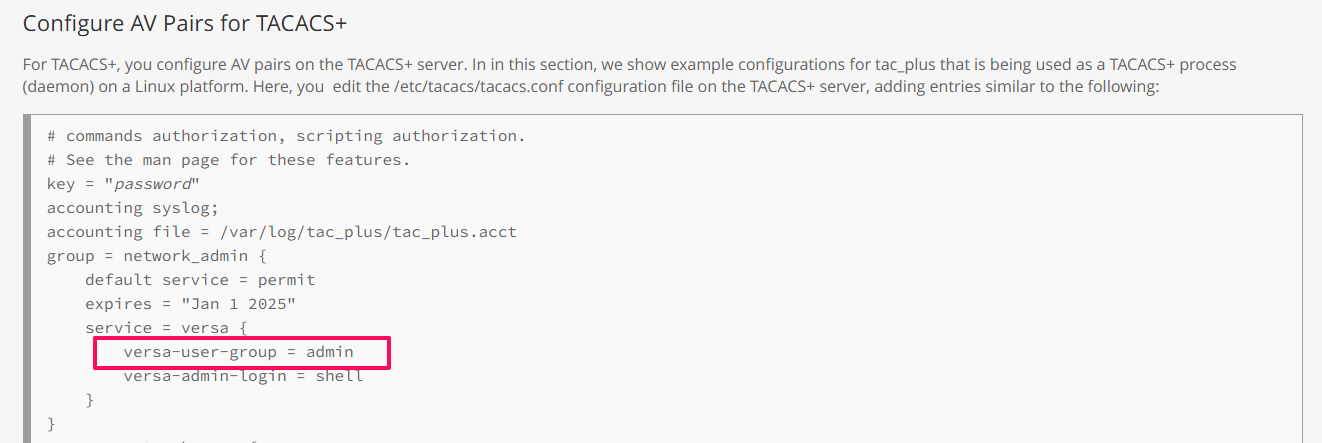
Reference
- Hardening tracking ID: 137409