
Overview
In real-world WAN environments, link conditions are rarely stable. Transient issues such as short bursts of packet loss, jitter, or latency spikes can cause SD-WAN path selection to react aggressively. This often leads to frequent path switching, oscillation of traffic between links, and sudden traffic surges on alternate paths. These behaviors can degrade application performance instead of improving it. To address this, Versa SD-WAN introduces three complementary mechanisms—SLA smoothing, SLA dampening, and gradual migration—which together ensure stable, predictable, and controlled traffic steering decisions.
SLA Smoothing
SLA smoothing simply means the system does not trust a path immediately when it appears to recover. Instead of looking at only the last few seconds of data, it averages the SLA metrics over a longer time window before declaring the path healthy again.
For example :If the recompute timer is 10 seconds, the smoothing interval is 60 seconds, and the SLA threshold is 20 ms, then when a path’s latency increases to 30 ms during a recompute cycle, it is immediately marked as SLA-violated. Failure detection is always based on the short recompute interval, so the path moves to the bad state quickly. However, when determining whether the path can return to a good state, smoothing comes into effect. Instead of looking at just the latest value, the system evaluates the average latency over the last 60 seconds, which effectively means multiple recompute samples (for example, six samples if recompute is 10 seconds since 60/10=6). If this averaged value is still above 20 ms, the path remains in the violated state; only if the average stays below the threshold over that window will the path be considered compliant again. Without smoothing, the decision would be based only on the most recent recompute value, meaning a single good sample (for example, 15 ms) could immediately bring the path back into service, leading to instability.
Below is the gui config of the forwarding profile and the sla profile
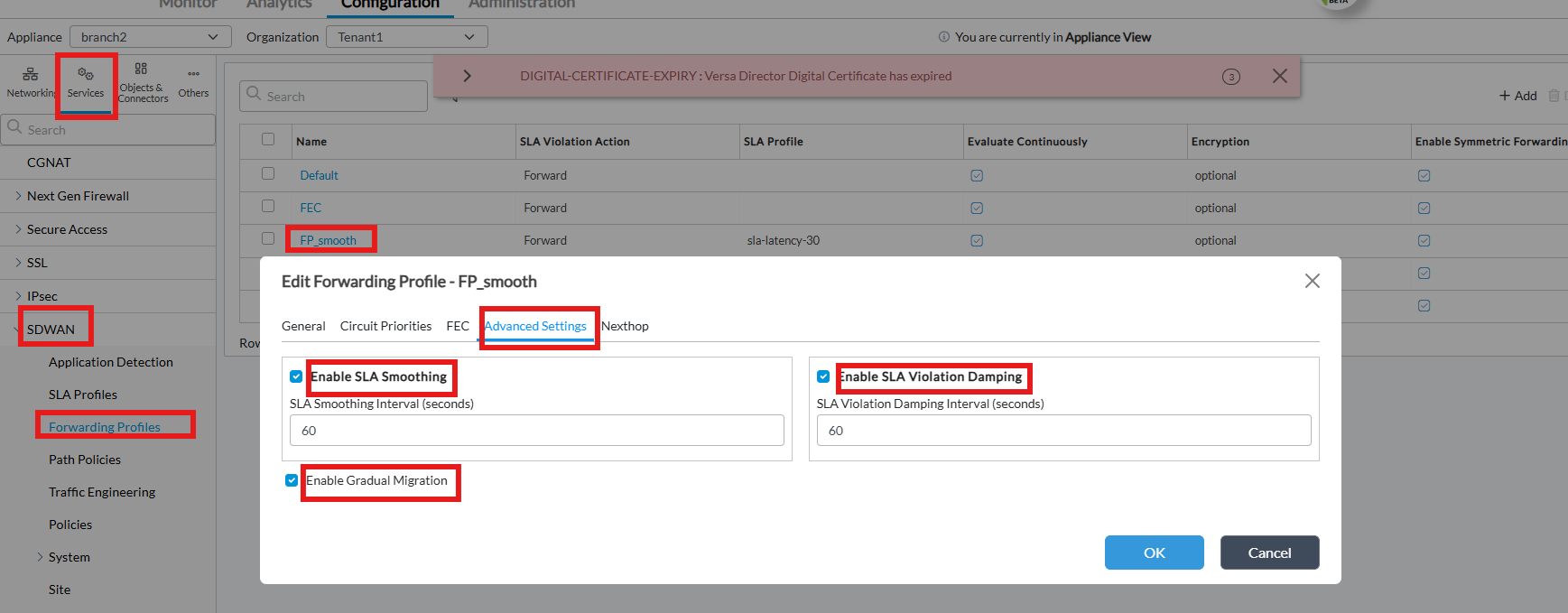
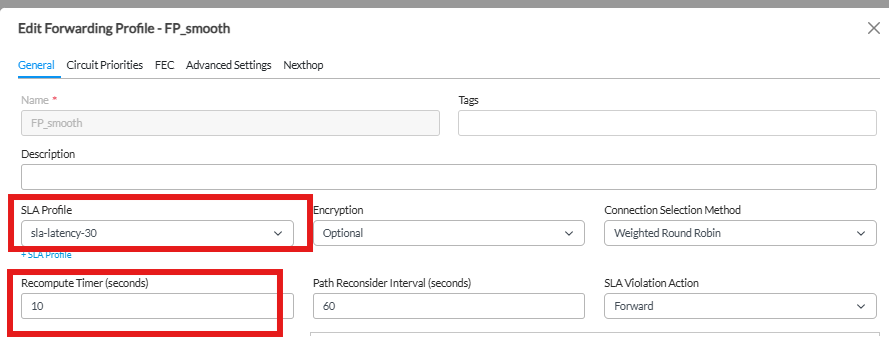
If we see below in VSMD we can use the below commands to see the loss and latency from a forwarding profile point of view and how many flaps have there been and what is the state in which for how long it has been there.
[admin@branch2: ~] $ vsh connect vsmd
vsm-vcsn0> show sd-wan forwarding-profile detail
Name : Tenant1/_$default_fp$_
id/gen : 0/242708
Name : Tenant1/FP_smooth
id/gen : 9/242713
Usage: show sd-wan forwarding-profiles { brief | detail } <profile name> [ <br id> <fc id> ]
vsm-vcsn0> show sd-wan forwarding-profile detail Tenant1/FP_smooth 102 4
Name : Tenant1/FP_smooth
FP prof id/gen : 9/242720
SLA profile Name : sla-latency-30
SLA profile id : 10
SLA latency : 30
SLA loss percent : 10000
SLA fwd loss percent : 10000
SLA rev loss percent : 10000
SLA delay variation : 0
SLA Circuit TX usage : 0
SLA Circuit RX usage : 0
SLA Low Latency : False
SLA Low Loss : False
SLA Low Forward Loss : False
SLA Low Reverse Loss : False
SLA Low DelayVariation: False
SLA MOS score : False [0]
Connection sel method : Weighted round robin
SLA violate action : Forward
Evaluate continuously : True
Gradual migration : True
Symmetric forwarding : True
Verify reverse route : False
Autosteering : False
Replication(Factor) : False(2)
Reorder : True
Session pin to DNS : False
FEC sender : Disable
FEC receiver recovery : Enable
Preserve order : Enable
Max packet length : 1400
number of windows : 3
FEC Parity cache sz : 16
TURN redirection : False
Load-balance : Per-flow
Recompute time : 10 seconds
SLA smoothing intvl : cfg 60, active 60 seconds
SLA dampening intvl : cfg 60, active 60 seconds
Path Reevaluate Interval : 60 seconds
Encryption capability : Both
Circuit Priorities :
Priority 1:
Local:
Circuit Names : MPLS
Default Priority : Default (15)
Nexthop re-evaluate: False
Nexthop re-evaluate cgnat : False
Active nexthops gen id 242769, version 1
Branch 102: branch1, Inline Loss: Yes
Forwarding Class: fc_ef Current Priority Index: 1
Min AC = 1, Min VL = 0x11, Max VL = 0x11
Max AC = 1, Min VL = 0x11, Max VL = 0x11
Priority[1][Priority 1] BL 0x8000000000000000
VL [MPLS::MPLS] [0x11] Flaps: 49, In current state for 3d05h35m
D: 0, FDV: 0 RDV: 0 FLP: 0.00 RLP: 0.00 PLP: 0.00 (0.00) score: 0
Priority[15][Default (15)] BL 0x800000000000
VL [INET::INET] [0x22] Flaps: 0, In current state for 4d00h58m
D: 20, FDV: 0 RDV: 0 FLP: 0.00 RLP: 0.00 PLP: 0.00 (0.00) score: 0
If you have the ckt on which you are looking it will help you check it faster with the below command. So based on the above config you can see that the recompute is 10sec and latency sla is 30ms .If you see the below example it means that the MPLS link is in violated state and the latency was checked 9 sec ago. During this time the latency was reduced back to 0ms so when it was checked at the end of the timer the last value is 0ms and it comes out of sla violated. This is without smoothening.
[admin@branch2: ~] $ vsh connect vsmd -c "show sd-wan forwarding-profile detail Tenant1/FP_smooth 102 4" | grep -i MPLS -A 1 -B 1
Connection closed by foreign host.
Priority[16][SLA Violated] BL 0x8000000000000000
VL [MPLS::MPLS] [0x11] Flaps: 10, In current state for 00:00:09
D: 50, FDV: 0 RDV: 10 FLP: 0.00 RLP: 0.00 PLP: 0.00 (0.00) score: 4593
[admin@branch2: ~] $ vsh connect vsmd -c "show sd-wan forwarding-profile detail Tenant1/FP_smooth 102 4" | grep -i MPLS -A 1 -B 1
Connection closed by foreign host.
Priority[15][Default (15)] BL 0x8000800000000000
VL [MPLS::MPLS] [0x11] Flaps: 11, In current state for 00:00:00
D: 0, FDV: 0 RDV: 10 FLP: 0.00 RLP: 0.00 PLP: 0.00 (0.00) score: 3675
If you see the below example with the same parameters , the link has been in violated state for the last 2 min and 2 sec, during this time now the latency has been brought back to 0. So at 2min and 10 sec when it checks the latency should be 0 but because we are now running smoothing it will take the average of the last 6 values because smoothing interval is 60 and recompute timer is 10 so it will bring out the link back to sla compliant much slower and not just based on the last value.
[admin@branch2: ~] $ vsh connect vsmd -c "show sd-wan forwarding-profile detail Tenant1/FP_smooth 102 4" | grep -i MPLS -A 1 -B 1
Connection closed by foreign host.
Priority[16][SLA Violated] BL 0x8000000000000000
VL [MPLS::MPLS] [0x11] Flaps: 16, In current state for 00:02:02
D: 50, FDV: 0 RDV: 0 FLP: 0.00 RLP: 0.00 PLP: 0.00 (0.00) score: 3675
[admin@branch2: ~] $ vsh connect vsmd -c "show sd-wan forwarding-profile detail Tenant1/FP_smooth 102 4" | grep -i MPLS -A 1 -B 1
Connection closed by foreign host.
Priority[16][SLA Violated] BL 0x8000000000000000
VL [MPLS::MPLS] [0x11] Flaps: 16, In current state for 00:02:13
D: 42, FDV: 0 RDV: 1 FLP: 0.00 RLP: 0.00 PLP: 0.00 (0.00) score: 4375
[admin@branch2: ~] $ vsh connect vsmd -c "show sd-wan forwarding-profile detail Tenant1/FP_smooth 102 4" | grep -i MPLS -A 1 -B 1
Connection closed by foreign host.
Priority[16][SLA Violated] BL 0x8000000000000000
VL [MPLS::MPLS] [0x11] Flaps: 16, In current state for 00:02:22
D: 35, FDV: 0 RDV: 1 FLP: 0.00 RLP: 0.00 PLP: 0.00 (0.00) score: 5250
[admin@branch2: ~] $ vsh connect vsmd -c "show sd-wan forwarding-profile detail Tenant1/FP_smooth 102 4" | grep -i MPLS -A 1 -B 1
Connection closed by foreign host.
Priority[15][Default (15)] BL 0x8000800000000000
VL [MPLS::MPLS] [0x11] Flaps: 17, In current state for 00:00:00
D: 28, FDV: 0 RDV: 1 FLP: 0.00 RLP: 0.00 PLP: 0.00 (0.00) score: 5250
SLA Dampening
This is stirctly the config related forwarding-profile.SLA dampening is a strict hold-down mechanism that prevents a path from being reconsidered immediately after it becomes bad. Once a path violates the SLA, it is forced to remain in the non-compliant state for a fixed duration, regardless of any temporary improvement in metrics. For example, with an SLA threshold of 20 ms, a recompute timer of 10 seconds, and a dampening interval of 60 seconds, if a path goes from 10 ms to 50 ms, it is marked bad within 10 seconds. Even if the latency drops back to 15 ms shortly after, the system will ignore this improvement and keep the path marked as bad for the full 60 seconds. Only after this timer expires will the system re-evaluate the path. This ensures that unstable links do not repeatedly move in and out of service .
Example: Even though the latency is within the sla dampening will only let the link come up once the recompute+sla dampening timer has expired.
[admin@branch2: ~] $ vsh connect vsmd -c "show sd-wan forwarding-profile detail Tenant1/FP_smooth 102 4" | grep -i MPLS -A 1 -B 1
Connection closed by foreign host.
Local:
Circuit Names : MPLS
Default Priority : Default (15)
--
Priority[16][SLA Violated] BL 0x8000000000000000
VL [MPLS::MPLS] [0x11] Flaps: 54, In current state for 00:00:16
D: 26, FDV: 0 RDV: 4 FLP: 0.00 RLP: 0.00 PLP: 0.00 (0.00) score: 7067
[admin@branch2: ~] $ vsh connect vsmd -c "show sd-wan forwarding-profile detail Tenant1/FP_smooth 102 4" | grep -i MPLS -A 1 -B 1
Connection closed by foreign host.
Local:
Circuit Names : MPLS
Default Priority : Default (15)
--
Priority[16][SLA Violated] BL 0x8000000000000000
VL [MPLS::MPLS] [0x11] Flaps: 54, In current state for 00:01:09
D: 1, FDV: 0 RDV: 0 FLP: 0.00 RLP: 0.00 PLP: 0.00 (0.00) score: 183750
[admin@branch2: ~] $ vsh connect vsmd -c "show sd-wan forwarding-profile detail Tenant1/FP_smooth 102 4" | grep -i MPLS -A 1 -B 1
Connection closed by foreign host.
Local:
Circuit Names : MPLS
Default Priority : Default (15)
--
Priority[1][Priority 1] BL 0x8000000000000000
VL [MPLS::MPLS] [0x11] Flaps: 55, In current state for 00:00:00
D: 0, FDV: 0 RDV: 0 FLP: 0.00 RLP: 0.00 PLP: 0.00 (0.00) score: 183750
Smoothing vs Dampening
Dampening controls when you are allowed to reconsider the path, while smoothing controls whether the path actually qualifies as healthy when you reconsider it. Dampening is the minimum time a path must stay down before it is even reconsidered, and smoothing ensures that when it is reconsidered, the decision is based on stable historical data rather than a single good sample.
What happens when Smoothing and Dampening are used together
Why it is good to use them together. The below example should help.
SLA = 20 ms
Recompute = 10 sec
Dampening = 60 sec
Smoothing = 60 sec
t0 → 50 ms (BAD)
t10 → 15 ms
t20 → 25 ms
t30 → 18 ms
t40 → 30 ms
t50 → 15 ms
t60 → 18 ms
Case 1 — Only Dampening
• From t0–t60 → path held BAD
• At t60 (timer expires):
o Current value = 18 ms (good)
→ Path becomes GOOD immediately
• At t70:
o Value = 30 ms (bad again)
→ Path becomes BAD again
Result: flip-flop starts again
Case 2 — Dampening + Smoothing
At t60, instead of checking just 18 ms, system checks last 60 sec:
50, 15, 25, 18, 30, 15
Average ≈ 25 ms
→ Still above SLA
→ Path remains BAD
Dampening stopped early reuse (0–60 sec)
Smoothing stopped false recovery at 60 sec
Gradual Migration
Gradual migration controls how traffic is moved between paths after a forwarding decision has been made. In the absence of this feature, all active flows may shift immediately from one path to another when an SLA violation occurs. This sudden movement can overload the alternate path, leading to congestion and potential cascading failures. Gradual migration mitigates this by distributing flow movement over multiple recomputation cycles. Only a subset of sessions is migrated at a time, allowing the network to adapt smoothly to changing conditions. This behavior is critical in high-scale environments with large numbers of concurrent sessions, where instantaneous failover would otherwise create significant traffic spikes.
Important note when gradual migration (GM) is enabled, each flow is given a random delay before switching paths, so traffic moves in a controlled, time-spread manner based on timers. The timer is generally 3* recompute timer with the maximum value being 90sec. This means with GM enabled within max 90 sec all flows should migrate off the non compliant path.
When GM is disabled, there is no delay logically but flows switch immediately when they are reevaluated—but since reevaluation happens only when each flow sends traffic, the movement can still appear gradual in practice due to different flows being active at different times. This is a gotcha to keep in mind.
Also path selection is priority-driven only at the time of session placement or when a path change event occurs. When a higher-priority path (e.g., MPLS with priority 1) recovers, it becomes eligible again, but existing sessions on a lower-priority path (e.g., INET with priority 15) will not move back automatically as long as the current path remains SLA-compliant. To move traffic back to the preferred higher-priority path, a new path selection event must be triggered, such as an SLA violation on the current path, session reset, or a policy-driven condition that forces reevaluation and switching.
Example:
Without gradual migration, 100 flows constantly passing traffic , you can see that immediately flows fail over.
[ok][2026-04-19 06:03:01]
admin@branch2-cli> show orgs org Tenant1 sd-wan session count local-circuit
LOCAL TX
CIRCUIT FLOWS
----------------
MPLS 50
INET 50
[ok][2026-04-19 06:03:02]
admin@branch2-cli> show orgs org Tenant1 sd-wan session count local-circuit
LOCAL TX
CIRCUIT FLOWS
----------------
MPLS 0
INET 100
With GM enabled max time is 90 but recompute timer in our case is 10 so 10*3 becomes 30 sec, so we should see all flows migrate within 30 sec. Same 100 flows sent and all of them are passing traffic.
admin@branch2-cli> show orgs org Tenant1 sd-wan session count local-circuit
LOCAL TX
CIRCUIT FLOWS
----------------
MPLS 50
INET 50
[ok][2026-04-19 06:06:59]
admin@branch2-cli> show orgs org Tenant1 sd-wan session count local-circuit
LOCAL TX
CIRCUIT FLOWS
----------------
MPLS 43
INET 57
[ok][2026-04-19 06:07:03]
admin@branch2-cli> show orgs org Tenant1 sd-wan session count local-circuit
LOCAL TX
CIRCUIT FLOWS
----------------
MPLS 29
INET 71
[ok][2026-04-19 06:07:11]
admin@branch2-cli> show orgs org Tenant1 sd-wan session count local-circuit
LOCAL TX
CIRCUIT FLOWS
----------------
MPLS 18
INET 82
[ok][2026-04-19 06:07:20]
admin@branch2-cli> show orgs org Tenant1 sd-wan session count local-circuit
LOCAL TX
CIRCUIT FLOWS
----------------
MPLS 15
INET 85
[ok][2026-04-19 06:07:29]
admin@branch2-cli> show orgs org Tenant1 sd-wan session count local-circuit
LOCAL TX
CIRCUIT FLOWS
----------------
MPLS 7
INET 93
[ok][2026-04-19 06:07:30]
admin@branch2-cli> show orgs org Tenant1 sd-wan session count local-circuit
LOCAL TX
CIRCUIT FLOWS
----------------
MPLS 0
INET 100
[ok][2026-04-19 06:07:30]
If you would like to log every recompute timer value and then check it over some period of time you can enable the debug as below. This will print the kpi’s of every recompute timer , per branch ,per path, so it is easy to be overwhelmed with the data. The simplest way would be to run the tail as per your branch id and particular fc that you are looking for.
set debug pbf flags control level info send to file name /tmp/pbf_control.log
For example, I am looking at both the paths between branch2 and branch1 which has id 102 , so first you can grep for “sdwan_fp_vl_pull_sla_kpis" and then with your branch id. You will see logs like below
tail -f /tmp/pbf_control.log | grep "sdwan_fp_vl_pull_sla_kpis"
tail -f /tmp/pbf_control.log | grep "sdwan_fp_vl_pull_sla_kpis:2734 fp Tenant1/FP_smooth br 102"
2026-04-19 06:41:59.247 INFO [0x201] sdwan_fp_vl_pull_sla_kpis:2734 fp Tenant1/FP_smooth br 102 vl 0x11 fc 4 Gen 203770 KPI: D: 0 FDV: 0 RDV: 0 FLP: 0.00 RLP: 0.00 PLP: 0.00 (0.00) score: 3602 flags 0x0
2026-04-19 06:41:59.248 INFO [0x201] sdwan_fp_vl_pull_sla_kpis:2734 fp Tenant1/FP_smooth br 102 vl 0x22 fc 4 Gen 203770 KPI: D: 20 FDV: 0 RDV: 0 FLP: 0.00 RLP: 0.00 PLP: 0.00 (0.00) score: 0 flags 0x0
2026-04-19 06:42:09.247 INFO [0x201] sdwan_fp_vl_pull_sla_kpis:2734 fp Tenant1/FP_smooth br 102 vl 0x11 fc 4 Gen 203771 KPI: D: 0 FDV: 0 RDV: 0 FLP: 0.00 RLP: 0.00 PLP: 0.00 (0.00) score: 3602 flags 0x0
2026-04-19 06:42:09.247 INFO [0x201] sdwan_fp_vl_pull_sla_kpis:2734 fp Tenant1/FP_smooth br 102 vl 0x22 fc 4 Gen 203771 KPI: D: 20 FDV: 0 RDV: 0 FLP: 0.00 RLP: 0.00 PLP: 0.00 (0.00) score: 0 flags 0x0
2026-04-19 06:42:19.245 INFO [0x201] sdwan_fp_vl_pull_sla_kpis:2734 fp Tenant1/FP_smooth br 102 vl 0x11 fc 4 Gen 203772 KPI: D: 40 FDV: 0 RDV: 10 FLP: 0.00 RLP: 0.00 PLP: 0.00 (0.00) score: 3602 flags 0x0
2026-04-19 06:42:19.246 INFO [0x201] sdwan_fp_vl_pull_sla_kpis:2734 fp Tenant1/FP_smooth br 102 vl 0x22 fc 4 Gen 203772 KPI: D: 20 FDV: 0 RDV: 0 FLP: 0.00 RLP: 0.00 PLP: 0.00 (0.00) score: 0 flags 0x0
2026-04-19 06:42:29.246 INFO [0x201] sdwan_fp_vl_pull_sla_kpis:2734 fp Tenant1/FP_smooth br 102 vl 0x11 fc 4 Gen 203773 KPI: D: 51 FDV: 0 RDV: 0 FLP: 0.00 RLP: 0.00 PLP: 0.00 (0.00) score: 4593 flags 0x0
2026-04-19 06:42:29.246 INFO [0x201] sdwan_fp_vl_pull_sla_kpis:2734 fp Tenant1/FP_smooth br 102 vl 0x22 fc 4 Gen 203773 KPI: D: 20 FDV: 0 RDV: 0 FLP: 0.00 RLP: 0.00 PLP: 0.00 (0.00) score: 0 flags 0x0
How to see from packet trace sessions being migrated
Below is the relevant part of the packet trace which shows that when the recompute timer hit and the session was re-evaluated it was moved of the circuit.
- The highlighted parts are obvious to understand from the entire KB's previous outputs. 0x11 is the MPLS ,0x22 is INET,Tenant1/FP_smooth is the tenant name and the FP name with 102 being the remote branch id.
- Dir 0 means traffic is in forward direction.
- vs_sdwan_evaluate_br_ac_multi indicates that once the path revaluation is done the route is also checked to make sure if there is a better ecmp route.
- sdwan_flow_update shows how it is switched from MPLS which has now become priority 16 since it is sla violated to INET which is priority 15.
- sdwan_flow_switch_now is the GM timer where 798765076 is the curr time and 798764257 is the GM time allocated to this flow , since the latter is smaller then current the GM timer has expired and this flow can be migrated from prio 16 to prio 15 ckt.
2026-04-19 06:31:06.646 DEBUG [0x102] [Tenant: 1][0x0201141a 0][0x10d9ed780/2] vs_sdwan_evaluate_wa_ac:3756 SDWAN header compression cfg Level: 1 skip_hmac: 0 uni_dir_hdr_comp: 1
2026-04-19 06:31:06.646 DEBUG [0x102] [Tenant: 1][0x0201141a 0][0x10d9ed780/2] vs_nfp_sess_set_hdr_comp_params:6582 Hdr comp config in sess HdrCompLevel: 1 SkipHmac: 0 UniDirHdrComp: 1 updated config HdrCompLevel: 1 SkipHmac: 0 UniDirHdrComp: 1
2026-04-19 06:31:06.646 DEBUG [0x102] [Tenant: 1][0x0201141a 0][0x10d9ed780/2] vs_sdwan_wt_get_vl:2041 Sess 0x7fb8a02b6010 flow 0x7fb8a02b6080 dir 0 fp 0x7fb8a4f35a10 Tenant1/FP_smooth branch 102 vl 0x11
2026-04-19 06:31:06.646 DEBUG [0x102] [Tenant: 1][0x0201141a 0][0x10d9ed780/2] vs_sdwan_wt_pick_new_vl_wrr:1484 Start curr ac 2 minvl 17 maxvl 17
2026-04-19 06:31:06.646 DEBUG [0x102] [Tenant: 1][0x0201141a 0][0x10d9ed780/2] vs_sdwan_wt_pick_new_vl_wrr:1524 curr ac 2 curr_vl_bit 17 minvl 17 maxvl 17
2026-04-19 06:31:06.646 DEBUG [0x102] [Tenant: 1][0x0201141a 0][0x10d9ed780/2] vs_sdwan_wt_pick_new_vl_wrr:1558 curr ac 2 curr_vl_bit reset to 16
2026-04-19 06:31:06.646 DEBUG [0x102] [Tenant: 1][0x0201141a 0][0x10d9ed780/2] vs_sdwan_wt_pick_new_vl_wrr:1587 curr ac 2 found vl_bit 16 path 0x22 credits 4
2026-04-19 06:31:06.646 DEBUG [0x102] [Tenant: 1][0x0201141a 0][0x10d9ed780/2] vs_sdwan_wt_get_vl:2175 Sess 0x7fb8a02b6010 dir 0 to br 102 fp Tenant1/FP_smooth curr_idx 15 : enforcing vl 0x22
2026-04-19 06:31:06.646 DEBUG [0x102] [Tenant: 1][0x0201141a 0][0x10d9ed780/2] vs_sdwan_evaluate_br_ac_multi:2704 Sess 0x7fb8a02b6010 flow 0x7fb8a02b6080 dir 0 fp 0x7fb8a4f35a10 Tenant1/FP_smooth current branch 102 eval result 0 prio 15 (sess prio 16) ifindex 1088 vl 0x22
2026-04-19 06:31:06.646 DEBUG [0x102] [Tenant: 1][0x0201141a 0][0x10d9ed780/2] vs_sdwan_evaluate_br_ac_multi:2771 Sess 0x7fb8a02b6010 flow 0x7fb8a02b6080 dir 0 fp 0x7fb8a4f35a10 Tenant1/FP_smooth rc 0 eval others
2026-04-19 06:31:06.646 DEBUG [0x102] [Tenant: 1][0x0201141a 0][0x10d9ed780/2] vs_sdwan_evaluate_br_ac_multi:2808 mpath lookup yielded 1 routes
2026-04-19 06:31:06.646 DEBUG [0x102] [Tenant: 1][0x0201141a 0][0x10d9ed780/2] vs_sdwan_evaluate_br_ac_multi:3013 Sess 0x7fb8a02b6010 flow 0x7fb8a02b6080 dir 0 fp 0x7fb8a4f35a10 Tenant1/FP_smooth rc 0 eval done
2026-04-19 06:31:06.646 DEBUG [0x102] [Tenant: 1][0x0201141a 0][0x10d9ed780/2] vs_sdwan_from_branch_check_fec:1067 start_cond 0 stop_cond 0 recovery 1 vmlh_mode_set 0 fec_parity_seen 0
2026-04-19 06:31:06.646 DEBUG [0x102] [Tenant: 1][0x0201141a 0][0x10d9ed780/2] vs_sdwan_to_branch_check_fec:1128 Curr_prio_idx 15 ext->fec_enabled 0 fp->fec_tx_enabled 0 vmlh_mode_set 0 fec_parity_seen 0
2026-04-19 06:31:06.646 DEBUG [0x102] [Tenant: 1][0x0201141a 0][0x10d9ed780/2] vs_sdwan_evaluate_br_ac_multi:3115 Sess 0x7fb8a02b6010 flow 0x7fb8a02b6080 dir 0 fp 0x7fb8a4f35a10 Tenant1/FP_smooth rt genid (259/259) and fp genid (203694/203694)
2026-04-19 06:31:06.646 DEBUG [0x102] [Tenant: 1][0x0201141a 0][0x10d9ed780/2] sdwan_flow_update:458 Flow 0x7fb8a02b6080 fp Tenant1/FP_smooth compare current path (0) 102:::0x11:16 if 1088 with 102:::0x22:15 (16) if 1088 win 798764257 curr 798765076
2026-04-19 06:31:06.646 DEBUG [0x102] [Tenant: 1][0x0201141a 0][0x10d9ed780/2] sdwan_flow_switch_now:430 Flow 0x7fb8a02b6080 switching back to 798765076 798764257 from 16 to 15
2026-04-19 06:31:06.646 DEBUG [0x102] [Tenant: 1][0x0201141a 0][0x10d9ed780/2] vs_sdwan_evaluate_wa_ac:3835 Flow 0x7fb8a02b6080 fp Tenant1/FP_smooth switching path from (0) 102:::0x11 @ prio 16 ifindex 1088 to 102:::0x22 @ prio 15 ifindex 1088 win 0