
Introduction:
This document explains how to configure and troubleshoot Versa Director SSO.
Single sign-on (SSO) is a session and user authentication service that allows a user to use a single set of login credentials to access multiple applications. The service authenticates all the applications for which the user has the required rights and eliminates further prompts when you switch applications during the same session. On the backend, SSO logs user activities and monitors user accounts. In the context of Versa Director, the service provider offers single sign-on as a login mechanism to different integrators and clients.
Configuration:
Below are the list of documents you can follow for the configuration of SSO in different platform.
- Below document explains how to integrate Versa Director with OKTA SSO IDP
- Below is the Video KB for how to integrate Versa Director with OKTA SSO IDP.
- Below document explains how to integrate Versa Director with Azure SSO
Troubleshooting:
There can be multiple issues may come during the the configuration of SSO on Versa Director. Below the list of issue mentioned and how to fix the issue, if it occurs.
The can be either configuration not configured properly or any error from IDP/SP side.
Issue 1: Authentication Failed [SAML]
Issue 2: If you are Not able to change the Sign-out type to IDP from local.
Issue 3: Not able to upload IDP MetaData XML file
Issue 4: Invalid Client Name
Issue 1: Authentication Failed [SAML]
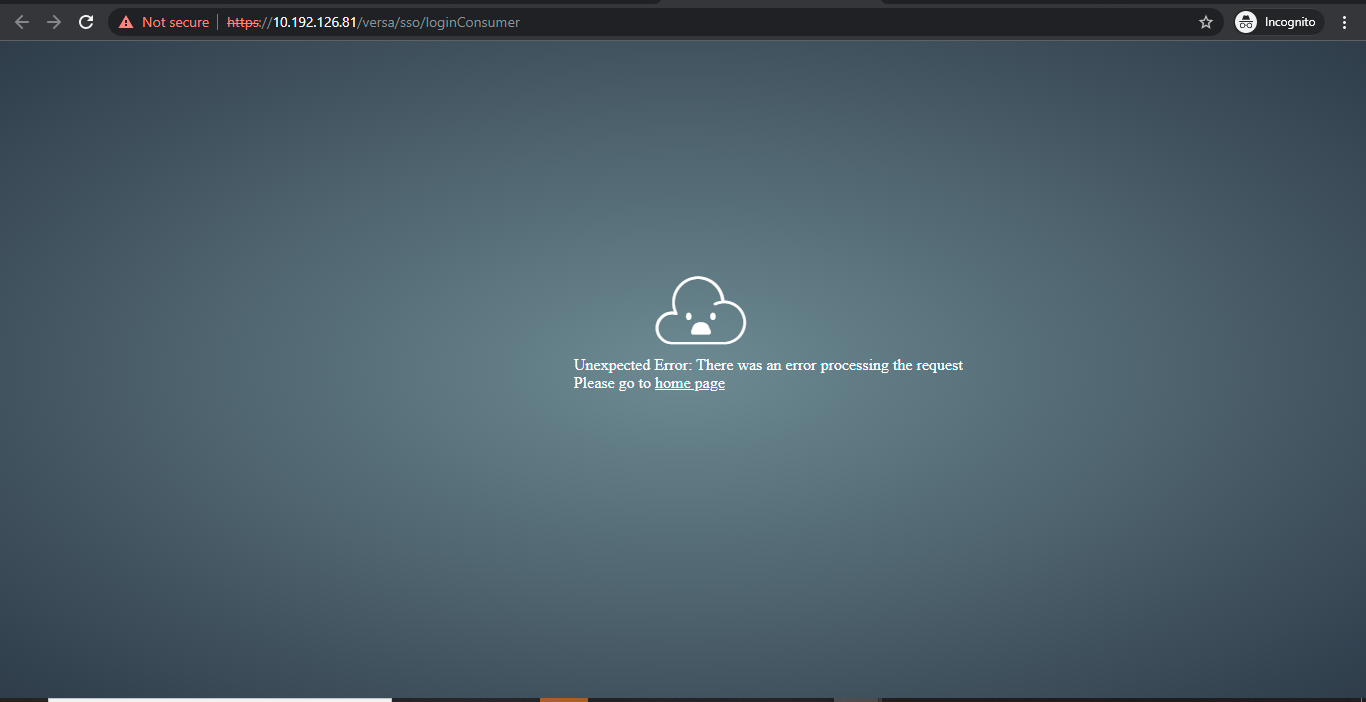
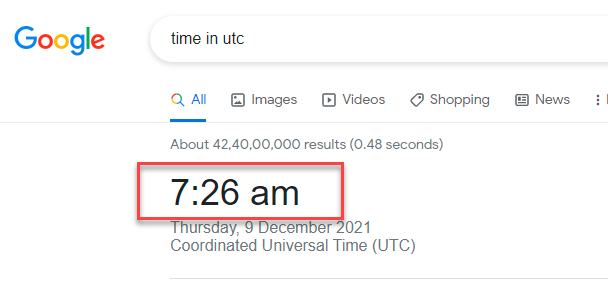
Check if the NTP is in sync or not. If the below message reported from the IDP then there could the time mismatch.
Check the Clock setting whether VD Clock is in sync or not. Authentication Failed [SAML]
After login by IDP/SP,if we are getting the below error, then we need to make sure VD Clock is in sync with standard time.
Check if any error on - /var/log/vnms/spring-boot/vnms-spring-boot.log and /var/log/vnms/spring-boot/vnms-spring-rest.log
For example, in vnms-spring-rest.log you can see an error as below
./vnms-spring-rest.log-[10-Jun-2023 09:22:53.801][,,][DEBUG][https-jsse-nio-9183-exec-8][org.springframework.web.filter.CommonsRequestLoggingFilter] Before request [POST /vnms/sso/loginConsumer]
./vnms-spring-rest.log-[10-Jun-2023 09:22:53.821][,,][ERROR][https-jsse-nio-9183-exec-8][com.versa.rest.controller.sso.saml.SSOServiceController] Exception while consuming the SSO URL
./vnms-spring-rest.log-com.versa.vnms.common.exception.SSOException: Unauthenticated
./vnms-spring-rest.log: at com.versa.rest.controller.sso.saml.SSOServiceController.loginConsumer(SSOServiceController.java:328)
“
And the below error may be seen in vnms-spring-boot.log
admin@VD-01:.../vnms/spring-boot$ cat vnms-spring-boot.log
[28-Oct-2021 19:26:21.080][ERROR][https-jsse-nio-9183-exec2][com.versa.vnms.core.sso.saml.SAMLLoginResponseParser] Exception while validating response
java.lang.Exception: Timing issues. Possible reasons include: SAML expired, service's clock setting is not UTC.
at com.versa.vnms.core.sso.saml.SAMLLoginResponseParser.isValid(SAMLLoginResponseParser.java:120)

RCA: Time Mismatch between IDP and Director:
Run the below command in director shell,
date -s "$(curl -s --head http://google.com | grep ^Date: | sed 's/Date: //g')"
Issue 2: If you are Not able to change the Sign-out type to IDP from local.
We need to make sure “ Single sign out URL” has been configured in SAML integration profile and “Enable Single Logout URL” knob is enabled.
In the meta data configuration Signout URL must be present.
Administrator@Rajvandani-VD-01% show system sso
settings {
default-idp-connector Okta-SSO;
is-single-idp-connector false;
}
idp-connector Okta-SSO {
idpname OKTA;
sso-type saml;
single-signon-url https://dev-37229589.okta.com/app/dev-37229589_rajvandaniversadirectorprimarysystemusers_1/exk2dgtz43MryCAvY5d7/sso/saml;
single-signout-url https://dev-37229589.okta.com/app/dev-37229589_rajvandaniversadirectorprimarysystemusers_1/exk2dgtz43MryCAvY5d7/slo/saml;
idp-entity-id http://www.okta.com/exk2dgtz43MryCAvY5d7;
idp-certificate "MIIDqDCCApCgAwIBAgIGAXy3tiIAMA0GCSqGSIb3DQEBCwUAMIGUMQswCQYDVQQGEwJVUzETMBEG\nA1UECAwKQ2FsaWZvcm5pYTEWMBQGA1UEBwwNU2FuIEZyYW5jaXNjbzENMAsGA1UECgwET2t0YTEU\nMBIGA1UECwwLU1NPUHJvdmlkZXIxFTATBgNVBAMMDGRldi0zNzIyOTU4OTEcMBoGCSqGSIb3DQEJ\nARYNaW5mb0Bva3RhLmNvbTAeFw0yMTEwMjUxMzQ3NTlaFw0zMTEwMjUxMzQ4NTlaMIGUMQswCQYD\nVQQGEwJVUzETMBEGA1UECAwKQ2FsaWZvcm5pYTEWMBQGA1UEBwwNU2FuIEZyYW5jaXNjbzENMAsG\nA1UECgwET2t0YTEUMBIGA1UECwwLU1NPUHJvdmlkZXIxFTATBgNVBAMMDGRldi0zNzIyOTU4OTEc\nMBoGCSqGSIb3DQEJARYNaW5mb0Bva3RhLmNvbTCCASIwDQYJKoZIhvcNAQEBBQADggEPADCCAQoC\nggEBAJIrIgE3bSFQSGN7LpDi15bwappoXCs2Loa8wFm11/VoWUA2Septv1wivT0ELeeevupPejJI\nTKcez7ePuPVQcA52BBVymeQyTYLO0S0i9iQxq/6AeAJyx1/a/ibq/9VrnuzRmiqlQoym60m4GF5u\nzysuW+umzzOnllAVNXdb9fdgYnTxtp0IJzINOXyaN3DcyGn/ulNtLzgczRhKaIJwv+OXZziS2TMt\nQqVUpbFRVOiRGrH3FfFLuhmf15eFBcjnzX0bVxCuYz5n1NSLatWFJ6CqAAj2pK7E/XwKsmhHVSga\nlSUIoI30SSgZX9dPSVle87tjBPSXTvs0Lb0MkVwfKikCAwEAATANBgkqhkiG9w0BAQsFAAOCAQEA\nR/ZQM7ouTp6v4DEf9epFSDE2alKT1fZddHhQ+FtSXJ1rM72Pa72QutzZrjDYyNP1HrYRmieicwgM\nMZICQxyZIAXxtNWkYAtRjQXPwrMXoQNB+itEpI6//PNIYXQGI/BwH+Z9B6YJgXMVcJEfrY/Fta0+\nMbFmGdqEBaNTe2DJtQc1uAiWee00xrXzhQ9KxCk3eCjD0PUs+PIzPtfpBStKg3hbFVK9k0wjiMsM\nSxDO5NfYHC6g24anbhinHoQUqwEPglDnx4uk6mj0S6LVvlxZsvow4QMxrK7P79THdmFJ228erzlf\nMpNBjvxUlxdsUsnQRyZRfujFYqIQOVcnX2eK6w==";
sp-entity-id http://versa-networks.com/sp;
auth-context-comparision exact;
sp-certificate "-----BEGIN CERTIFICATE-----\nMIIC1DCCAj2gAwIBAgIJAKqSwloKn2scMA0GCSqGSIb3DQEBCwUAMIGCMRcwFQYD\nVQQDDA52ZXJzYS1kaXJlY3RvcjEXMBUGA1UECgwOdmVyc2EtbmV0d29ya3MxFjAU\nBgNVBAsMDVZlcnNhRGlyZWN0b3IxCzAJBgNVBAYTAlVTMRMwEQYDVQQIDApDYWxp\nZm9ybmlhMRQwEgYDVQQHDAtTYW50YSBDbGFyYTAeFw0yMTA2MDQyMjEyNTJaFw0y\nMjA2MDQyMjEyNTJaMIGCMRcwFQYDVQQDDA52ZXJzYS1kaXJlY3RvcjEXMBUGA1UE\nCgwOdmVyc2EtbmV0d29ya3MxFjAUBgNVBAsMDVZlcnNhRGlyZWN0b3IxCzAJBgNV\nBAYTAlVTMRMwEQYDVQQIDApDYWxpZm9ybmlhMRQwEgYDVQQHDAtTYW50YSBDbGFy\nYTCBnzANBgkqhkiG9w0BAQEFAAOBjQAwgYkCgYEAy8HApp3Ue0g4H/ZTotUlMT5P\nxmMbmD6UkGF/Y8eBmC9/6NIZ+quCIYZo/fymw3eXc1LnoSh2SItL8MEIrE3R8niz\nfet3ggbQfZXlnNIwrtdz8rbSk6w9llTw++bc2KZ37svLxVqf5S0ormvBJdRqXJrr\naR5hy1M1ib/uEqJEDgkCAwEAAaNQME4wHQYDVR0OBBYEFD33AY73fQga73qKzguG\nytddFM2MMB8GA1UdIwQYMBaAFD33AY73fQga73qKzguGytddFM2MMAwGA1UdEwQF\nMAMBAf8wDQYJKoZIhvcNAQELBQADgYEAlB9LfX61fUqeUnhzqEP3vjuykLPqR1aY\nxe4IpqomsPKaKcHcX/79p3G3gQxsWEz01SPvHBX3+yxWqpK3Y/Ognvv9PGYC+Jn2\nHF9srmGVpFyOWMsilVFAMm0lEc46caNMXpns8CQGCuSmFJ1Pk+QmRUJy+599Ip2J\nvW+0z/1g4uc=\n-----END CERTIFICATE-----";
sso-acs-url https://10.192.126.81/versa/sso/loginConsumer;
slo-acs-url https://10.192.126.81/versa/sso/logoutConsumer;
saml-client vd-ui {
ui-login-consumer https://10.192.126.81/versa/sso/consumer;
ui-logout-consumer https://10.192.126.81/versa/sso/consumer;
}
is-enabled true;
sso-initiated-type all;
signout-type idp;
email email;
role role;
org org;
idle-time-out IdleTimeOut;
}
[ok][2021-10-31 13:38:16]
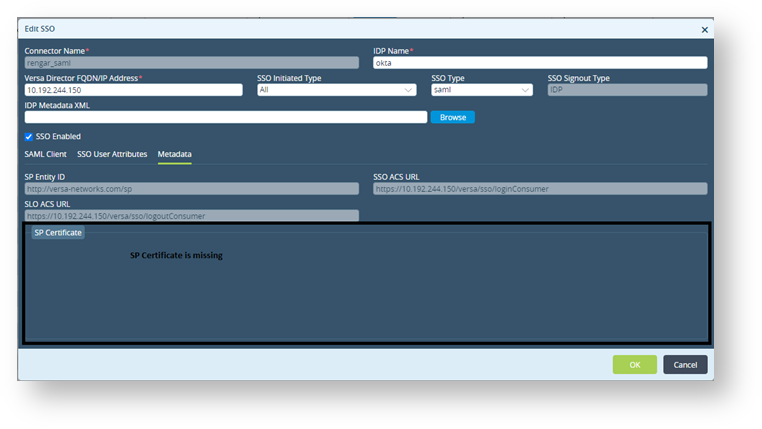
Issue 3: Not able to upload IDP MetaData XML file
==> vnms-spring-boot.log <==
[12-Aug-2020 08:57:45.843][INFO][tomcat-exec-20][com.versa.vnms.core.sso.saml.SSOServiceImpl] Exception while getting the SP certificate/var/versa/vnms/data/certs/vnms_sso_public.crt (No such file or directory)
RCA: vnms_sso_public.crt/vnms_sso_private.key missing in the /var/versa/vnms/data/certs directory
Regenerate the SSO certificate.
Note that you should type this command on a single line
# sudo openssl req -newkey rsa:1024 -nodes -keyout vnms_sso_private.key -x509 -days 365 -out vnms_sso_public.crt -subj "/CN=<director-hostname>/O=<organization-name>/OU=<organizational-unit-name>/C=<country>/ST=<state or province>/L=<location>"
For example:
# sudo openssl req -newkey rsa:1024 -nodes -keyout vnms_sso_private.key -x509 -days 365 -out vnms_sso_public.crt -subj "/CN=vm/O=versa-networks/OU=VersaDirector/C=US/ST=California/L=Santa Clara"
admin@DIRECTOR1:~$ cd /var/versa/vnms/data/certs
admin@DIRECTOR1:.../data/certs$ ls -l
-rw-rw---- 1 versa versa 912 Jul 3 14:08 vnms_sso_private.key
-rw-r----- 1 versa versa 1005 Jul 3 14:08 vnms_sso_public.crt
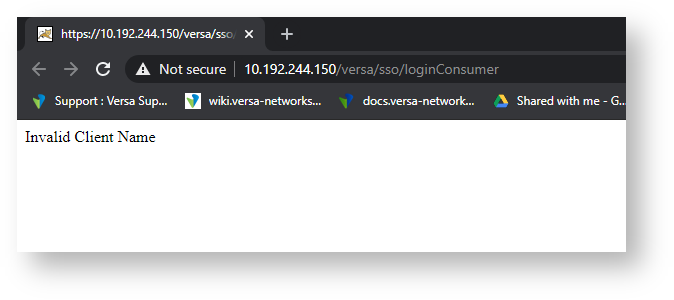
Issue 4: “Invalid Client Name”
Log seen in Director GUI for IDP initiated SSO [SAML]
==> vnms-spring-boot.log <==
tail -f vnms-spring-boot.log
[07-Jul-2020 20:13:56.533][ERROR][tomcat-exec-13][com.versa.rest.controller.sso.saml.SSOServiceController] Invalid Client name
RCA: Relay state was not configured or properly defined in the IDP

IDP: Default Relay State vd-ui::TENANT1 ### same as org name

IDP: Default Relay State vd-ui::system ### Always SYSTEM for parent org